











KoCAD · Pantallas y funciones
Simple tab: every button, for people who never used CAD
The first tab of KoCAD (0.33+): large buttons with everyday names, ready models per profile, drawing by typing the size, outputs in one click.
Este artículo aún no está traducido a su idioma: se muestra la versión en English.
En esta página
The Simple tab is the first of the ribbon. It does the essentials in a few clicks and everything it makes is a normal tree feature — someone who knows CAD opens the same part in the full tabs and carries on.
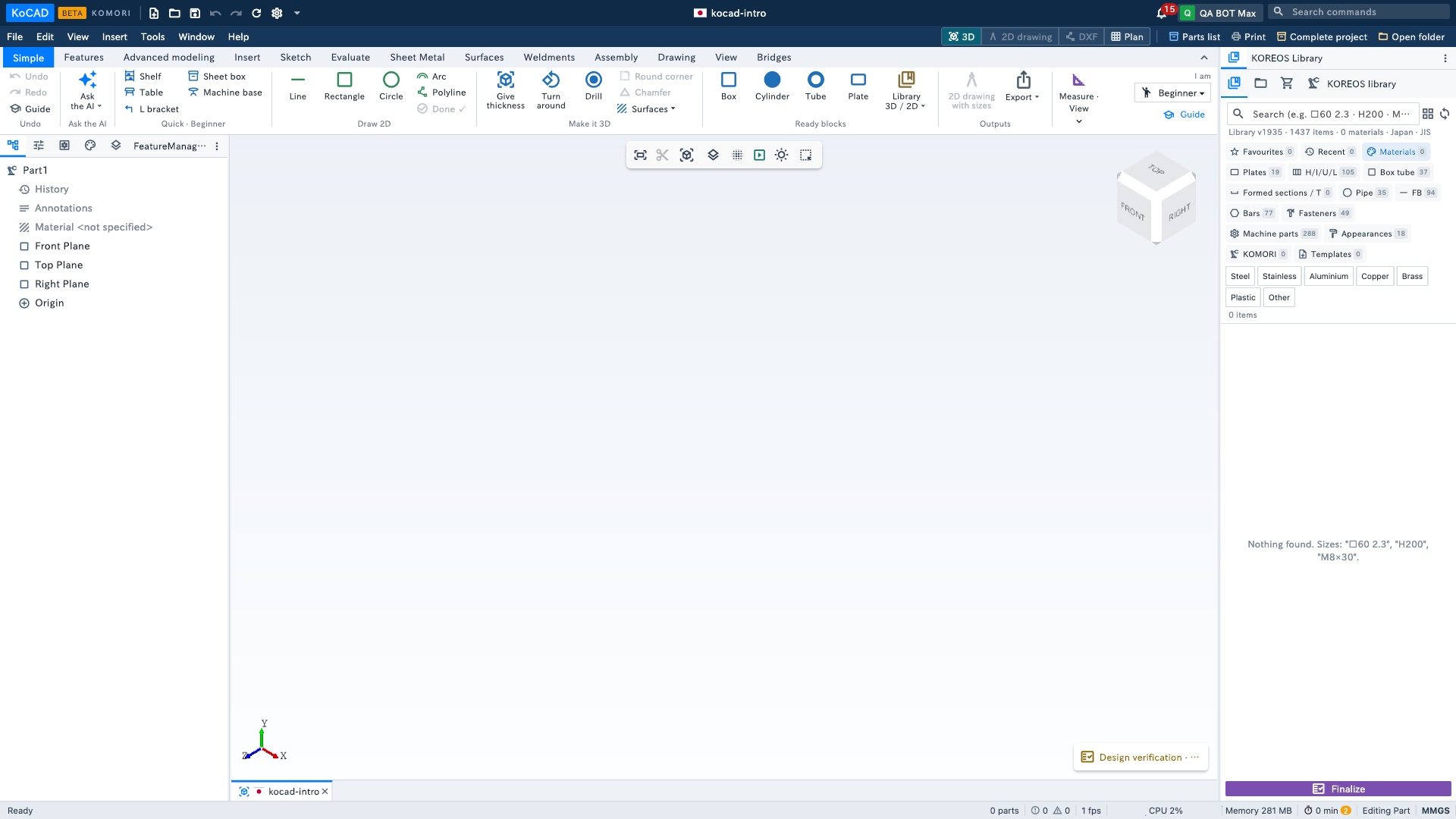
The groups, left to right
- Undo — Undo, Redo and Guide (5 steps, lighting the right button).
- Ask the AI — opens Bob with ready examples. Uses your own AI (Options › Connect AI).
- Quick · (your profile) — the ready models change with the profile: Beginner (Shelf, Table, L bracket, Sheet box, Machine base); Architect/site (Room walls, Levels, Stairs, Guardrail); Engineer (Bent sheet (U), Welded frame, Standard holes, Check).
- Draw 2D — Line, Rectangle, Circle, Arc, Polyline and Done ✓. Draws on the plane in view; type the size while drawing: 200x100 (rectangle), 150<30 (length and angle), 50 (diameter or length).
- Make it 3D — Give thickness (join, separate or cut out), Turn around, Drill (4 corners, 1 in the centre, a row), Round corner, Chamfer and Surfaces ▾.
- Ready blocks — Box, Cylinder, Tube, Plate (drag into the view or click) and Library 3D / 2D ▾ (standard profiles and bolts, insert as 3D or 2D, turn 2D ⇄ 3D).
- Outputs — 2D drawing with sizes (automatic A3 sheet) and Export ▾ (DXF, PDF, STEP, bill of materials, print).
- Measure · View — Measure, Weight, Dimension; See 2D drawing, Cut to see inside, Explode.
- Right corner: I am ▾ (switch profile) and Guide.
Where to change it
Tools › Options… › General: Who uses it, Tab that opens first (Simple or full) and Show the first-steps guide again.