











KoCAD · Pantallas y funciones
Plans and limits: annual license, 3 PCs, grace period and what is included
Published price, what the license includes, computer limit, renewal, 14-day grace period and what happens if it expires.
Este artículo aún no está traducido a su idioma: se muestra la versión en English.
En esta página
How KoCAD is sold
KoCAD is sold as an annual license per company or person, purchased in the KOMORI customer portal. At purchase there is a one-time installation fee and the annual fee.
- Item · Price (tax excluded) · With 10 % tax
- Installation (once) · ¥500,000 · ¥550,000
- Annual license · ¥100,000 per year · ¥110,000 per year
- First payment · ¥600,000 · ¥660,000
Discount coupons may change the amount; the valid price is always the one shown in the portal at the time of purchase.
What the license includes
- The whole CAD: parts, sketches, advanced modeling, sheet metal, weldments, assemblies, 2D drawings, DXF/DWG, STEP/IGES and other formats.
- Verification and design rules, measuring and mass properties.
- Engineering studies in BETA (structural analysis, plate with a hole, plate bending, thermal).
- Bridges with SolidWorks and MP4/GIF movies of the build.
- Bob, the AI assistant, using your own AI account or key (Claude, ChatGPT/Codex, OpenAI, Meshy or a compatible service).
- Updates while the license is valid.
What is not part of the license
- KOMORI's internal data and systems: KOREOS tab, cases, material catalogue with prices and stock, official process cost and the chat with the team.
- KOMORI's AI engines (connect your own for AI).
- View in VR/AR by link (it uses an online KOMORI service).
Limits and deadlines
- Rule · How it works
- Computers · Up to 3 PCs per license. On the 4th, KoCAD asks you to disconnect one.
- Offline · Works offline; needs one online check every 72 hours.
- Renewal · Before expiry you receive a notice and the annual invoice.
- Grace period · 14 days after expiry: everything keeps working, with a warning band.
- Expired license · KoCAD opens and shows your files, but Save, Export and printing are blocked until renewal. Nothing is deleted.
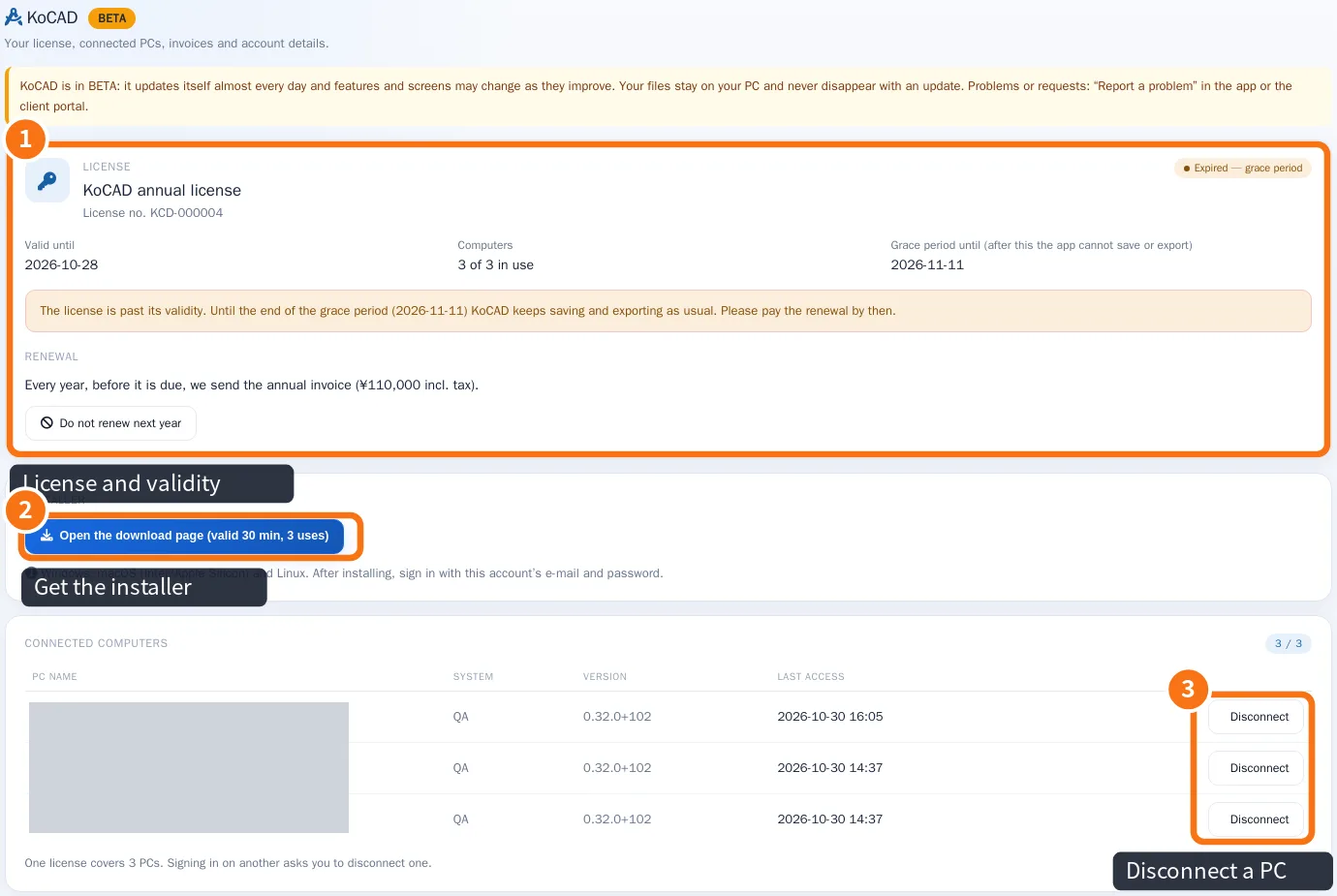
Where to see your license
- In KoCAD: click your picture at the top right → My account / License. Tabs License, Devices, Invoices and Details.
- In the customer portal: the KoCAD page ①, with validity, grace period and connected computers ③.
Common mistakes
- I paid and it still shows expired: in the KoCAD message click Already paid — check again. Right after payment it can take a few minutes.
- I changed PCs: disconnect the old one in the portal before signing in on the new one, or pick it in the limit message.
Related articles
- Install KoCAD and sign in with your account
- How to change computers and free a PC from the license (limit of 3)
- How to renew the annual license and what happens if it expires
- Questions: purchase, license, PCs, payment and privacy