











KoCAD · 界面与功能
How to build a weldment (tube frame) from sketch to weld
Skeleton, profiles, corners, trimming, gussets, end caps and weld beads — step by step.
此文章暂无您的语言版本,以English显示。
本页目录
What this is for
Machine bases, tables, racks and platforms are welded frames of profiles. In KoCAD you draw only the skeleton (lines) and the program turns each line into a standard profile, with the corners cut and the mass calculated.
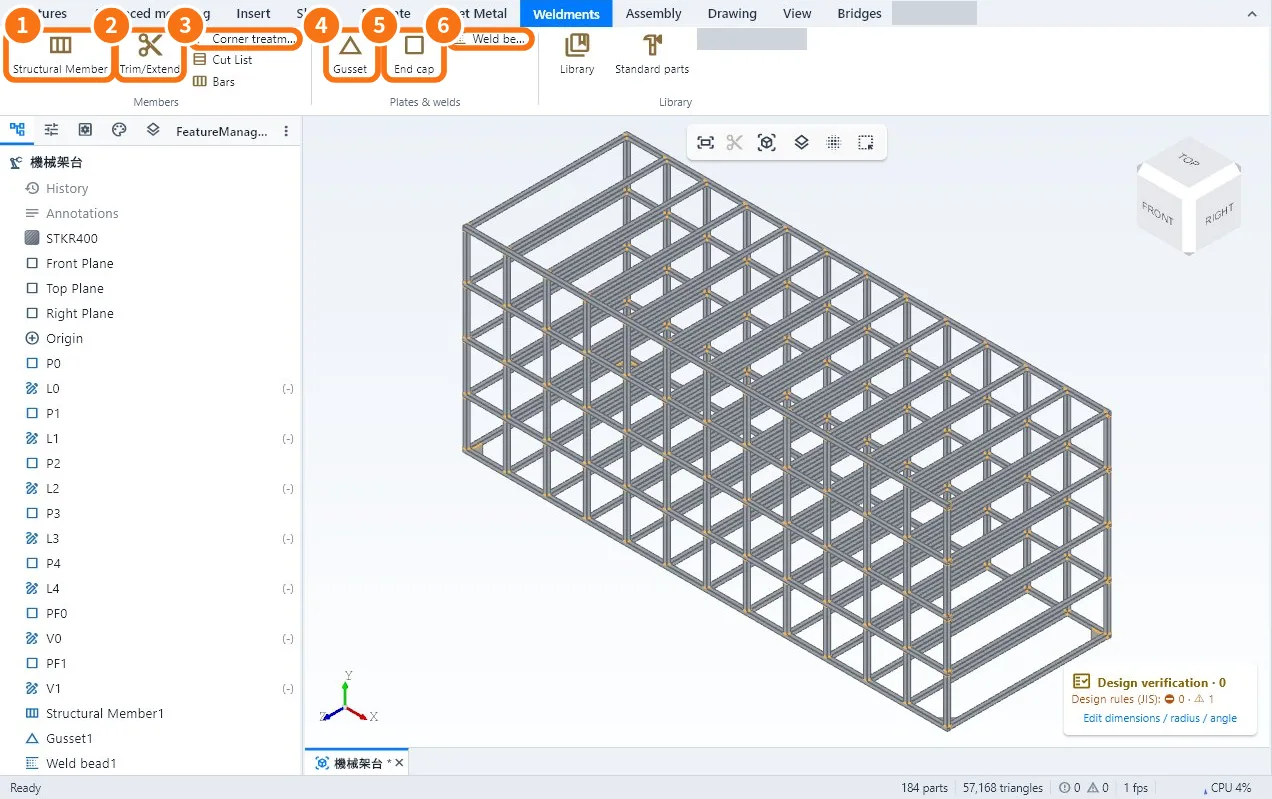
Step by step
- Skeleton: draw the lines in a sketch. For 3D frames, make one sketch per plane (front, side, top) and use the shared points.
- Members: click Structural Member ①. Choose the profile type and size (e.g. □60×60×2.3) and the material. Click the lines — one group per profile. Confirm.
- Joints: where one profile meets another, use Trim/Extend ② and choose which one cuts which.
- Corners: with Corner treatment ③ choose mitre (45°) or butt, and the weld gap.
- Gussets: Gusset ④ puts the triangular plate between two members; enter size and thickness.
- Caps: End cap ⑤ closes the open ends of tubes.
- Welds: Weld bead ⑥ on the joints, with type and leg size. The weld mass goes into the total and the symbol goes to the drawing.
- Save and check the Cut List.
Tips
- Changed a skeleton size? The members follow (Ctrl+B).
- Use Verification: it warns about loose members, joints without trimming and corners without welds.
- To know whether the frame carries the load, use Structural analysis (BETA).
Common mistakes
- Profile rotated the wrong way: in the member panel rotate the profile or change the alignment point.
- Members overlap at the corners: Trim/Extend or Corner treatment is missing.
- A line without a profile: it was not selected in the group; edit the member and add it.
Related articles
- Weldments tab: members, plates, welds, cut list and bars
- How to make the cut list and work out how many bars to buy
- Library: standard profiles, fasteners and standard parts
- How to run an engineering study (BETA): frame, plate, thermal and second opinion