











KoCAD · 界面与功能
How to dimension and annotate the drawing: dimensions, tolerances, hole callouts, welds and balloons
Complete the shop drawing with everything the shop needs, and edit a dimension.
此文章暂无您的语言版本,以English显示。
本页目录
What this is for
Automatic dimensions cover the basics. The Annotation tab ① completes the shop drawing: special dimensions, tolerances, surface finish, weld symbols, notes and balloons.
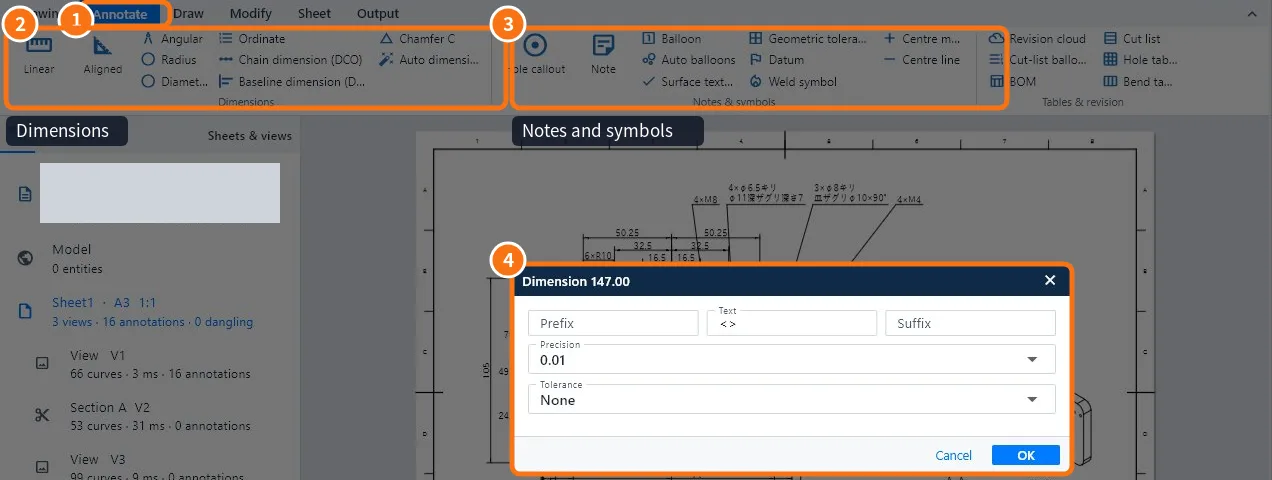
Dimensions ②
- Command · Use
- Linear / aligned / angular dimension · Horizontal/vertical and slanted distances, and angles
- Radius / Diameter · Arcs and circles
- Chain / baseline / ordinate dimension · Rows of holes and positions
- Chamfer C · Chamfers the JIS way (C2, C5…)
- Auto dimension · Dimensions the selected view without repeats
Notes and symbols ③
- Hole callout: takes the full text from the hole (4×M8, drill, counterbore, countersink).
- Note and Balloon; Auto balloons number the parts of the assembly.
- Surface finish, Geometric tolerance and Datum.
- Weld symbol and Centre mark/line.
- Tables and revision: parts, holes and bends tables, and revision cloud.
Step by step: edit a dimension ④
- Double-click the dimension.
- Use Prefix and Suffix to add text (for example "2×" or "(ref.)"); <> in the Text field is the measured value.
- Choose the Decimal places.
- In Tolerance choose none, symmetric, limits or fit.
- Click OK.
Common mistakes
- Dimension "loose" after changing the part: the edge it measured is gone; delete it and dimension again.
- Dimension value is wrong: someone typed a number instead of <>; put the Text field back to <>.
Related articles
- How to create the 2D drawing of a part or assembly
- Drawing tab and the 2D drawing workspace: every tab and command
- How to make holes with the Hole Wizard (clearance, tapped, counterbore, countersink)