











KŌLOGY · Bắt đầu
Create the company account and sign in
Create the company's free account in the app or on the web, confirm the email and sign in as a manager.
Bài viết này chưa được dịch sang ngôn ngữ của bạn: đang hiển thị bản English.
Trong trang này
What it is for
Any company can start on KŌLOGY with a free account, no card needed. The free account already opens the basic operation: drivers, vehicles, routes, shifts, roll call and daily reports. When the company needs more, it moves to a paid plan on the web.
If your company already has a contract with KOMORI, you do not need to create anything: sign in with the email and password you received.
Where it is
- App: on the sign-in screen, tap Create a free account.
- Web: at kology.its-komori.com, click Create a free account (company or driver).
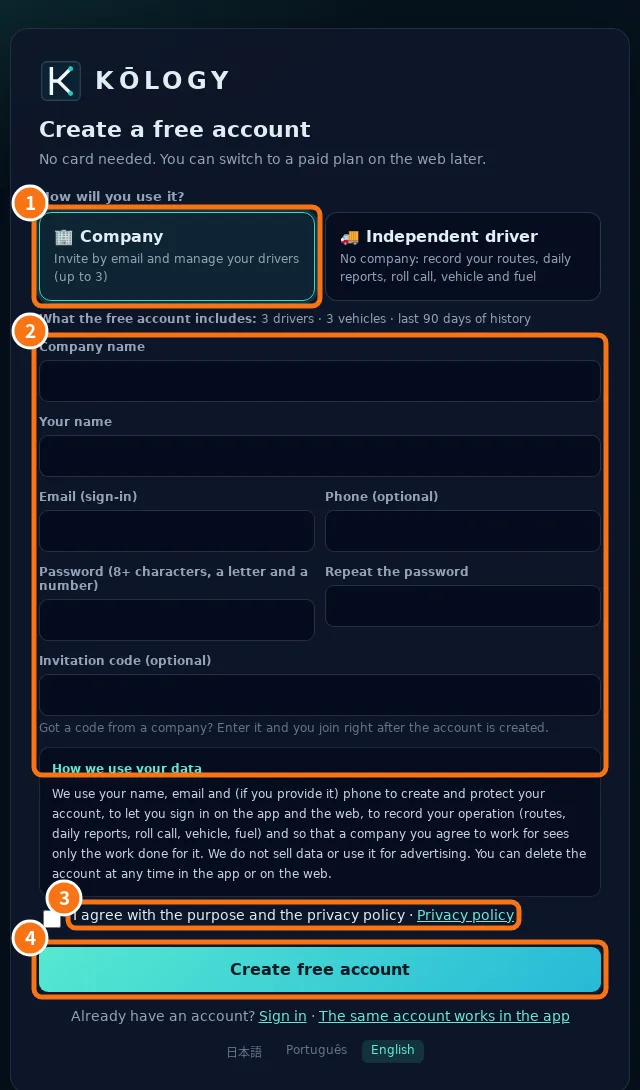
Step by step
- Under How will you use it? choose ① Company («Invite by email and manage your drivers»). Independent driver is for people who work alone, without a company.
- Fill in ② Company name, Your name, Email (your sign-in), Phone (optional) and the password twice. The password needs 8–128 characters with at least one letter and one digit.
- Leave Invitation code (optional) empty. It is only used when another company invited you as a driver.
- Read How we use your data and tick ③ I agree with the purpose and the privacy policy.
- Tap ④ Create free account. You are in right away, as the company's manager.
- Open the email KŌLOGY sent and confirm the address. Without confirmation, after a few days the system asks for the link again before opening the screens.
Signing in later
- Open the app and choose Company / manager.
- Type the email and password and tap Sign in.
- Forgot the password? Tap Forgot password and follow the link sent by email.
Common errors
- «An account could not be created with this email.» The email already has an account. Sign in with it or use «Forgot password».
- «Too many attempts.» Wait a few minutes and try again.
- I did not get the confirmation email. Check the spam folder. Opening a locked screen sends the link again.
Related questions
- Getting started with KŌLOGY
- Invite drivers by email
- KŌLOGY plans and limits