











KŌLOGY · Màn hình & chức năng
The More menu and driver shortcuts
Where every driver feature lives: bottom bar, top icons and the More menu with Operations, My work and Account.
Bài viết này chưa được dịch sang ngôn ngữ của bạn: đang hiển thị bản English.
Trong trang này
What it is for
The More menu is the full index of the driver app. Everything that is not on the bottom bar — vehicle, shift, payments, fuel card, reports, profile, guide and settings — is here, in three groups.
Where it is
The last tab of the bottom bar: More. In the browser, the same menu opens from the driver portal's menu button.
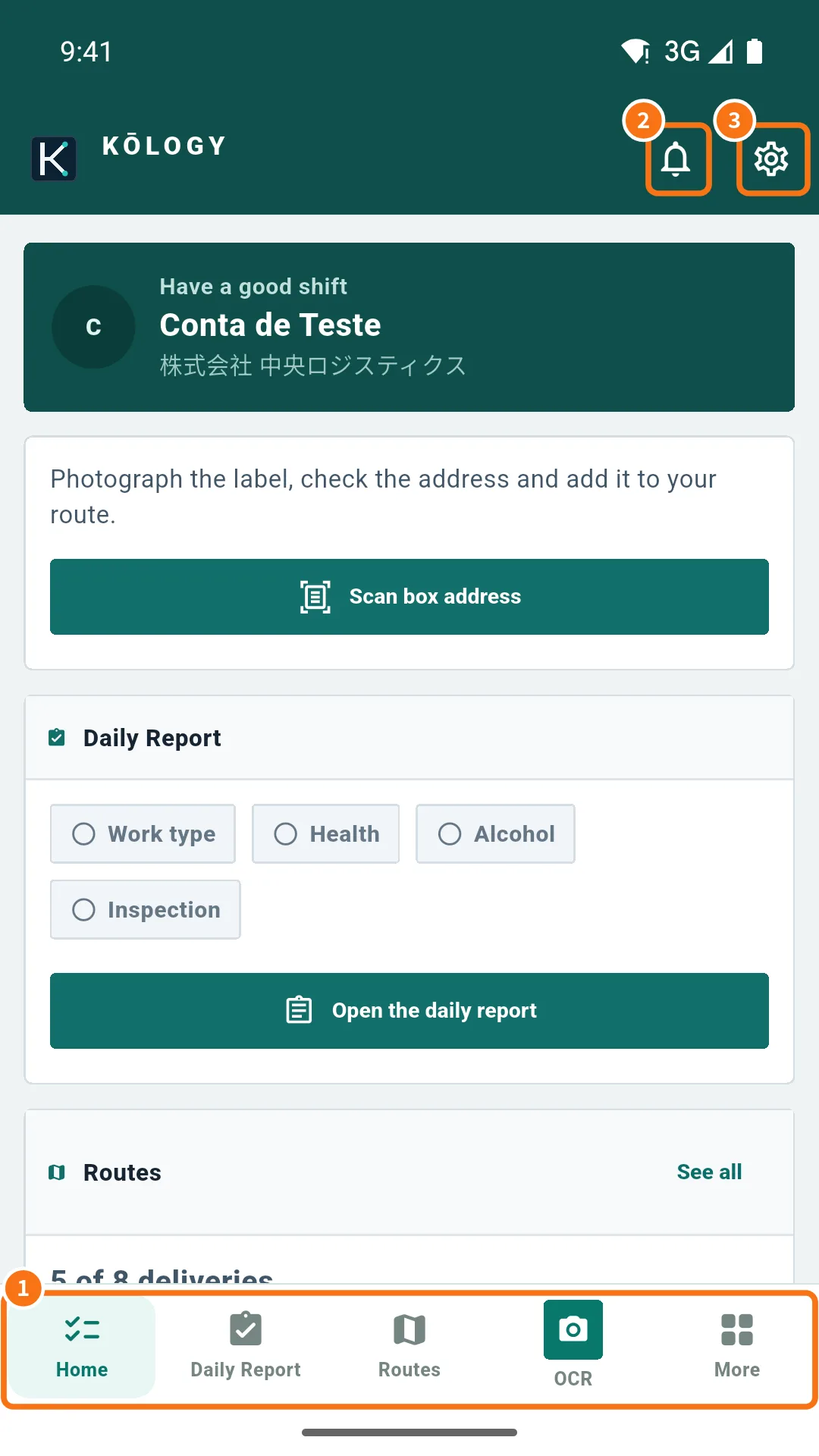
Bottom bar and top
- Bottom bar (①): Home, Daily Report, DRIVER (route map), OCR and More. On the full-screen map the bar disappears; use the back arrow to leave the map.
- Bell (②): Notifications of the last 30 days.
- Gear (③): Settings. Next to it are the Support icon (AI and KOMORI team) and the N pending badge when something was saved without signal.
The groups of the More menu
At the top there are filters: All, Operations, My work and Account. Tap a filter to see only that group.
- Group · Items
- Operations · Home, Daily Report, Routes, OCR, Performance
- My work · Vehicle, Shift, Payments, Fuel card, Reports
- Account · Profile, Profile & documents, Guide, Settings
Step by step: find a feature
- Tap More on the bottom bar.
- Choose the group filter (for example My work).
- Tap the item (for example Payments). To go back, use the arrow at the top.
Special bars at the top
- DRIVE · name with Back to STAFFS: shown to managers or independent drivers who are in driver mode.
- Update available: opens the store or downloads the new version.
Common mistakes
- I cannot find the bottom bar: you are on the full-screen map. Tap the back arrow.
- An item does not open and says “No connection”: some screens need internet the first time.
Related questions
- Driver Home (Today) screen
- Driver app settings
- Notifications and notices