











KŌLOGY · Màn hình & chức năng
Driver Home (Today) screen
Your day at a glance: route numbers, daily-report checks, shortcuts to scan labels and to your work.
Bài viết này chưa được dịch sang ngôn ngữ của bạn: đang hiển thị bản English.
Trong trang này
What it is for
The Home screen is the dashboard of your day. It shows how many routes and stops you have today, what is already delivered, which daily-report checks are missing, and gives shortcuts to everything you use often. Every number is a button: tapping it opens the right screen.
Where it is
It is the first tab of the bottom bar (Home). It is also in More → Operations → Home. Pull the screen down to refresh.
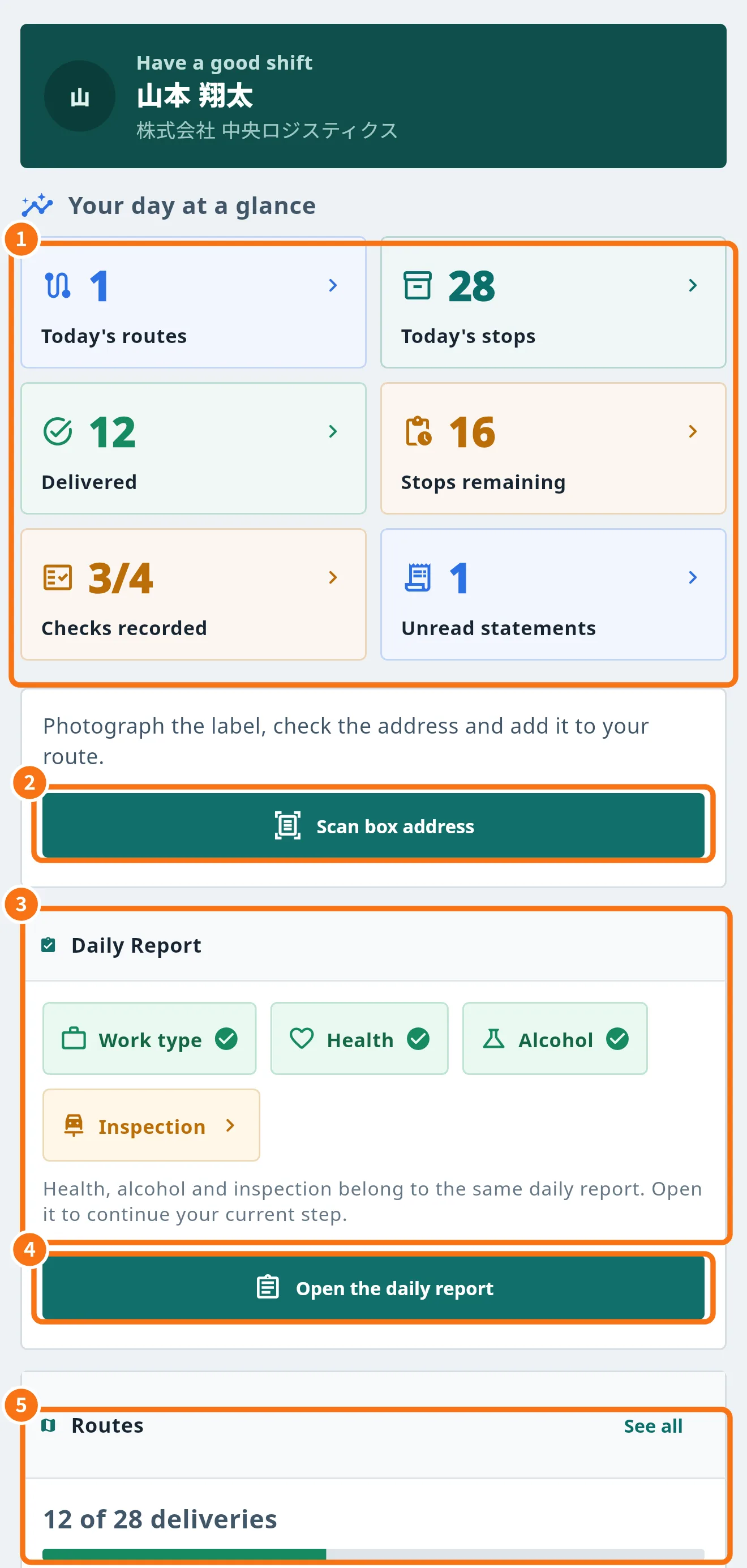
What is on the screen
- Your day at a glance (①): Today's routes, Today's stops, Delivered, Stops remaining, Checks recorded (0/4 to 4/4) and Unread statements. Tap “Delivered” for the delivery history; the others open the map, the daily report or payments.
- Scan box address (②): opens the OCR tab to photograph the label, check the address and add it to your route. It only appears when your account is linked to a company.
- Daily Report panel (③): the four checks — Work type, Health, Alcohol and Inspection. A tick means it is recorded.
- Open the daily report (④): continues the report at the step where you stopped.
- Routes panel (⑤): “12 of 28 deliveries” and a progress bar. See all opens the map.
Further down, My work has shortcuts to My vehicle, My card (fuel), Shift, Payment statement, Performance, Reports and Guide. If the company registered a phone number, the red Call the office button appears.
Notices that can appear at the top
- Message from dispatch: stays pinned until you tap Received — dispatch then knows you read it.
- Unsent daily report reminder: appears when a shift day has a daily report that was not submitted.
- New version available: tap to update (see “How to update the app”).
- Offline: the numbers shown are the last ones saved on the phone.
Common mistakes
- “No route published for today”: dispatch has not published your route yet. You can add deliveries from the OCR tab if your company allows it.
- “Your account is not linked to a company yet”: contact the office; without the link there is no route and no label scan.
- Old numbers: pull down to refresh or check your connection.
Related questions
- Driver daily report (日報 and 点呼)
- Routes and deliveries on the map
- The More menu and driver shortcuts