











KŌLOGY · Màn hình & chức năng
Driver daily report (日報 and 点呼)
Do the daily checks — vehicle, work type, health, alcohol and inspection — and record start, end and fuel in the daily report.
Bài viết này chưa được dịch sang ngôn ngữ của bạn: đang hiển thị bản English.
Trong trang này
What it is for
The Daily Report is the day's log (日報) together with the pre-driving roll call (点呼). It records the vehicle you will use, the work type, your health, the alcohol test, the vehicle inspection, the odometers and the day's results. It is the first thing to do before you leave.
Where it is
Second tab of the bottom bar: Daily Report. It also opens from Open the daily report on Home. It works in the browser too.
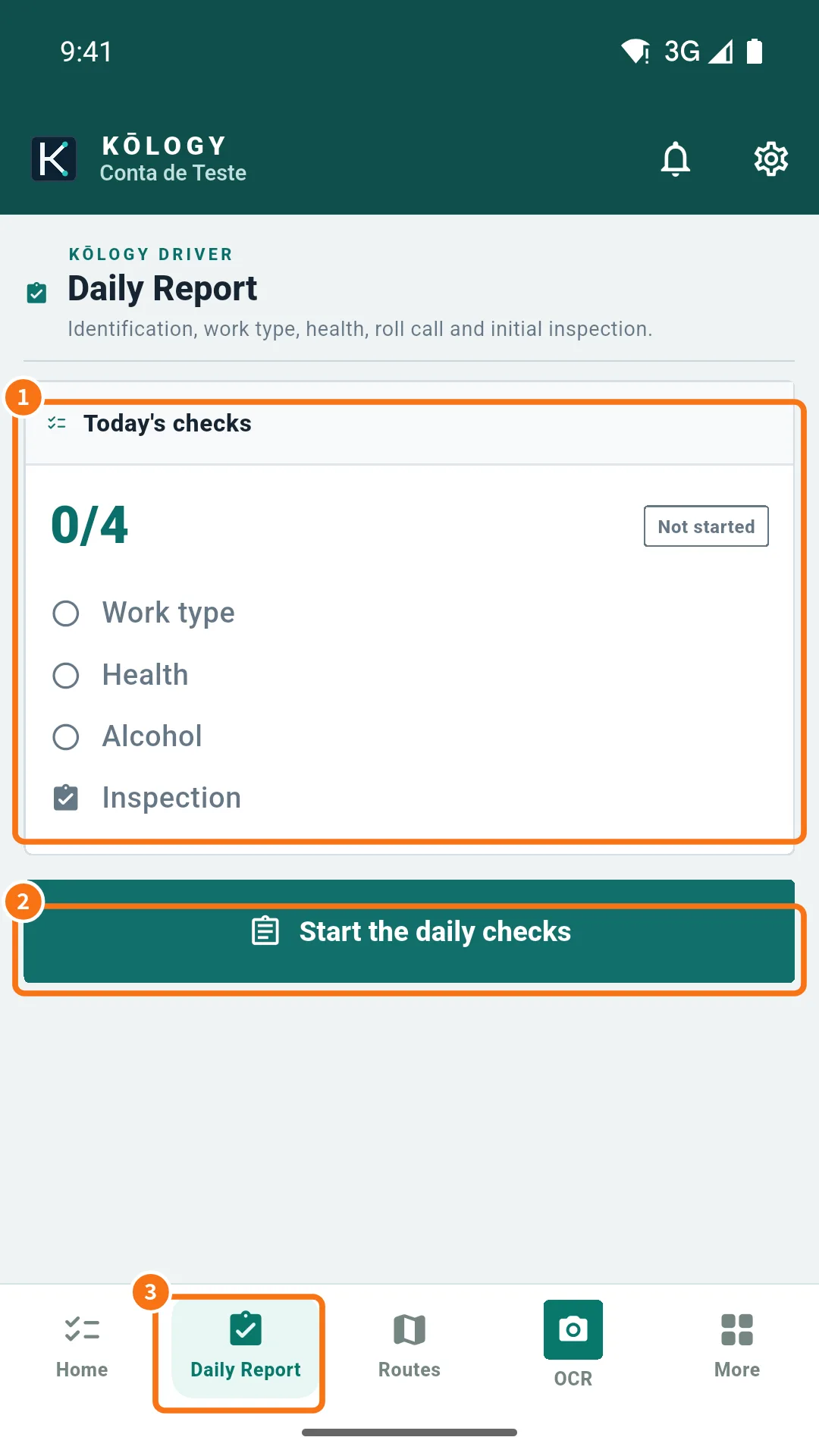
What is on the screen
- Today's checks (①): the counter (0/4 to 4/4), the status (Not started, In progress or Completed) and the four checks: Work type, Health, Alcohol and Inspection.
- Start the daily checks (②): opens the wizard. If you already started, it becomes Continue the daily checks and opens at the current step.
- The Daily Report tab (③) on the bottom bar.
The wizard step by step
Steps and fields come from your company's setup; the usual order is:
- Vehicle: scan the vehicle QR or pick the vehicle from the list. Enter and photograph the home-departure odometer if your company asks.
- Work type: for example operation, office or maintenance. For operation, also choose the day's route.
- Health: temperature, hours of sleep, condition and symptoms.
- Alcohol: device used and test result (mg/L).
- Inspection: tap each vehicle item and choose OK or NG. While an item is unchecked you cannot continue.
- Start: photograph the departure odometer — the number is read from the photo — and start delivering.
- End of day: end-of-service odometer, the day's results and, if you refuelled, litres, amount and receipt photo. Review and submit.
On each step use Save and continue (or the forward button the step shows) and Back to fix the previous one.
Common mistakes
- “Some items are still missing”: what you filled is saved; complete the marked items (number or photo) and continue again.
- Odometer does not add up (departure lower than home, or arrival lower than end of service): the app shows the error in the field and blocks sending until it is fixed.
- A report from another day is still “in progress”: finish and submit that one before starting today's.
- The vehicle is not listed: ask the office to assign it to you (or add it if you are an independent driver).
Related questions
- On duty and location for dispatch
- How to do a full working day
- Vehicle and fuel card