











KŌLOGY · Màn hình & chức năng
How to invite drivers by email
Send an invitation with a code; the person creates a free account and joins your company as a driver.
Bài viết này chưa được dịch sang ngôn ngữ của bạn: đang hiển thị bản English.
Trong trang này
What it is for
An invitation is the simplest way to bring in a driver: you only need their email. They create the free account and choose the password themselves. Their personal history stays theirs; your company only sees the work done for it.
Where: web Account & support → Invitations & free account; app More → Account & support → Invitations & free account.
Step by step
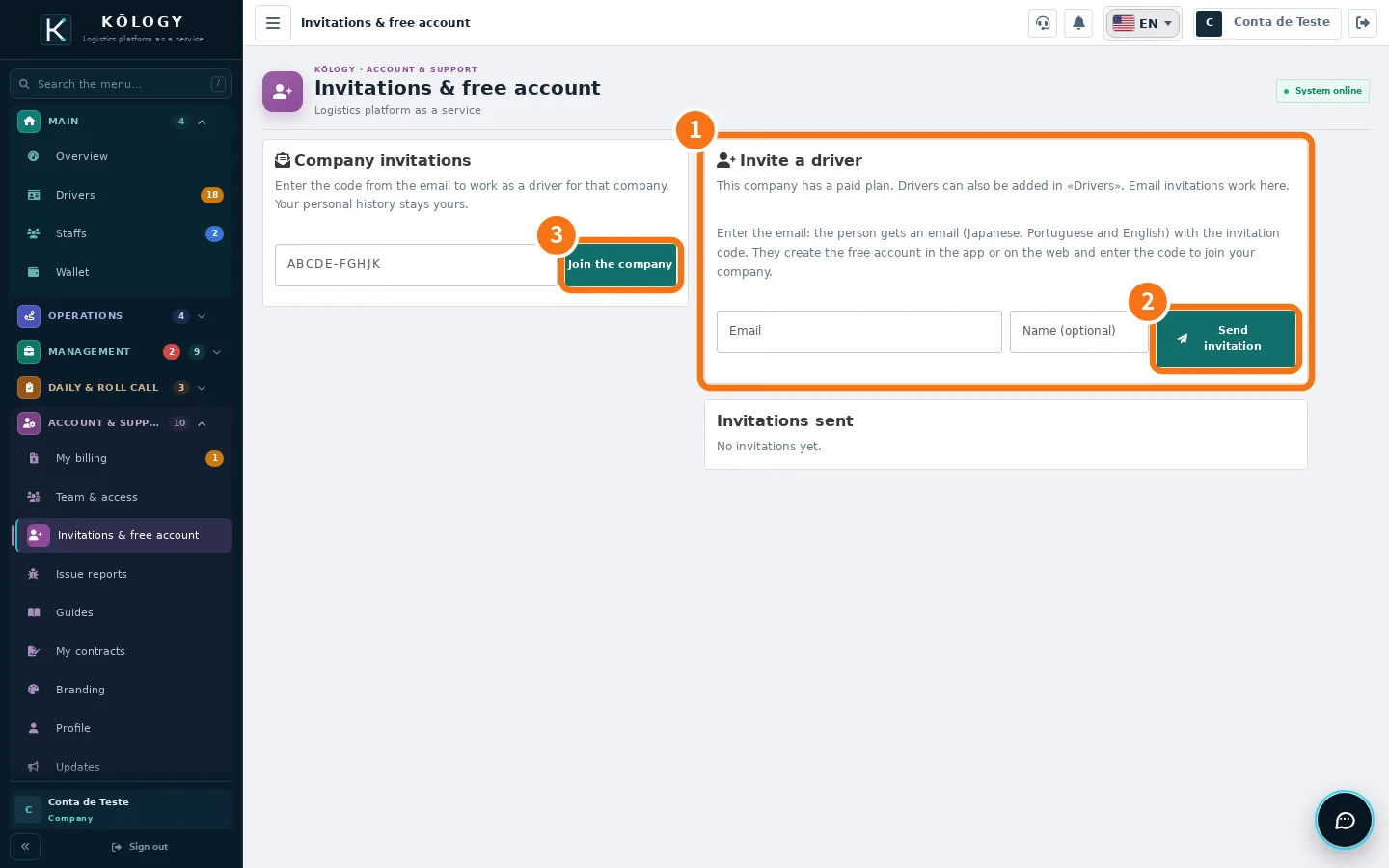
- In ① Invite a driver, type the Driver's email and, if you want, the Name (optional).
- Tap ② Send invitation. The person gets an email in Japanese, Portuguese and English with the code.
- The code shows on screen only once. If the email does not arrive, tap Copy or Share and send the code by message.
- The person opens the app or web, taps Create a free account and enters the code in Invitation code (optional) — or, if they already have an account, enters it under ③ Join the company.
- Done: they appear in Drivers and as accepted under Invitations sent.
Follow your invitations
Under Invitations sent you see each invitation's expiry («expires…») and who accepted, and you can Resend (new code) or Cancel invitation. The code is valid for 14 days. Up to 10 invitations can wait at the same time.
Common errors
- «There is already a pending invitation for this email.» Use Resend on the existing invitation.
- «This person is already one of your drivers.» They are already in Drivers.
- «The free account allows up to 3 driver(s).» Free account limit reached. Suspend someone or change plan.
- «The invitation code is invalid, expired or already used.» Send a new code with Resend.
Related questions
- Add a driver with sign-in and password
- Roles and team access
- KŌLOGY plans and limits