











KoCAD · Màn hình & chức năng
How to use user parameters and formulas (a part that changes size)
Name key sizes like width and height, use formulas in dimensions and change the size of the whole part in one place.
Bài viết này chưa được dịch sang ngôn ngữ của bạn: đang hiển thị bản English.
Trong trang này
What this is for
A cover that comes in 5 sizes does not need 5 drawings. With User parameters you name the main sizes (width, height, thickness) and use those names in the dimensions. Change the parameter and the whole part adjusts.
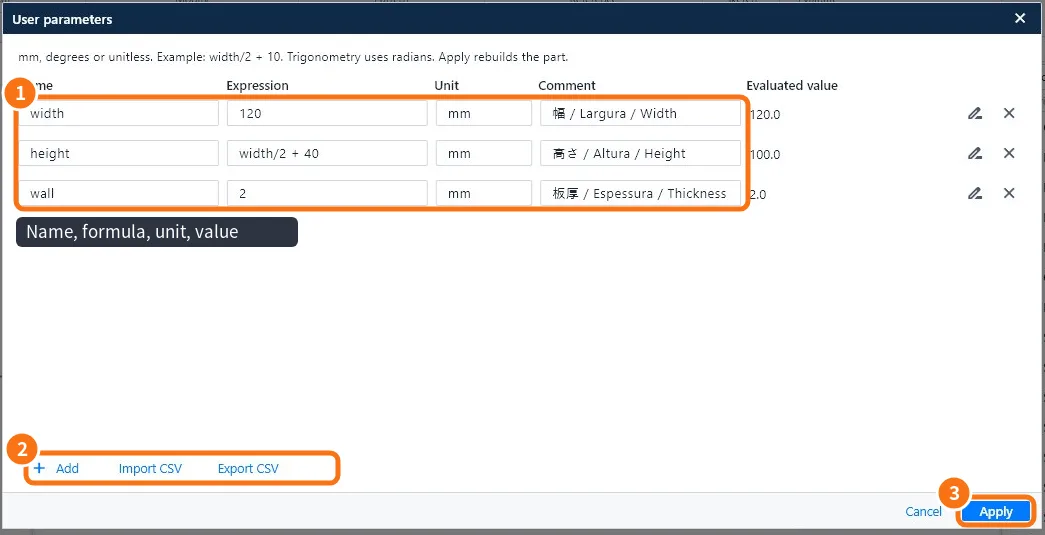
Step by step
- Click Advanced modeling → User parameters.
- Click Add ②. Fill in the Name (no spaces, e.g. width), the Formula (a number or a calculation, e.g. width/2 + 40), the Unit (mm, degrees or none) and a comment ①.
- Repeat for the other sizes. The Calculated value shows the result at once.
- Click Apply ③. The part is regenerated.
- In sketch dimensions and depths, type the parameter name (e.g. width) or a formula with it (width/20).
- For another size, come back, change the value and Apply.
Accepted formulas
- The four operations and brackets: (width - 2*wall)/2.
- Trigonometry in radians: sin, cos, tan.
- Units: mm, degrees or none (counts).
Spreadsheet
Export CSV saves the list to edit in Excel; Import CSV brings it back. Good for size tables.
Common mistakes
- "Invalid name": use letters, numbers and _; do not start with a number.
- Circular reference: a parameter uses another that uses the first; break the loop.
- The part fails after a change: the new value made a feature impossible (a hole bigger than the part); use consistent values.
Related articles
- Advanced modeling tab: parameters, timeline, bodies and AI
- How to draw a sketch with dimensions and relations
- How to edit a part from the tree and the timeline