











KoCAD · Màn hình & chức năng
How to make holes with the Hole Wizard (clearance, tapped, counterbore, countersink)
Standard holes with the right size, fit and depth, which become hole callouts in the drawing.
Bài viết này chưa được dịch sang ngôn ngữ của bạn: đang hiển thị bản English.
Trong trang này
What this is for
The Hole Wizard creates standard holes without you working out diameters: choose the type and the bolt size and KoCAD applies the right clearance diameter, thread, counterbore or countersink. In the 2D drawing the hole becomes an automatic callout (for example 4×M8).
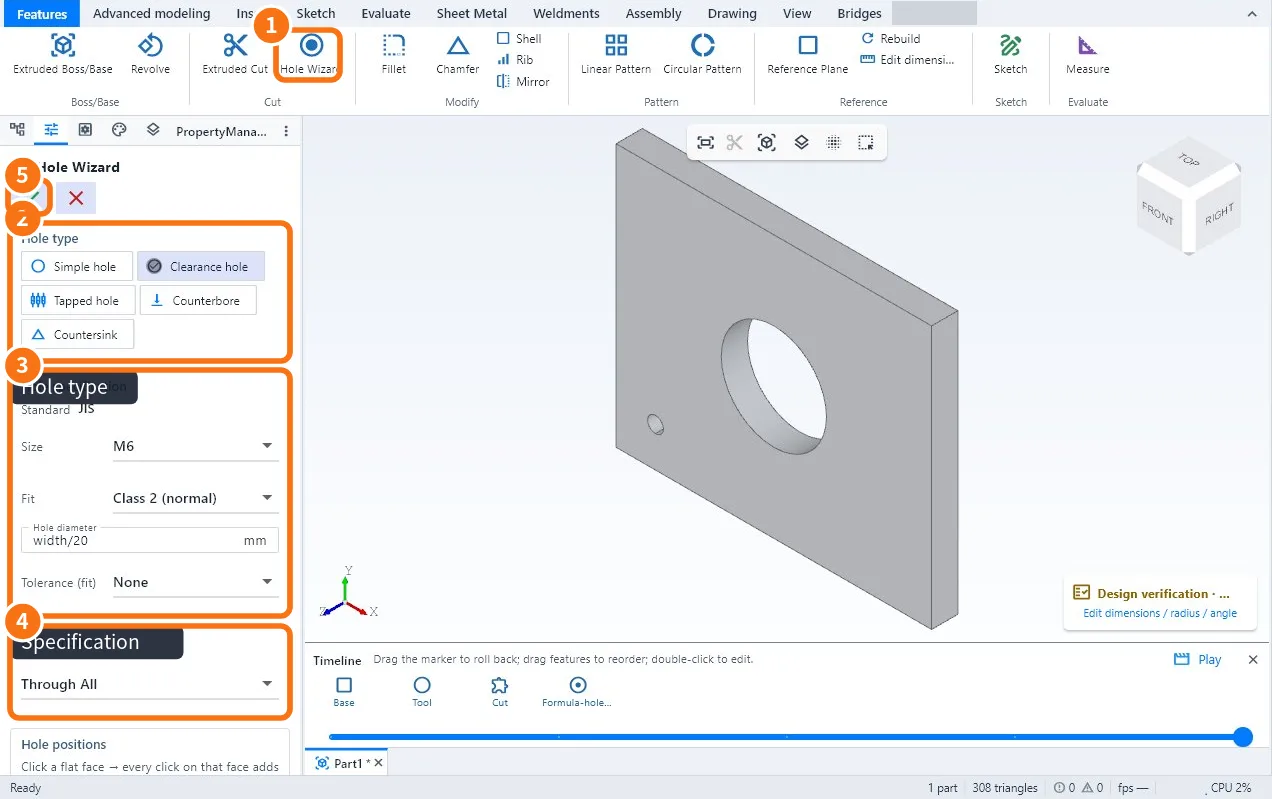
Step by step
- Click Hole Wizard ① (Features tab).
- In Hole type ② choose: Simple hole, Clearance hole (for the bolt to pass), Tapped hole, Counterbore or Countersink.
- In Hole specification ③ check the standard (for example JIS), choose the Size (M6, M8…) and the Fit (Class 1 close, 2 normal, 3 loose). The diameter is calculated; you can use a formula.
- In End condition ④ choose the depth or Through All.
- Click the face of the part to place the hole; dimension its position from the edges.
- Confirm with ✓ ⑤.
Which type to use
- Type · When
- Clearance hole · The bolt passes through the part and tightens on the other side
- Tapped hole · The part takes the thread
- Counterbore · The socket-head bolt sits below the face
- Countersink · A flat-head screw sits flush with the face
- Simple hole · Free diameter, no standard
Common mistakes
- Verification warns "hole close to the edge": the edge distance is small for that bolt; move the hole away.
- The drawing callout shows no thread: the hole was made as Simple hole; edit it and choose Tapped hole.
Related articles
- How to extrude and cut (boss, cut and end conditions)
- How to repeat features: linear pattern, circular pattern and mirror
- How to dimension and annotate the drawing: dimensions, tolerances, hole callouts, welds and balloons
- How to check the design before sending it to the shop (Verification and JIS rules)