











KMR · Pantallas y funciones
How to follow the team's day on your phone
A manager's daily routine: check who is in, act on lateness and absence, clear to-dos and see the team on the map.
Este artículo aún no está traducido a su idioma: se muestra la versión en English.
En esta página
When to use it
Use this routine every work day in the manager app. In a few minutes you know who is on duty, who is late or absent, and you clear what is pending.
Step by step
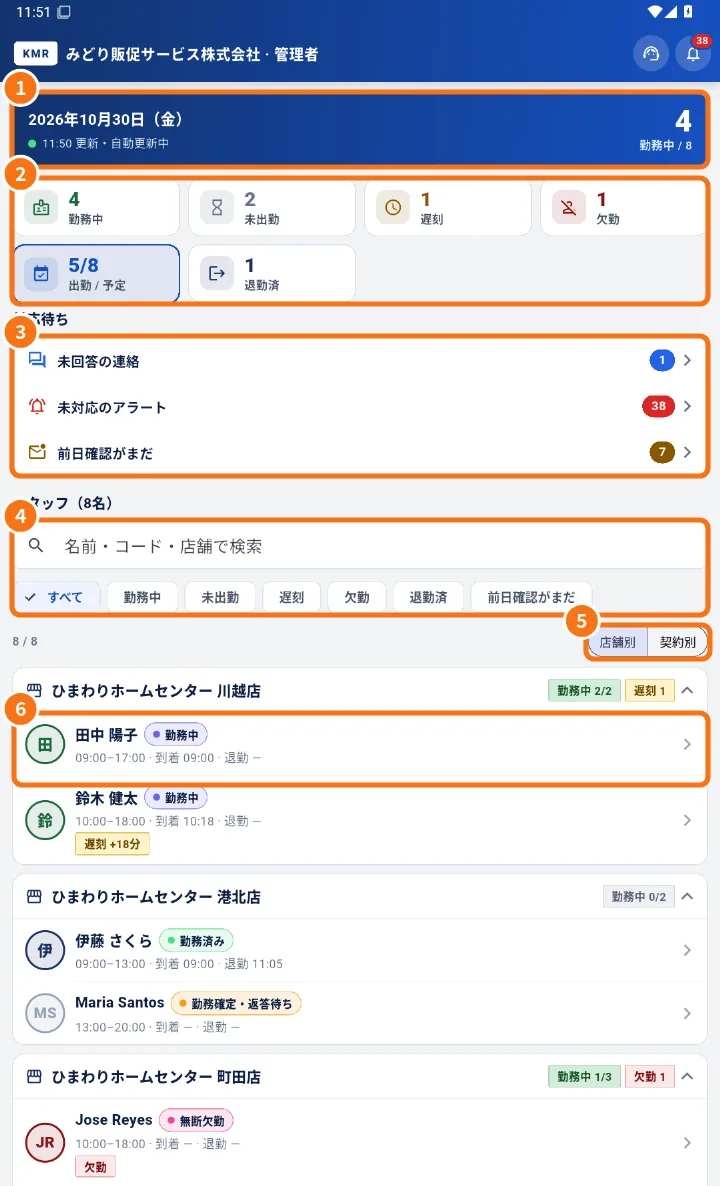
- The day before: open Home and check Not confirmed (day before) under To do (③). Tap it, open the person and use Message or Call. On the schedule, Resend confirmation reminder.
- In the morning: check the tiles (②). In / total shows how many have checked in.
- Lateness: tap Late to filter. Each person shows “Late +N min”. Tap the person (⑥) and use Call.
- Absences and cancellations: tap Absent. Check Open alerts (for example a last-minute cancellation). If needed, find a replacement in Shifts.
- Where everyone is: tap Live map. See who is “At the store”, “Near the store” or “Away from the store”.
- Messages: under To do, Unanswered messages takes you to the team's questions.
- In the afternoon: open Today in detail to see the hourly breakdown and the approach, conversation and application counters.
- At the end of the day: Finished shows who checked out. Those who did not show as incomplete in Attendance.
Tips
- Use By store to go store by store, and By contract to separate contract types.
- Search accepts name, code or store.
- Turn on notifications in Settings → Notifications so you do not miss alerts.
Common mistakes
- “No one matches this filter”: tap All to clear the filter.
- The person is not on the map: they did not allow location or have not tapped a work-day button yet.
Related questions
- Managers on the phone: tabs, Home and Menu
- Today in detail and Live map
- Alerts, stores, projects and training