











KMR · Pantallas y funciones
My page: your details, payments, training and settings
What is on the My page tab and how to reach payment statements, training and settings.
Este artículo aún no está traducido a su idioma: se muestra la versión en English.
En esta página
What it is for
The My page tab (マイページ) brings together what is yours: your details and documents, training, payment statements, shift preferences, contact with the administrator and app settings.
What is on the screen
- At the top, a card with your name, Company, Staff code and Area.
- Profile & documents: personal details, photos and documents (see its own article).
- Manual & training: company manuals, videos and tests.
- Payment statements: statements waiting for your check. The red number shows how many.
- Submit availability: only for people whose company asks for shift preferences.
- Ask the administrator: opens the Messages tab.
- Settings and Language. At the bottom, the app version.
Step by step: see your payments
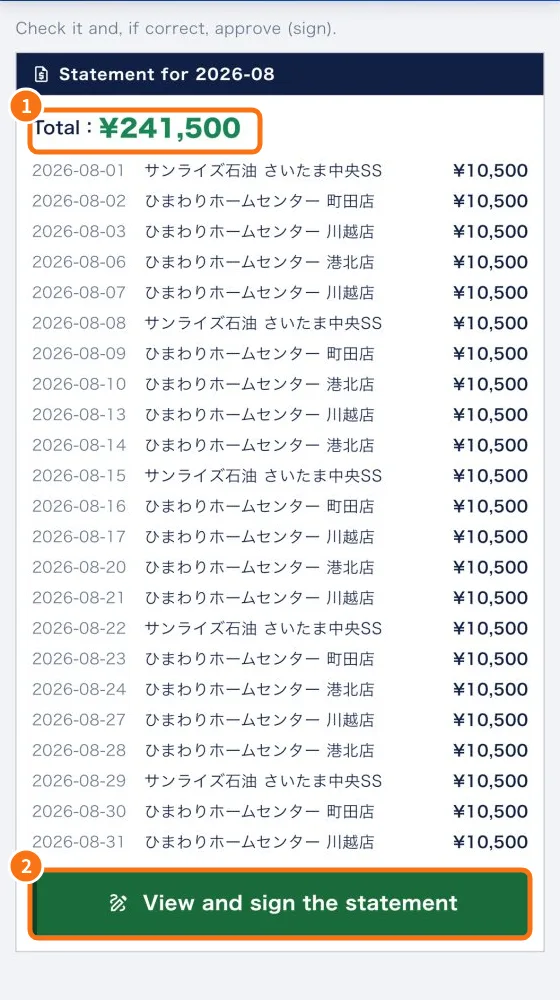
- Tap My page → Payment statements (or the shortcut on Home).
- Check the Statement for + month, with the Total (①) and each day: date, store and amount.
- Tap View and sign the statement (②) to check and approve it. The step by step is in “Check and sign your payment statement”.
- If nothing is waiting, you see “No statements awaiting you.”
Step by step: details and training
- Tap Profile & documents to keep your details up to date. Expiring documents trigger a notice.
- Tap Manual & training to see what is mandatory and your progress.
Common mistakes
- “Link expired. Contact the administrator.”: the signing link is valid for 30 days. Ask for a new one in Messages.
- My details are wrong: fix them in Profile & documents. Fields managed by the company can only be changed by the person in charge.
- I don't see “Payment statements”: free accounts have no company statements.
Related questions
- Check and sign your payment statement
- Profile & documents: personal details, photos and automatic document reading
- Manual & training: mandatory materials and progress
- Settings: general, language, notifications, account and about