











KMR · Màn hình & chức năng
My page: your details, payments, training and settings
What is on the My page tab and how to reach payment statements, training and settings.
Bài viết này chưa được dịch sang ngôn ngữ của bạn: đang hiển thị bản English.
Trong trang này
What it is for
The My page tab (マイページ) brings together what is yours: your details and documents, training, payment statements, shift preferences, contact with the administrator and app settings.
What is on the screen
- At the top, a card with your name, Company, Staff code and Area.
- Profile & documents: personal details, photos and documents (see its own article).
- Manual & training: company manuals, videos and tests.
- Payment statements: statements waiting for your check. The red number shows how many.
- Submit availability: only for people whose company asks for shift preferences.
- Ask the administrator: opens the Messages tab.
- Settings and Language. At the bottom, the app version.
Step by step: see your payments
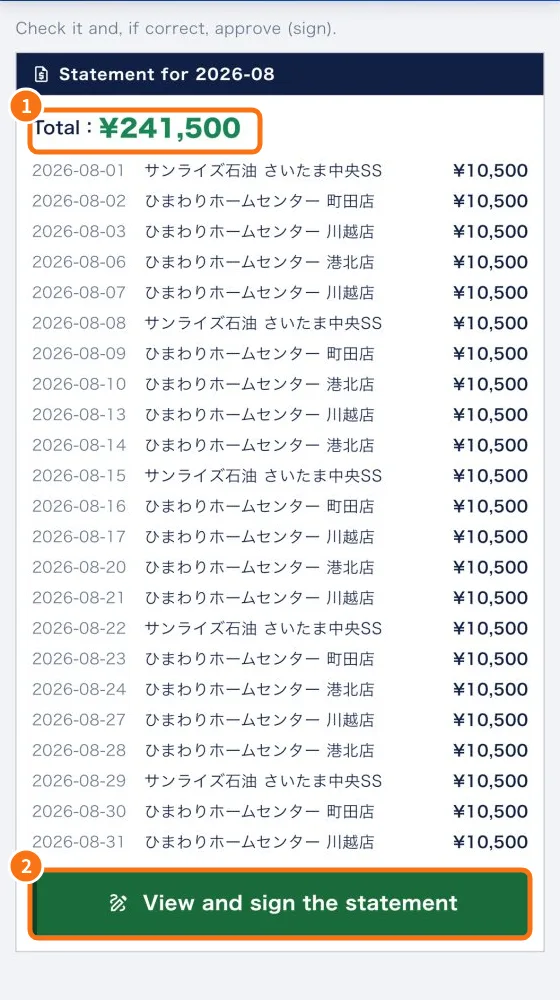
- Tap My page → Payment statements (or the shortcut on Home).
- Check the Statement for + month, with the Total (①) and each day: date, store and amount.
- Tap View and sign the statement (②) to check and approve it. The step by step is in “Check and sign your payment statement”.
- If nothing is waiting, you see “No statements awaiting you.”
Step by step: details and training
- Tap Profile & documents to keep your details up to date. Expiring documents trigger a notice.
- Tap Manual & training to see what is mandatory and your progress.
Common mistakes
- “Link expired. Contact the administrator.”: the signing link is valid for 30 days. Ask for a new one in Messages.
- My details are wrong: fix them in Profile & documents. Fields managed by the company can only be changed by the person in charge.
- I don't see “Payment statements”: free accounts have no company statements.
Related questions
- Check and sign your payment statement
- Profile & documents: personal details, photos and automatic document reading
- Manual & training: mandatory materials and progress
- Settings: general, language, notifications, account and about