











KMR · Màn hình & chức năng
Settings: general, language, notifications, account and about
The five tabs of KMR Settings and what each one does, for staff and for managers.
Bài viết này chưa được dịch sang ngôn ngữ của bạn: đang hiển thị bản English.
Trong trang này
What it is for
Settings gathers everything about the app and your account, split into tabs: General, Language, Notifications, Account & privacy and About. On a phone the tabs are at the top (swipe to switch); on a tablet, on the side.
Where it is
- Staff: My page → Settings.
- Manager: Menu → Settings.
What each tab has
- General: a card with your name, company and code; Profile & documents (staff); for free accounts, My work and Company invitations; under Switch mode, Use as manager (staff) or Worker mode and Use as staff (manager).
- Language: 日本語, Português, English, Tagalog, 简体中文, Tiếng Việt and Español, or Same as device. The first four are translated by people; the other three automatically, and anything missing shows in English.
- Notifications: choose which notifications you receive on your phone. Staff get, for example, the expiring-document notice; managers get plan, limits, system and activity notices.
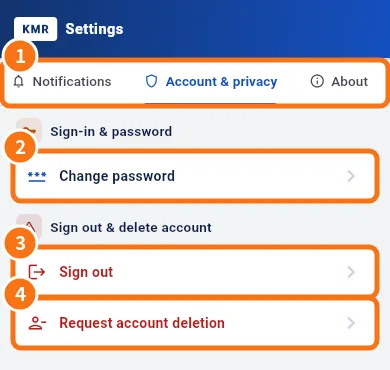
- Account & privacy (①): Change password (②, staff only), Sign out (③) and Request account deletion (④).
- About: Version, What's new, Wiki / Guide and Report a problem.
Step by step: request account deletion (staff)
- Open Account & privacy → Request account deletion.
- Read it: the account is managed by your company. The request goes to the administrator, who deletes your data except records the law requires to keep (attendance, statements).
- Add a note if you like and tap Send request. Confirm: this device signs out.
With a free account, deletion is immediate: tick I understand, tap Delete account and confirm in Really delete?. Personal data is erased at once and cannot be recovered; records of work done for a company stay with that company.
For managers
- Manager passwords are changed on the web panel (profile).
- Delete account explains that manager accounts belong to the company: ask your account administrator. Administrators see an Open admin accounts button.
Common mistakes
- I don't get notifications: check the Notifications tab and that your phone allows notifications for KMR.
- The language did not change everywhere: texts written by your company (news) stay in the language they were written in.
Related questions
- How to change your password and app language
- In-app support, Report a problem, Wiki and What's new
- Sign in, choose your company and reset your password
- KMR frequently asked questions (staff and free account)