











KMR · Screens & features
Settings: general, language, notifications, account and about
The five tabs of KMR Settings and what each one does, for staff and for managers.
On this page
What it is for
Settings gathers everything about the app and your account, split into tabs: General, Language, Notifications, Account & privacy and About. On a phone the tabs are at the top (swipe to switch); on a tablet, on the side.
Where it is
- Staff: My page → Settings.
- Manager: Menu → Settings.
What each tab has
- General: a card with your name, company and code; Profile & documents (staff); for free accounts, My work and Company invitations; under Switch mode, Use as manager (staff) or Worker mode and Use as staff (manager).
- Language: 日本語, Português, English, Tagalog, 简体中文, Tiếng Việt and Español, or Same as device. The first four are translated by people; the other three automatically, and anything missing shows in English.
- Notifications: choose which notifications you receive on your phone. Staff get, for example, the expiring-document notice; managers get plan, limits, system and activity notices.
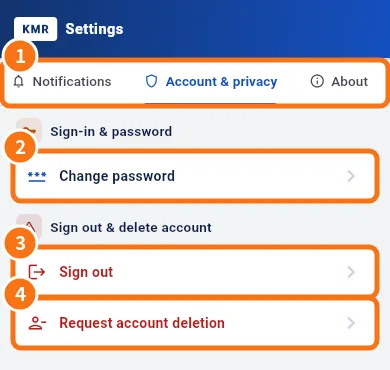
- Account & privacy (①): Change password (②, staff only), Sign out (③) and Request account deletion (④).
- About: Version, What's new, Wiki / Guide and Report a problem.
Step by step: request account deletion (staff)
- Open Account & privacy → Request account deletion.
- Read it: the account is managed by your company. The request goes to the administrator, who deletes your data except records the law requires to keep (attendance, statements).
- Add a note if you like and tap Send request. Confirm: this device signs out.
With a free account, deletion is immediate: tick I understand, tap Delete account and confirm in Really delete?. Personal data is erased at once and cannot be recovered; records of work done for a company stay with that company.
For managers
- Manager passwords are changed on the web panel (profile).
- Delete account explains that manager accounts belong to the company: ask your account administrator. Administrators see an Open admin accounts button.
Common mistakes
- I don't get notifications: check the Notifications tab and that your phone allows notifications for KMR.
- The language did not change everywhere: texts written by your company (news) stay in the language they were written in.
Related questions
- How to change your password and app language
- In-app support, Report a problem, Wiki and What's new
- Sign in, choose your company and reset your password
- KMR frequently asked questions (staff and free account)