











KMR · Getting started
Sign in, choose your company and reset your password
How to sign in as staff or manager, what to do when your e-mail is in several companies, and how to reset your password.
On this page
What it is for
The KMR sign-in screen has two profiles: Staff (field) and Manager. Each profile has its own account and password. This article explains how to sign in, how to choose the company and what to do if you forgot your password.
What is on the screen
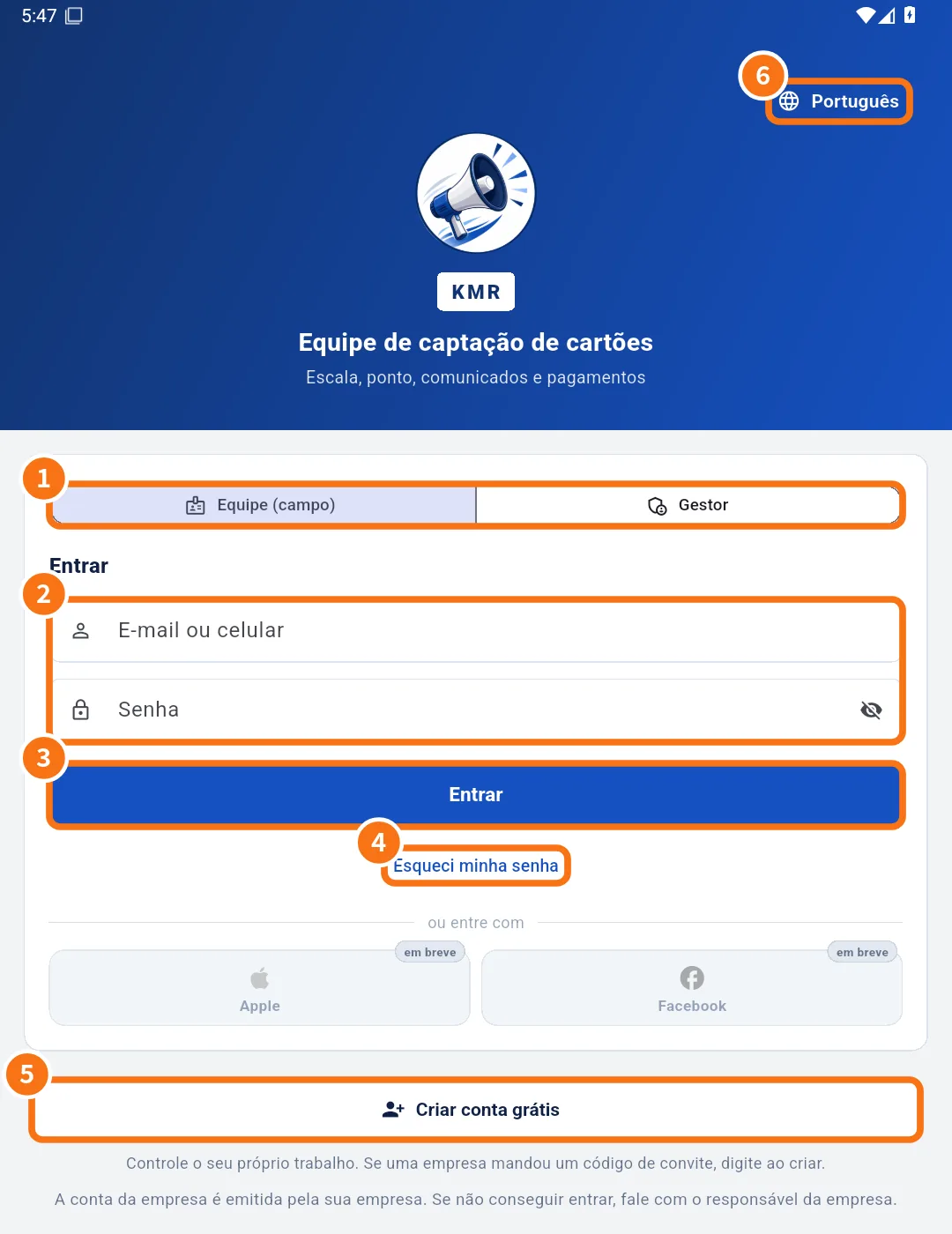
- ① Profile choice: Staff (field) or Manager.
- ② The E-mail or mobile number field (for managers, only E-mail) and Password. The eye shows what you typed.
- ③ The Sign in button.
- ④ The Forgot your password? link.
- ⑤ Create a free account (Staff profile only).
- ⑥ The app language.
Sign in as staff
- Tap Staff (field).
- Enter the e-mail or mobile number your company registered, and your password.
- Tap Sign in.
- If you see Choose your company, your e-mail or phone is registered with more than one company. Tap the one you are working for now.
Sign in as manager
- Tap Manager.
- Use the same e-mail and password as the web admin panel.
- Tap Sign in. The app opens with the Home, Dashboard, Shifts, Messages and Menu tabs.
Forgot your password
- Staff: tap Forgot your password?, enter your registered e-mail or phone and tap Send link. A link to set a new password arrives by e-mail or SMS.
- Manager: the link opens the recovery page in the browser. If that does not work, ask your company's account administrator.
Switch profile without reinstalling
Managers who also work in the field can switch in Settings → General: Use as manager or Use as staff. The app signs out and returns to the sign-in screen with the other profile.
Common mistakes
- “Wrong e-mail or password”: check the chosen profile and that the keyboard did not add a capital letter or a space.
- “No connection”: signing in needs internet. Try again where you have signal.
- The password link did not arrive: check your spam folder and that the e-mail/phone is the one your company registered.
Related questions
- Getting started with KMR
- How to change your password and app language
- Roles in KMR: staff, manager, administrator and free account
- Common KMR problems and what to do