











KMR · Getting started
Create a free account (no company)
How anyone creates a free account in the KMR app, what it does and what the limits are.
On this page
What it is for
The free account is for people who want to keep track of their own work even without a company in KMR: work days, hours, clock-ins, daily report and expected earnings. If a company later invites you, the same account can work for it, and your personal history stays yours.
Who uses it and where
Anyone, in the KMR app (Android or iPhone), on the sign-in screen with the Staff (field) profile selected. Everything in the app is free: there are no prices, paid plans or purchases.
Step by step
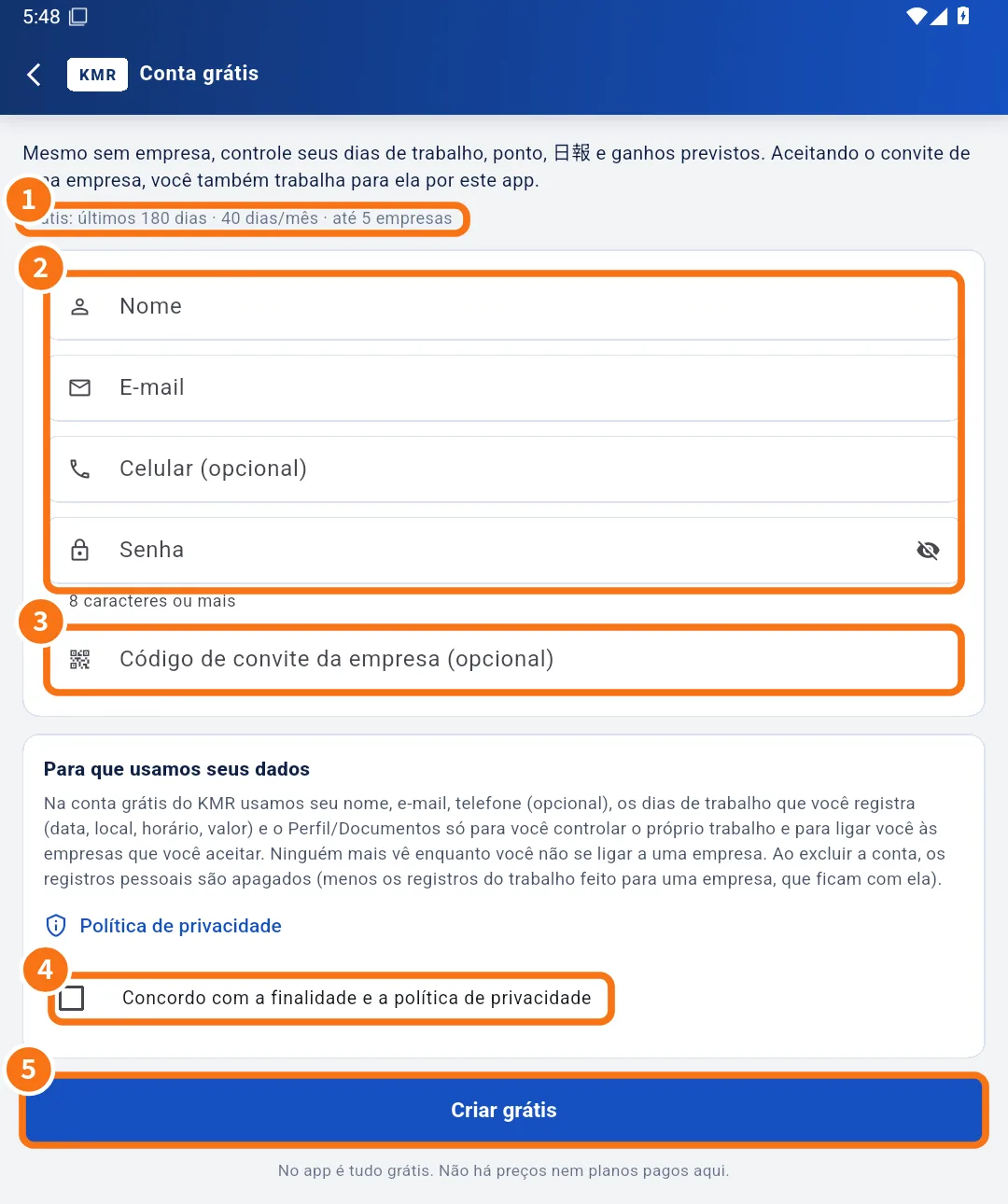
- On the sign-in screen, keep Staff (field) selected and tap Create a free account.
- Read the limits line under the text (①). It shows, for example, how many past days are kept, how many days per month you can register and up to how many companies you can link.
- Fill in Name, E-mail, Mobile phone (optional) and Password (②). The password needs 8 characters or more.
- If a company sent you a code, enter it in Company invitation code (optional) (③).
- Read “How we use your data” and tick I agree to the purpose and the privacy policy (④).
- Tap Create for free (⑤). You see Free account created (or Account created and linked to + the company name if you used a code).
After creating it
- In My page → My work, register your days (place, hours and hourly or daily rate).
- On a registered day, use the Work tab to record leaving home, check-in, lunch and check-out.
- In My page → Company invitations, enter a code when a company invites you.
Common mistakes
- “Please agree to the purpose”: tick the agreement box before tapping Create for free.
- The e-mail already belongs to a company account: the app takes you straight to Sign in with the company account, with the e-mail filled in. Use your company password.
- “Too many sign-ups in a short time”: wait a little and try again.
Related questions
- My work (free account): register days and see expected earnings
- Company invitations: link your free account to a company
- Plans and limits: company plan and free account
- Roles in KMR: staff, manager, administrator and free account