











KMR · Screens & features
Submit availability (shift preferences)
How to mark the days you can work and the stores you prefer, before the deadline set by your company.
On this page
What it is for
Some companies ask for your availability before building the month's schedule (希望シフト). Day by day, you say whether you can work and which stores you prefer. Your manager uses the answers to build the schedule and then sends the confirmation of each shift.
Who uses it and where
- It shows for people whose company asks for preferences (usually contractors, 業務委託).
- In the app: My page → Submit availability, or the Submit availability shortcut on Home.
- In the browser: in the staff portal, the “Preferred shifts” shortcut.
What is on the screen
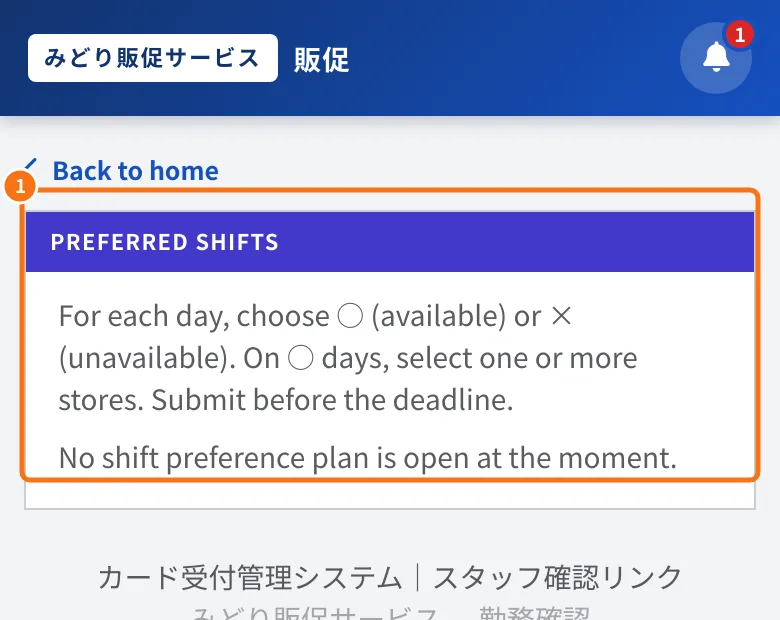
In the staff portal (browser), box ① shows the instructions and the current status; in the example, no request is open yet.
- The Plans sent to you list, with plan name, period, weekdays, Submission deadline and status: Not submitted or Preference submitted.
- Inside the plan: the calendar of the days the company opened, the store list and a notes field.
Step by step
- Open Submit availability and tap the plan.
- For each day, choose ○ Available or × Unavailable.
- On ○ days, select one or more Preferred stores.
- If you like, write in Notes (optional) (for example “only afternoons on the 12th”).
- Tap Submit preference. The status changes to Preference submitted.
- Until the deadline you can open it again, change it and submit again.
Common mistakes
- “No shift preference plan is open at the moment.”: the company has not opened this month's request yet, or the period has passed.
- “The submission deadline has passed; editing is disabled.”: after the deadline, contact the administrator in the Messages tab.
- “Enter at least one preferred day.”: mark at least one day as ○.
- I can't find “Submit availability”: it only shows for people whose company asks for preferences.
Related questions
- Shifts tab: your shift calendar
- Shift preferences (希望シフト): request, follow and apply
- KMR frequently asked questions (staff and free account)