











KMR · Màn hình & chức năng
My work (free account): register days and see expected earnings
How a free-account user registers work days, clocks in and follows hours and expected earnings.
Bài viết này chưa được dịch sang ngôn ngữ của bạn: đang hiển thị bản English.
Trong trang này
What it is for
My work is the work log of the free account. You register your days (place, hours and amount), clock in on the day in the Work tab and see the month's total days, hours and expected earnings.
Where it is
My page → My work, the My work button on the “Free account (personal)” card on Home, or Settings → General.
What is on the screen
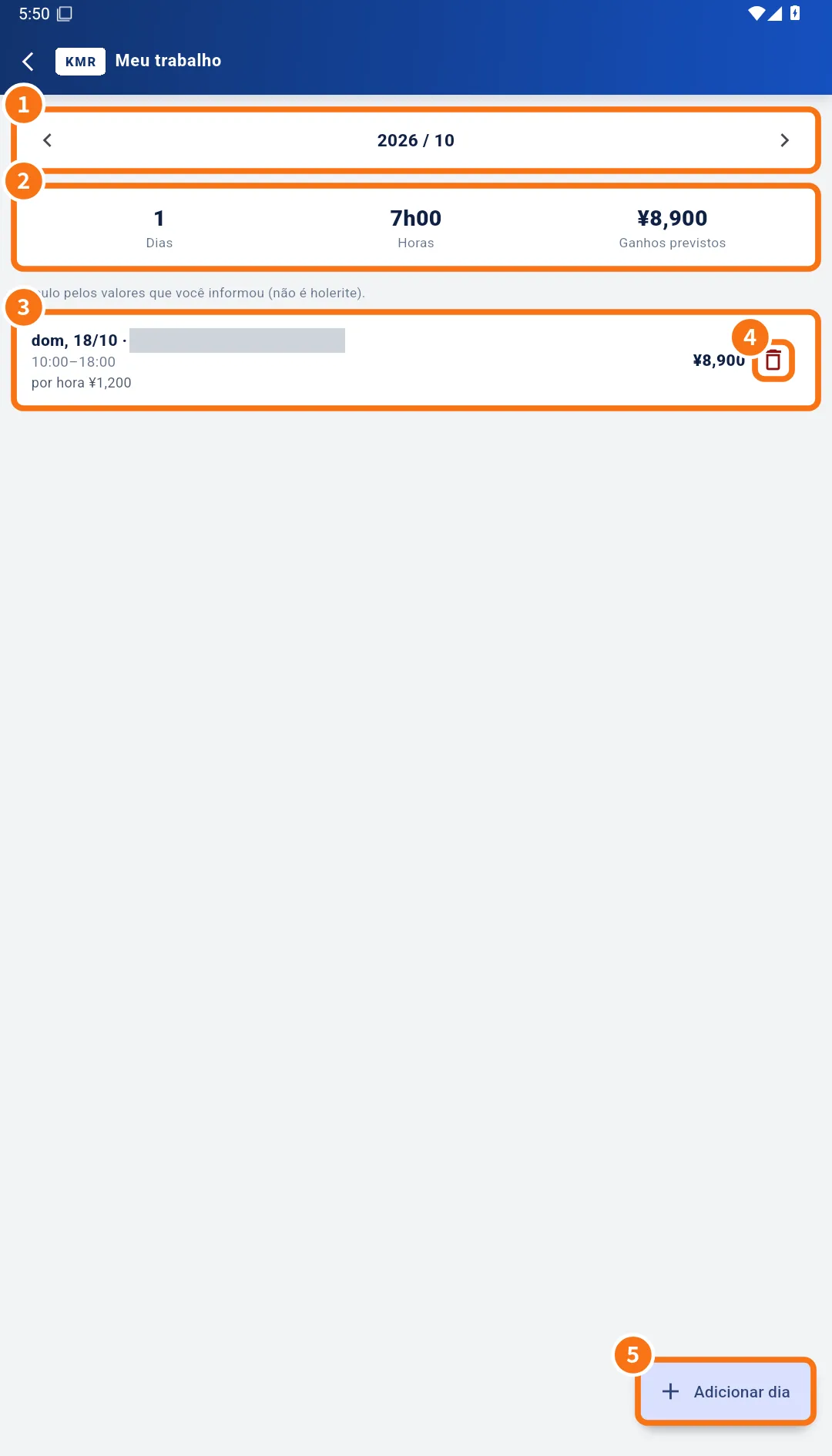
- ① The month, with arrows to change it.
- ② Totals: Days, Hours and Expected earnings, with the note “Calculated from the rates you entered (not a pay slip).”
- ③ Registered days: date, place, hours, amount and, after clock-in, the real times (“clock 10:02–18:05”).
- ④ The bin to Delete day.
- ⑤ The Add work day button.
Step by step: register a day
- Tap Add work day (⑤).
- Choose the date and fill in Place (store name etc.).
- Enter Start, End and the Break in minutes.
- Choose how you are paid: Hourly (fill in Hourly rate (¥)), Daily (Daily rate (¥)) or None. If you like, add Transport (¥) and a note.
- Tap Save. The day appears in the list and the totals update.
On the work day
On a registered day, use the Work tab to record leaving home, check-in, lunch and check-out, just like company staff. The real times show on that day in My work.
Free account limits
- There is a limit of days per month, of how many past days are kept and of how far ahead you can register. The limits line is shown on the account creation screen.
- When you go over a limit, the app shows a message such as “The free account allows up to N entries per month.”
Common mistakes
- “Please enter the place.”: Place is required.
- “You can register up to N days ahead.”: choose a closer date.
- I deleted a day by mistake: register it again with Add work day.
Related questions
- Create a free account (no company)
- Company invitations: link your free account to a company
- Plans and limits: company plan and free account
- Work tab: confirm the shift and record the day