











KMR · Màn hình & chức năng
Check and sign your payment statement
How to check the month's statement, approve it with a digital signature or request a revision, and see the invoice after signing.
Bài viết này chưa được dịch sang ngôn ngữ của bạn: đang hiển thị bản English.
Trong trang này
What it is for
Every month your company sends the payment statement (支払明細) with each day worked. You check it in the app and, if it is correct, approve it with a digital signature. If there is a mistake, you request a revision. After signing, the app shows the number of the invoice (請求書) that was created.
Where it is
My page → Payment statements or the Payment statements shortcut on Home (shown when a statement is waiting).
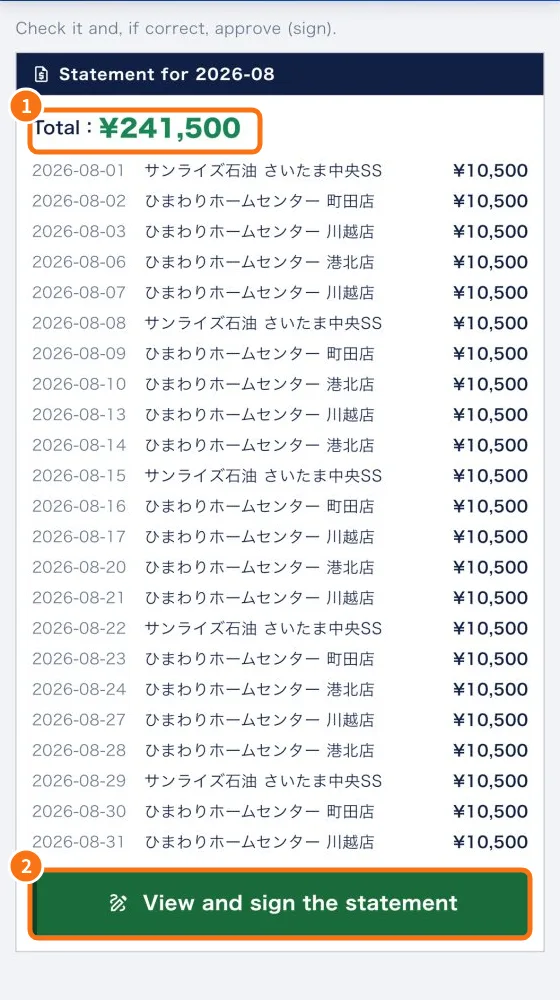
Step by step
- Open Payment statements. Check the Total (①) and the lines: date, store and amount.
- Tap View and sign the statement (②).
- To see the full document, tap Open the statement (PDF). It opens inside the app.
- In Approval & Digital Signature, tick I have reviewed the pay stub and confirm it is correct.
- Check the Name. The Digital seal is assigned automatically by the system.
- If you like, write in Notes (optional).
- Tap Approve & sign. The status changes to Approved (digital signature).
- After signing you see the Invoice # with a View invoice button.
If you find a mistake
- In Request Revision, write the Revision reason (for example: “The hours on XX/XX are incorrect. The correct amount is X hours.”).
- Tap Request revision and confirm.
- You see “Revision requested. You will receive an updated link once reviewed.” Check the corrected statement again when it arrives.
Common mistakes
- “Please check the confirmation box before signing.”: tick the box and tap Approve & sign again.
- “No statements awaiting you.”: it has not been sent yet, or you already signed it.
- The amount is different from what you expected: the estimated pay in Shifts is only an estimate. If the statement is wrong, use Request revision.
Related questions
- My page: your details, payments, training and settings
- Manager payment statements: generate, approve and send
- KMR frequently asked questions (staff and free account)