











KMR · Pantallas y funciones
Messages tab: news, questions and cancellation requests
Read company news, acknowledge it, ask the administrator, attach files and request to cancel a shift.
Este artículo aún no está traducido a su idioma: se muestra la versión en English.
En esta página
What it is for
The Messages tab (連絡) brings together company news and your conversation with the administrator. Unread items are marked, so nothing gets lost. It is also where you request to cancel a confirmed shift.
What is on the screen
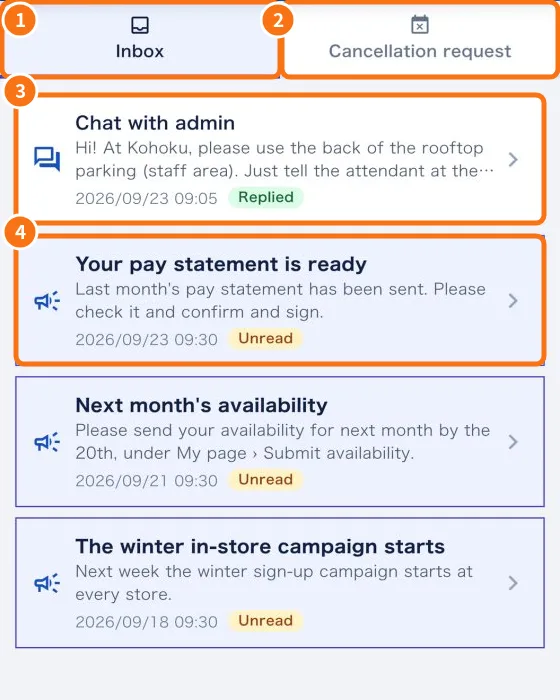
- ① Inbox: news and conversations, with date and status (for example “Unread”, “Replied”, “Acknowledged”).
- ② Cancellation request: to say you cannot go to a confirmed shift.
- ③ The conversation with the administrator.
- ④ Unread company news.
- Filters at the top of the Inbox: All, Unread and Read.
Read and acknowledge news
- Tap the item to read it.
- If it asks for confirmation, tap I have read this. The status changes to Acknowledged.
- Photos, PDFs and files open inside the app, with zoom.
Ask the administrator
- In Ask the administrator (also on My page), write in Type your question.
- To attach, use Take a photo, Choose a photo or Choose a file (PDF, Excel, etc.). Up to 10 MB: image, PDF, Word, Excel, CSV, TXT or ZIP.
- Send it. The reply arrives in the same conversation (use Type a reply to continue).
- While nobody has replied, you can remove the question with Delete question.
Request a cancellation
- Tap Cancellation request (②).
- Choose the shift and tap Request.
- Write a Note (optional) and tap Send request. You see “Cancellation request sent.” and the administrator is notified.
- In History you see your past requests.
Common mistakes
- “No shifts to cancel.”: only confirmed future shifts can be cancelled here.
- The attachment does not send: check the size (up to 10 MB) and the file type.
- I can't delete my question: once the administrator replies, it stays in the history.
Related questions
- How to tell your company you cannot work a shift
- Manager messages: reply to the team and send notices
- Home screen (staff)
- In-app support, Report a problem, Wiki and What's new