











KOCHAT · Screens & features
My profile and status
Customize your banner, avatar decoration and emoji status. Check the preview and choose how your presence appears to colleagues.
On this page
My profile
In the app, open the ☰ menu and select My profile. You can also open this menu by selecting your photo at the top. In a browser, click your photo in the top left corner to change your presence from the menu.
Customize your profile
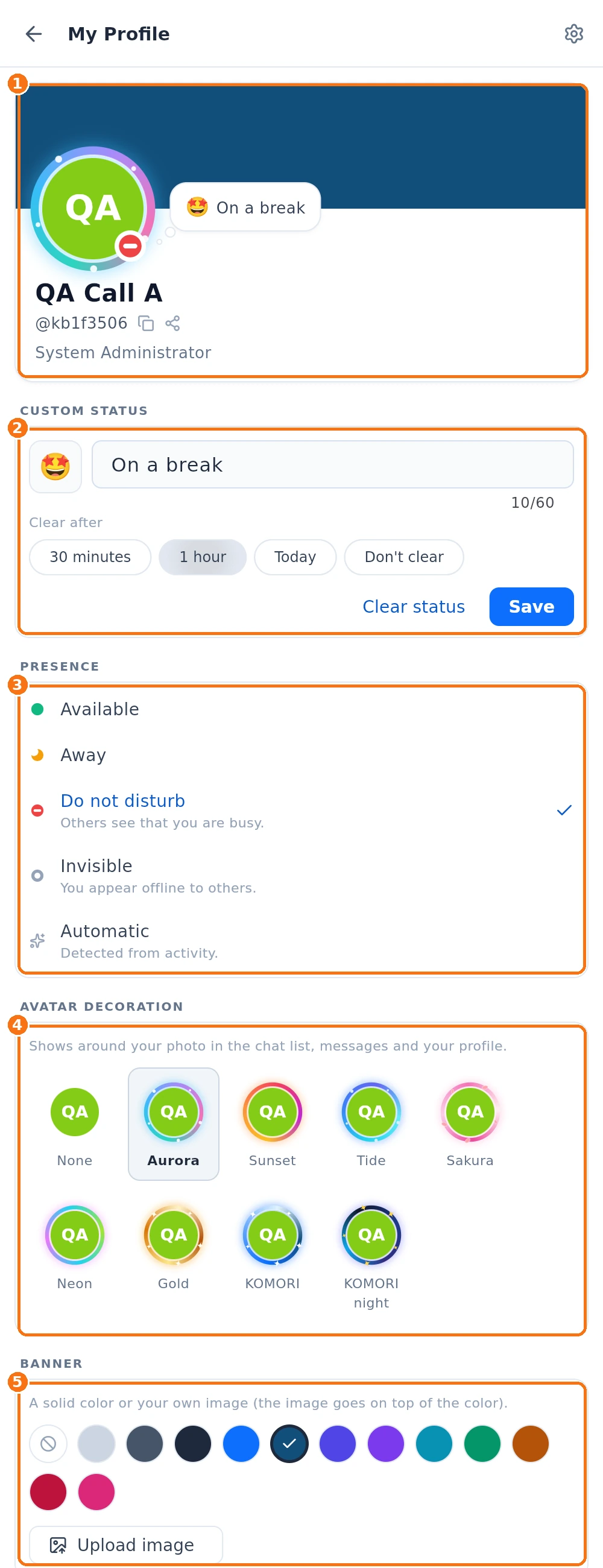
- ① Preview. The card at the top shows how your profile appears to others. While editing your status, you can see the emoji and text on the card before saving.
- ② Custom status. Pick an emoji, enter a short message and choose when to clear it: 30 minutes, 1 hour, Today or Don't clear. Tap Save. To remove it immediately, tap Clear status.
- ③ Presence. Choose Available (green dot), Away (moon), Do not disturb (dash) or Invisible (appear offline). Automatic follows your activity. The ✓ marks your current choice. The custom status timer applies only to the emoji and text.
- ④ Avatar decoration. Choose an animated effect to frame your photo.
- ⑤ Banner. Choose a solid colour or tap Upload image to use an image at the top of your profile. The image appears over the colour.
Account details
Account details shows email, phone, role and department. In company accounts, name, photo, role and department come from the company record: the app does not let you edit them. To change them, ask your administrator. Pull down to refresh the screen.
Common mistakes
- I set a status with a time limit and it disappeared: that is expected — the status clears itself when the chosen limit (30 min, 1 h or today) ends. Choose no limit if you want it to stay.
- Colleagues see me online with my phone in my pocket: another device of yours (computer, browser) is open. Close it or set your presence to Away (moon) or Do not disturb (dash).
- I want to change my photo: in a company account, ask your administrator.
Related questions
- Use on several devices at once
- Settings: what each tab has
- Account types and roles in KOCHAT
- FAQ: calls, notifications and status