











KOCHAT · Screens & features
How to delete one or several messages
“Delete for me” removes it only from your screen; “Delete for everyone” works on your own messages up to 60 minutes after sending and deletes the attachment. Use Select for several.
On this page
What it is for
Sent it to the wrong chat, with a typo or with a file that shouldn't be there? KOCHAT deletes like the messengers you already know: just for you, or for everyone within the time limit.
The two options
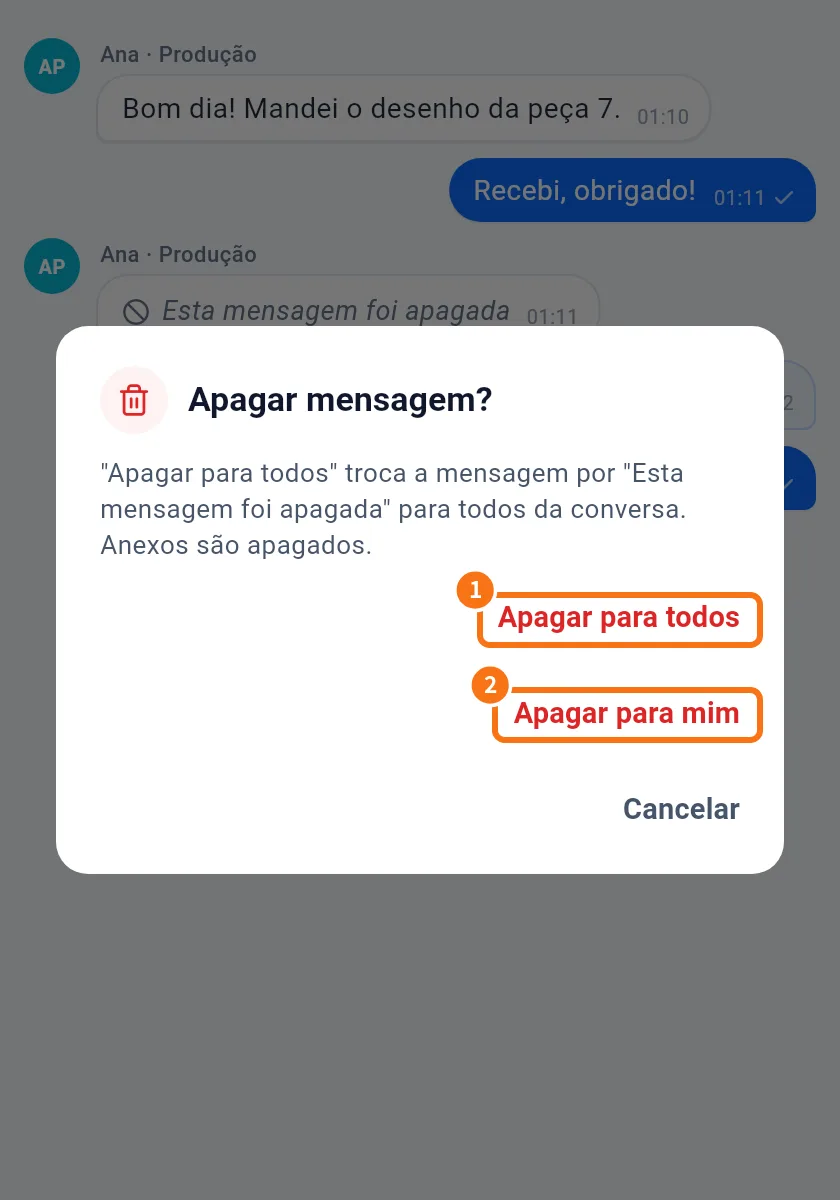
- Delete for everyone: only your own messages, up to 60 minutes after sending. Everyone sees “This message was deleted” and the attachment is deleted from the server.
- Delete for me: works on any message. It disappears only from your screen; others still see it.
(The screenshot shows the Portuguese version.)
Step by step: delete one message
- Touch and hold the message (right-click on a computer).
- Choose Delete.
- In Delete message?, tap Delete for everyone or Delete for me.
- You see “Deleted for everyone” or “Deleted for you”.
Step by step: delete several
- Touch and hold a message → Select.
- Tap other messages to mark them. The top shows “3 selected”.
- Tap the bin (Delete). “Delete 3 messages?” appears.
- Choose the option. “Delete for everyone” appears only if all selected messages are yours and within the time limit.
- To give up, tap Cancel selection.
Phone, desktop and web
It works the same on phone, computer and web. A message deleted for everyone disappears from every participant's devices. Call records cannot be deleted.
Common problems and what to do
- No “Delete for everyone”: the message isn't yours or 60 minutes have passed. Use “Delete for me” and, if needed, ask the chat's admin.
- I deleted for me by mistake: it can't be undone on your screen; others still see it.
- Someone had already downloaded the file: deleting removes it from KOCHAT, not from where they saved it.
Related questions
- Message menu: react, reply, copy, pin and more
- How to reply to, quote and forward a message
- Open, download and save received files