











KOCHAT · Screens & features
Settings: what each tab has
A map of KOCHAT Settings: General, Language & text, Notifications, Account & privacy and About.
On this page
What it is for
Settings gathers everything you adjust in the app: translation, language, notifications, account, privacy and version information. On phones the tabs are at the top; on computers and tablets, on the left.
Where it is
- ☰ menu → Settings.
- Or the gear icon in My profile.
- In the browser, the main settings (status, language, text size, What's new) are in your photo menu.
The tabs
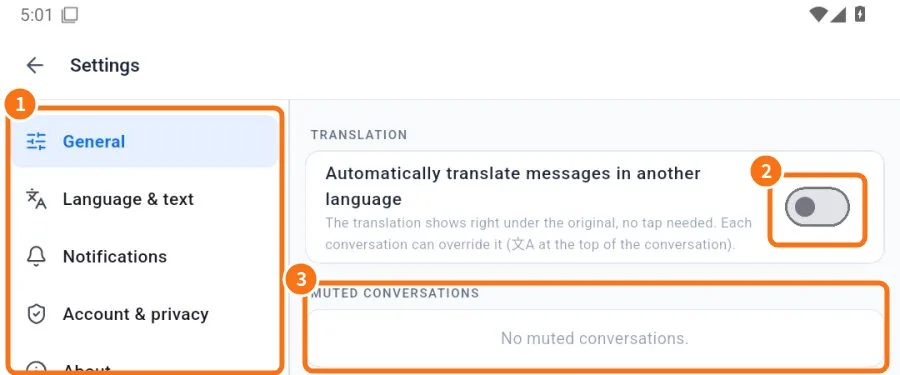
- ① Tabs: General, Language & text, Storage and data, Notifications, Account & privacy, About.
- ② General → Translation: turns on automatic translation of messages in another language.
- ③ General → Muted conversations: lists muted chats, with an Unmute button.
- Tab · What it has
- General · Translation; Reply mode (My reply or Suggestions); Muted conversations; on computers, Window (start with the system, keep running, minimize/maximize).
- Language & text · App language (7 languages or Follow device) and Text size.
- Storage and data · Media auto-download: what downloads by itself on mobile data, Wi-Fi or roaming; Reset settings.
- Notifications · Notification types; message and call sounds; story alerts; Account notices. On Android, the locked-screen calls panel.
- Account & privacy · My profile; Sign out; Delete account; Connection location.
- About · Version; Wiki / Guide; What's new (full version history, grouped by month, with a photo of each change); GIF & sticker credits; on computers, Check for updates.
Storage and data: media auto-download
Just like WhatsApp: choose what KOCHAT downloads by itself on each type of connection. It applies to all your devices.
- Open Settings → Storage and data tab.
- Tap a row: When using mobile data, When connected on Wi-Fi or When roaming. The network you are on now is marked now.
- Tick Photos, Audio, Videos and/or Documents and tap OK.
Default: Wi-Fi = all media; mobile data = photos only; roaming = nothing. Reset settings goes back to it.
Media that is not downloaded by itself shows in the chat with a blurred thumbnail, its size and a ⬇ button: tap to download. Audio shows ⬇ instead of ▶ (tap: it downloads and plays). Documents show no first-page preview until you open them.
Each chat or group can have its own rule: tap the name at the top → Media auto-download → Default, Yes (always download) or No (never download).
The About tab
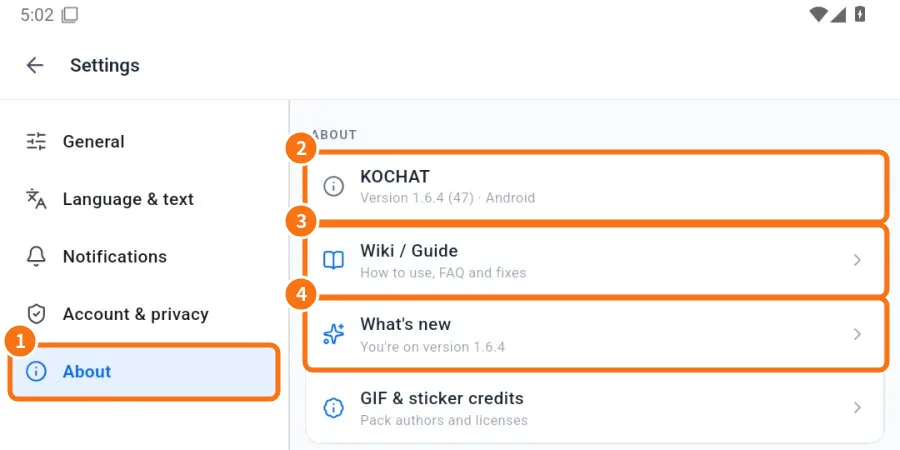
- ① Tap About.
- ② The KOCHAT row shows the version and platform. Give this number when asking for help.
- ③ Wiki / Guide: these manuals inside the app.
- ④ What's new: the full history of every version, grouped by month, with a photo of each change. Photos of older versions are cached on your device so they open offline. Scroll to the end to load more versions.
Common mistakes
- I cannot find the Window option: it only exists in the desktop app.
- Suggestions shows a lock: your company plan does not include AI, or the feature is not enabled for you.
Related questions
- App language and text size
- Automatic message translation
- Notifications: what to notify and how it sounds
- Reply mode (with or without AI)