











KOCHAT · Getting started
What KOCHAT is and where to use it
KOMORI’s work messenger: chats, groups, calls and files on your phone, computer and browser.
On this page
What it is for
KOCHAT is KOMORI’s work messenger. You chat with colleagues and partners, join groups by team or project, make voice and video calls and send photos, files and voice messages. The idea is simple: work stays separate from your personal apps.
The same sign-in works everywhere. A message sent from your phone shows up on your computer and in the browser right away.
Who uses it
- Employees of KOREOS client companies: they use the account their company created (KOCHAT is part of the KOREOS contract).
- Outside people (drivers, partners, suppliers) who talk with KOMORI: they create a free personal account.
- Company administrators: besides chatting, they check plan, seats and people in My company.
Where to use it
- Where · How
- Android · App on Google Play
- iPhone and iPad · App on the App Store
- Windows and Mac · Desktop app, downloaded from its-komori.com/kochat
- Linux · Desktop app, when your company provides the installer
- Computer browser · chat.its-komori.com/messenger/
The first screen in 3 points

- ① The ☰ menu button opens the side menu: chats, company tools and your account.
- ② Your photo shows your name, role and a dot with your status (green = available).
- Below are the tabs (Chats, Status, Groups, People and others, depending on your access).
Where your account items are
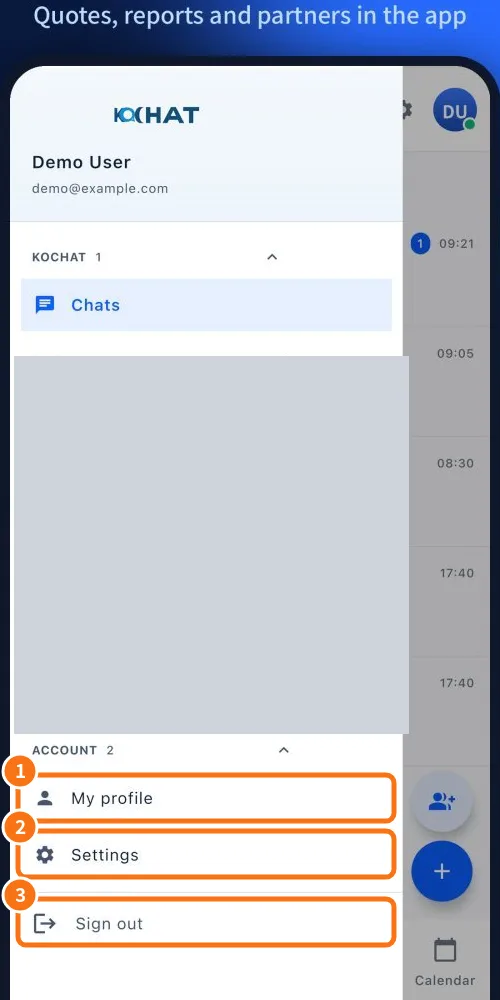
- ① My profile: photo, name, account details and your status.
- ② Settings: language, translation, notifications, account and privacy, about.
- ③ Sign out: ends the session on this device only.
The items in the middle of the menu (tasks, calendar, AI assistant and so on) depend on your company’s plan and permissions. A free personal account does not have these tools.
Common mistakes
- I opened KOCHAT in my phone browser and the chat did not open: this is on purpose. Install the app.
- My menu has fewer items than my colleague’s: the menu changes with your role and the company plan.
Related questions
- Install KOCHAT (phone, computer and web)
- Create a free personal account
- Sign in, sign out and reset your password
- Account types and roles in KOCHAT