











KŌLOGY · Pantallas y funciones
Driver performance
See the week summary (deliveries, completed, exceptions, distance) and the month's numbers: reports, pieces, delivery rate and efficiency.
Este artículo aún no está traducido a su idioma: se muestra la versión en English.
En esta página
What it is for
Performance shows your work numbers: how many deliveries you made this week, how many were completed, how many had exceptions and how many km you drove — and, per month, reports submitted, completed pieces, delivery rate, distance, litres and efficiency.
Where it is
More → Operations → Performance, or the Performance row under “My work” on Home. Also in the browser.
What is on the screen
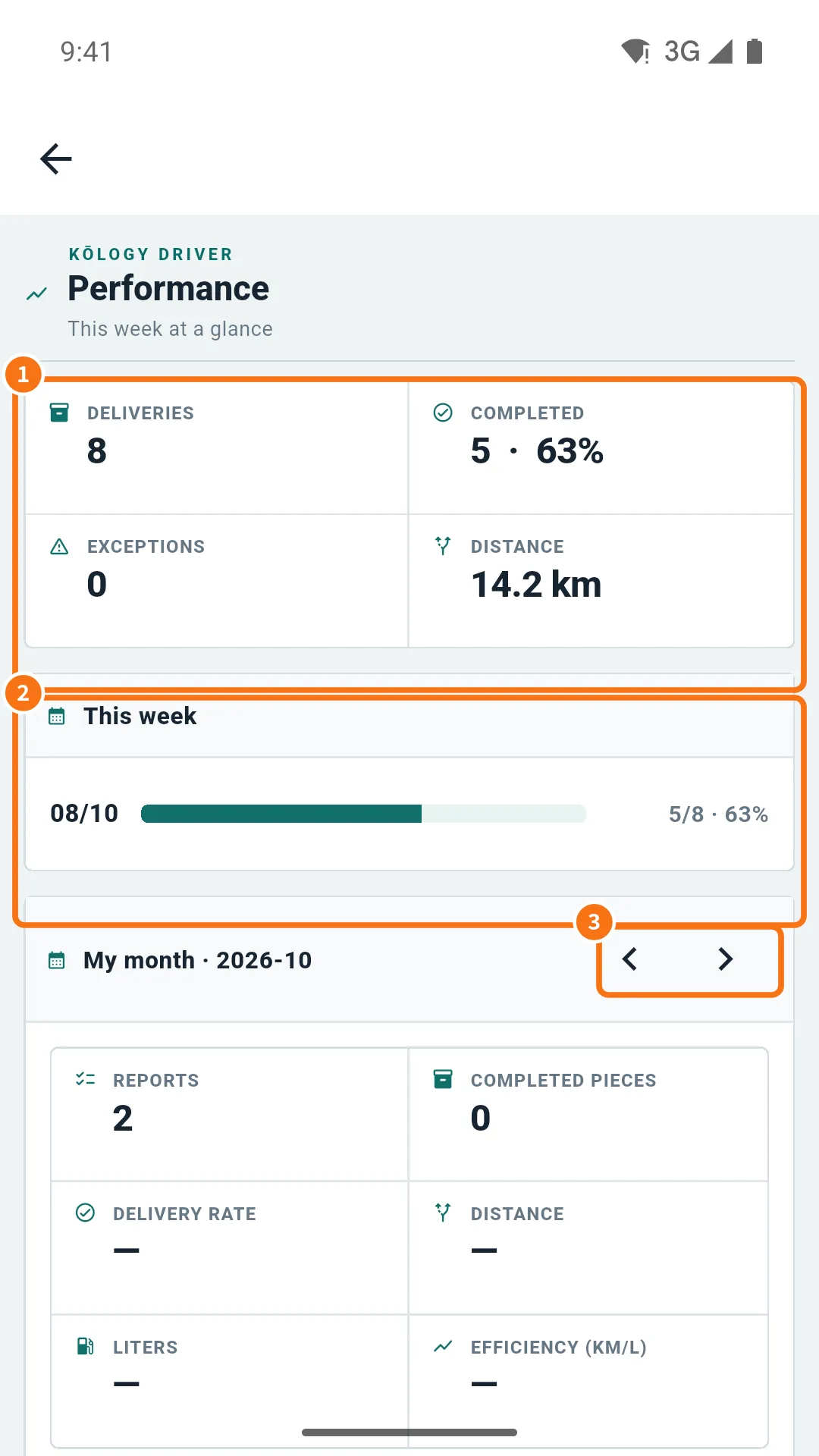
- This week at a glance (①): Deliveries, Completed (with the percentage), Exceptions and Distance. The week starts on Monday.
- This week (②): the progress bar (completed over total).
- My month with arrows (③): switch month and see Reports, Completed pieces, Delivery rate, Distance, Liters and Efficiency (km/L). When there is data per vehicle, each car appears with km, litres, efficiency and a rating.
Step by step
- Open Performance.
- Check the week's totals at the top.
- Under My month, use the arrows for earlier months.
- If your company uses fuel receipts, a Fuel receipts button appears to see the month's receipts.
How to use the numbers
Compare the Delivery rate and Exceptions week by week: many absences in the same area may point to a better time to pass by. Efficiency (km/L) helps you notice early a soft tyre or a problem with the car — if it drops suddenly, use Request a repair on the Vehicle screen.
Common mistakes
- “There is no activity this week yet”: no route with deliveries this week.
- “No data for this period”: no submitted daily report in the chosen month.
- “Your account is not linked to a company yet”: contact the office.
- Efficiency is empty: record litres and amount of the refuel at the end of the daily report.
Related questions
- Driver daily report (日報 and 点呼)
- Payments: review and approve the statement
- Vehicle and fuel card