











KOCHAT · 界面与功能
Connection location
What is recorded, when, who sees it and how to turn it on, off or delete it — optional on phones; on computers and in the browser it follows company policy.
此文章暂无您的语言版本,以English显示。
本页目录
What it is for
Connection location records roughly where you connect to KOCHAT from, for your company. It is not real-time tracking and it does not run with the app closed.
What is recorded
- Approximate position (about 100 m, with the city), the time and the device.
- When: at sign-in and every few minutes (usually 15) while KOCHAT is open and in use.
- If the device location is not allowed, only the internet address of the connection is recorded.
- Records are deleted automatically after some days (usually 30).
- Who sees it: you and company administrators with permission to see the team’s location.
Phone (Android and iPhone): optional
- Open Settings → Account & privacy tab → Connection location.
- Turn it on or off. It starts off.
- In My history you see your records by day. To delete everything, use the delete history option (cannot be undone).
A Mac installed from the App Store is optional too.
Computer and browser: company policy
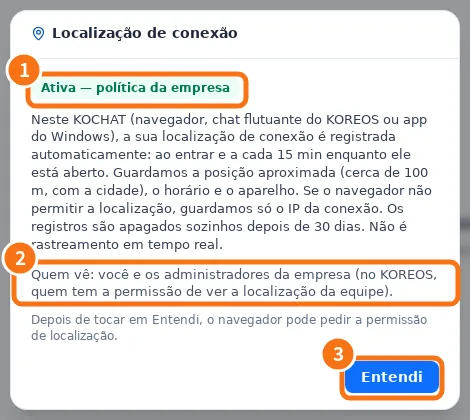
In the Windows app, the Mac downloaded from the website, Linux and the browser, recording is automatic for everyone in the company:
- ① The first time, a notice appears with the On — company policy badge.
- ② It explains what is stored and who sees it.
- ③ Tap Got it. The browser may ask for location permission.
For administrators
People with permission see Team location on the same screen: the latest position of each person with recording on, with “Last seen”.
Common mistakes
- “Last record by IP only (no position).”: the device did not give a position. Allow location for KOCHAT in the system settings.
- “Could not get your position right now.”: no GPS/Wi-Fi signal; try again in a moment.
- I thought it was real-time: it is not. To show where you are in a chat, use Send location from the attach menu.
Related questions
- Privacy: block, report and your ID
- KOCHAT on the computer (Windows, Mac and Linux)
- Settings: what each tab has
- FAQ: account, devices and plans