











KOCHAT · Màn hình & chức năng
Connection location
What is recorded, when, who sees it and how to turn it on, off or delete it — optional on phones; on computers and in the browser it follows company policy.
Bài viết này chưa được dịch sang ngôn ngữ của bạn: đang hiển thị bản English.
Trong trang này
What it is for
Connection location records roughly where you connect to KOCHAT from, for your company. It is not real-time tracking and it does not run with the app closed.
What is recorded
- Approximate position (about 100 m, with the city), the time and the device.
- When: at sign-in and every few minutes (usually 15) while KOCHAT is open and in use.
- If the device location is not allowed, only the internet address of the connection is recorded.
- Records are deleted automatically after some days (usually 30).
- Who sees it: you and company administrators with permission to see the team’s location.
Phone (Android and iPhone): optional
- Open Settings → Account & privacy tab → Connection location.
- Turn it on or off. It starts off.
- In My history you see your records by day. To delete everything, use the delete history option (cannot be undone).
A Mac installed from the App Store is optional too.
Computer and browser: company policy
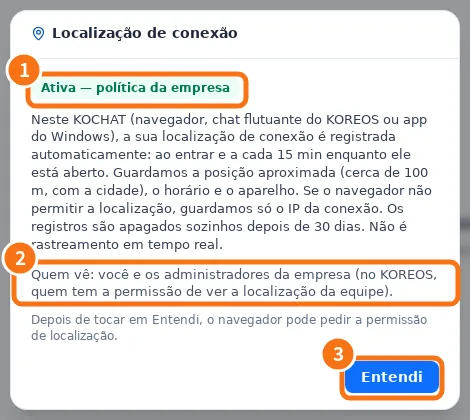
In the Windows app, the Mac downloaded from the website, Linux and the browser, recording is automatic for everyone in the company:
- ① The first time, a notice appears with the On — company policy badge.
- ② It explains what is stored and who sees it.
- ③ Tap Got it. The browser may ask for location permission.
For administrators
People with permission see Team location on the same screen: the latest position of each person with recording on, with “Last seen”.
Common mistakes
- “Last record by IP only (no position).”: the device did not give a position. Allow location for KOCHAT in the system settings.
- “Could not get your position right now.”: no GPS/Wi-Fi signal; try again in a moment.
- I thought it was real-time: it is not. To show where you are in a chat, use Send location from the attach menu.
Related questions
- Privacy: block, report and your ID
- KOCHAT on the computer (Windows, Mac and Linux)
- Settings: what each tab has
- FAQ: account, devices and plans