











KOCHAT · Màn hình & chức năng
KOREOS menu, My purchases and profile
KOREOS features are grouped together; your profile and settings remain at the bottom of the menu.
Bài viết này chưa được dịch sang ngôn ngữ của bạn: đang hiển thị bản English.
Trong trang này
Find each feature
On a phone, open the ☰ menu. In a wide window, use the side rail and its expand-menu button.
- KOCHAT: Chats, Calls and AI.
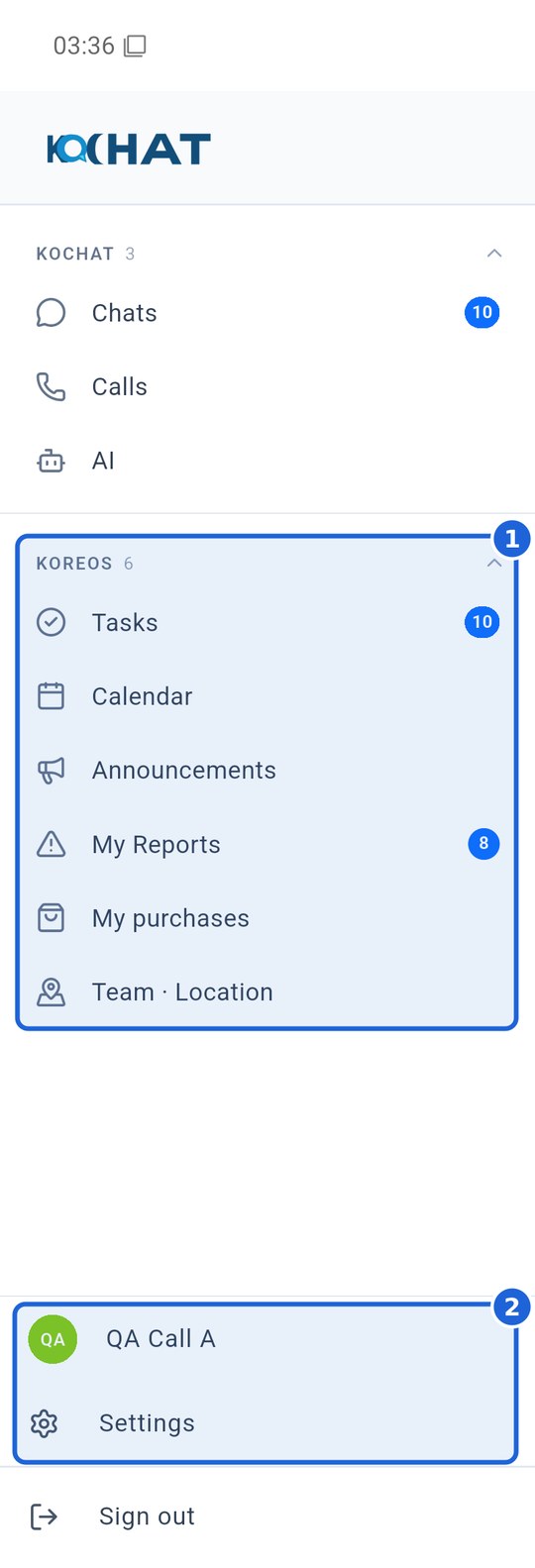
- KOREOS (1): Tasks, Calendar, Announcements, My Reports and My purchases. Some accounts also see Team · Location. Each item only appears if your account permissions allow it — not every user sees all of them.
- Bottom area (2): tap your name or avatar to open your profile; the gear opens Settings. Both stay fixed at the bottom of the menu.
My purchases
Tap My purchases to inspect internal purchase requests allowed for your account. This is separate from purchasing KOCHAT digital plans. A shared account may require badge identification in KOREOS before displaying personal requests. Missing menu items can depend on your role or company permissions.
Changes in version 1.8.56
In Tasks, use the green ✓ in the list, Kanban or timeline and confirm the dialog. The list and counts update. For a task linked to another module, open its source to complete it. Announcements use one column on phones, two on tablets and three on computers. Open a purchase detail to see photos, participants, case and prices permitted for your account; choose Open in KOREOS to continue.
Scroll PDFs and zoom with −/+, pinch or Ctrl+wheel on a computer. In integrated KoMail, choose Always show images globally or per sender, set a signature for each mailbox and use Save as for attachments.