











KOCHAT · Màn hình & chức năng
App language and text size
Pick one of KOCHAT’s 7 languages (or follow your device) and set the text size that is comfortable.
Bài viết này chưa được dịch sang ngôn ngữ của bạn: đang hiển thị bản English.
Trong trang này
What it is for
KOCHAT works in Portuguese, Japanese, English, Tagalog, Simplified Chinese, Vietnamese and Spanish. Text size makes chats easier to read, for example for people who wear glasses or read on the factory floor.
Where it is
☰ menu → Settings → Language & text tab. In the browser: click your photo → Language and Text size.
Step by step
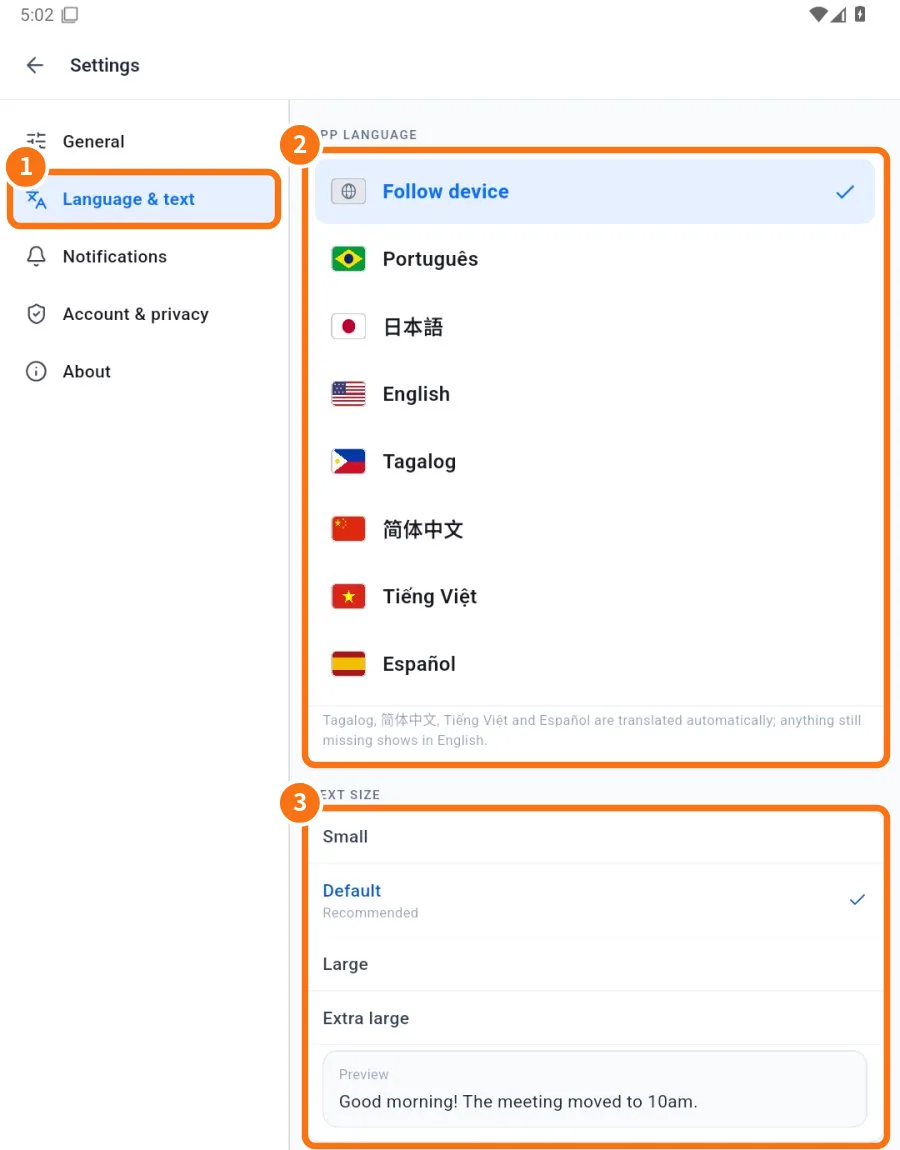
- ① Tap the Language & text tab.
- ② Under App language, tap a language. The ✓ marks the current one and the app changes immediately. Follow device uses your phone’s or computer’s language.
- ③ Under Text size, choose Small, Default (recommended), Large or Extra large. The Preview shows how it looks.
Good to know
- Portuguese, Japanese and English are written by the team. Tagalog, Chinese, Vietnamese and Spanish are translated automatically; anything still missing shows in English.
- The app language does not change the language of messages. To read messages in other languages, use automatic translation.
- Text size is saved for you on this device.
In the browser and on the computer
- In the browser (chat.its-komori.com/messenger/), click your photo in the top left corner.
- Under Language, pick from the list with flags.
- Under Text size, click Small, Default, Large or Extra large.
The chosen language is also used for help texts and for these manuals inside the app (Settings → About → Wiki / Guide).
Common mistakes
- I changed the language and one screen stayed in English: that part is not yet translated in the automatic languages.
- Text does not fit the buttons: go back to Default or Large.
Related questions
- Automatic message translation
- Settings: what each tab has
- Use on several devices at once
- FAQ: chats, attachments and translation