











KOCHAT · 界面与功能
Send your location or share it live
Paperclip → Location: send a fixed point on the map or share your live position for 15 min, 1 hour or 8 hours, and stop whenever you like.
此文章暂无您的语言版本,以English显示。
本页目录
What it is for
It tells people where you are without explaining: you reached the client, you are stuck in traffic, someone needs to meet you. Choose between a fixed point or a live location for a set time.
Who uses it and where it is
In chats with colleagues and in company groups. It does not appear in website or external conversations, to protect your position.
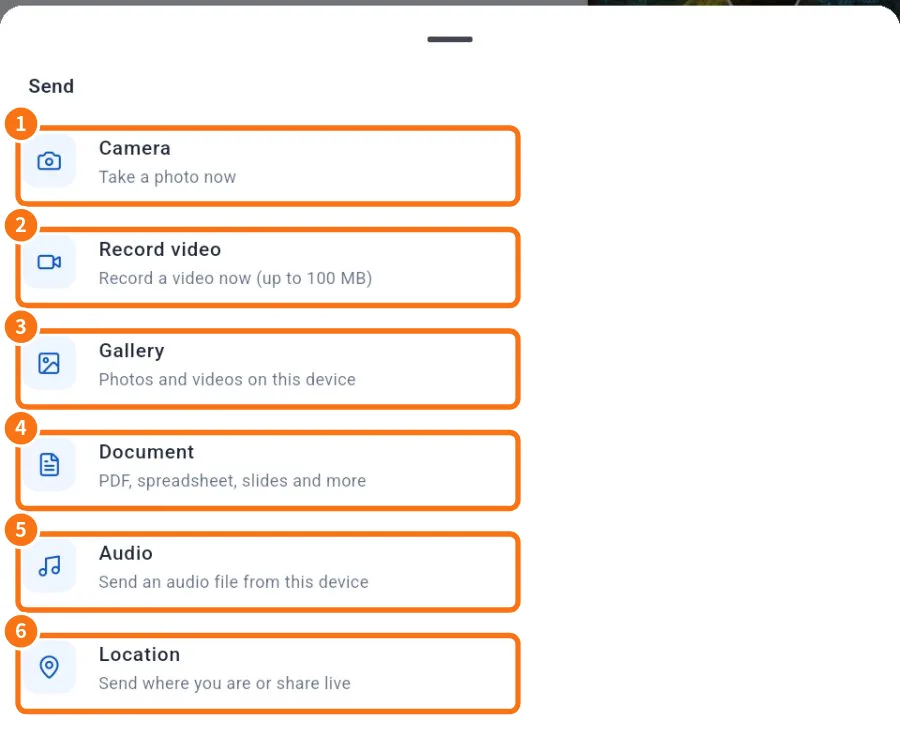
Step by step: send your current location
- In the chat, tap the paperclip → Location (⑥).
- “Getting your location…” appears. The first time, allow location for KOCHAT.
- Tap Send current location. A fixed point goes out with the current accuracy (e.g. “±15 m”).
Step by step: share live
- In the same menu, tap Share live location.
- Choose how long: 15 min, 1 hour or 8 hours.
- A Live location card appears in the chat with “until 14:30” and “updated 1 min ago”.
- To end early, tap Stop on the card. It then shows “Sharing ended”.
See someone's location
- Tap the card or View map to open the map (on a computer there is Full screen).
- Directions opens the device's maps app with the route.
- Re-center brings the map back to the point.
Phone, desktop and web
On the phone the position comes from GPS. On a computer and in the browser it comes from the system/browser location, which is usually less precise. This is different from the “connection location” some companies use by policy; that one is in Settings › Location.
Common problems and what to do
- “Could not send the location.”: check that device location is on and allowed for KOCHAT.
- The point is far from where I am: wait for better GPS (accuracy shows on the card) and send again.
- No Location option: it is an external conversation, where the option does not exist.
Related questions
- Send photos, videos and files (preview and caption)
- Inside a chat: header, messages and read status
- Groups tab and group chats