











KOCHAT · 界面与功能
Message info: who read it and who has not
View message previews, sent times and readers on the web and in KOCHAT 1.8.55 (115) for Android, Windows and Linux.
此文章暂无您的语言版本,以English显示。
本页目录
Version 1.8.55 (115) availability
- Web: browser features remain available.
- Android: version 1.8.55 (115) is published on Google Play.
- Windows: version 1.8.55 (115) is available through the download and update channel.
- Linux: version 1.8.55 (115) is available through the download and update channel.
- macOS: version 1.8.55 (115) is waiting for the Apple account agreement to be resolved and has not been published.
- iPhone and iPad: version 1.8.55 (115) is waiting for the same Apple agreement. It has not been submitted or published.
Shows what happened to a message after you sent it: a preview, when it was sent and who has read it.
How to open
On a phone, touch and hold the message → Message info. On a computer, right-click → Message info.
What you see
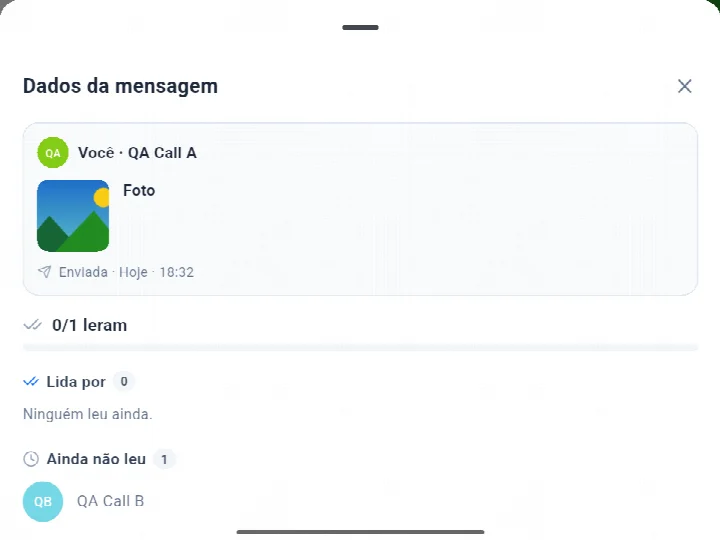
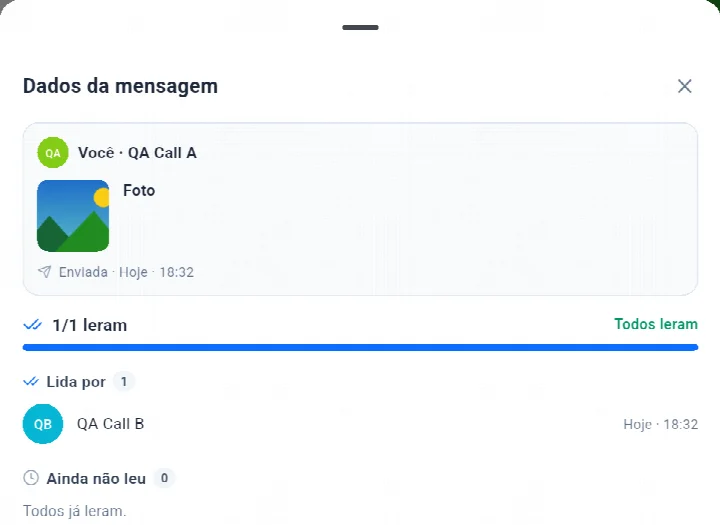
- Preview: photo or video thumbnail, file icon with its name, or the start of the text. Technical file names (like scaled_…jpg) are hidden.
- Sender with photo, and the date and time in your language (e.g. “Today · 16:55”, “Nov 4 · 16:55”).
- In a group: the “3/8 read” counter with a bar, the Read by list (photo, name and read time) and the Not read yet list. Bots, agents and test accounts are never listed as pending.
- In a one-to-one chat: Read with the time, or Delivered when the person has not opened it yet.
If something goes wrong
The window shows the reason (no connection, you left the conversation, the message is still sending) and a Try again button.
Avatars on the latest message read — version 1.8.55 (115)
In version 1.8.55 or later, the small photos below messages show how far each person has read the conversation. Each person appears only on the latest message they read; their photo moves as they keep reading. This also applies to received messages, bot messages and direct conversations. To see timestamps and the full list, open Message info from the message menu.