











KOCHAT · 界面与功能
Use on several devices at once
Phone, computer and browser together: what syncs, how calls ring, what is saved per device and how to sign out of just one.
此文章暂无您的语言版本,以English显示。
本页目录
What it is for
You can keep KOCHAT open on your phone, computer and browser at the same time with the same account. There is no device limit for normal use.
What syncs everywhere
- Messages and chats: what you send or read on one appears on the others. Read on one device, they no longer count as unread on the others.
- Status: Available, Busy, Away or Invisible change immediately everywhere.
- Automatic translation and reply mode: saved in your account.
- Muted conversations.
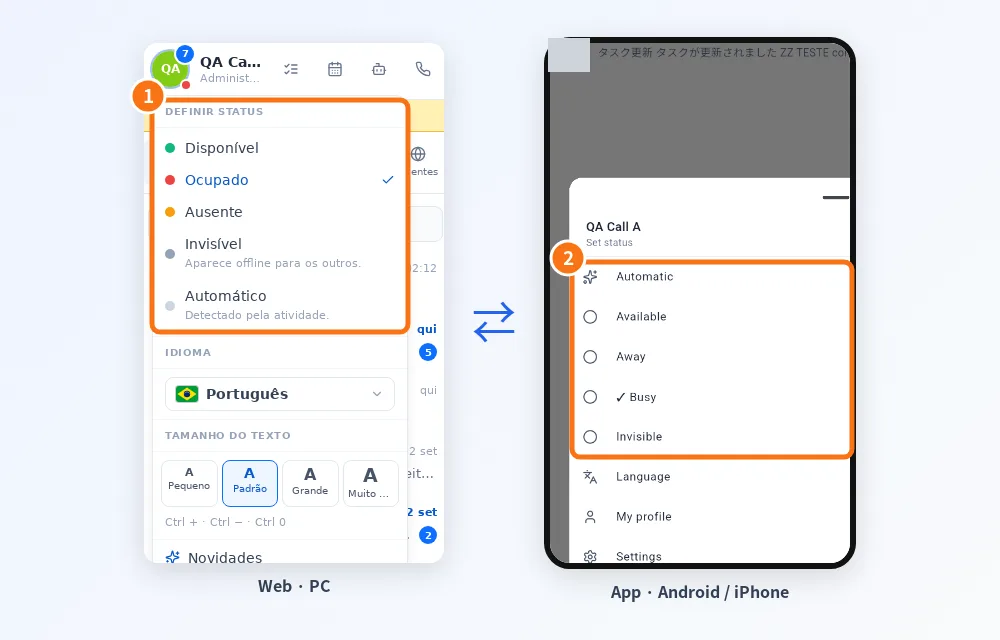
① In the browser and ② in the app, the same choice shows on both sides.
What stays on each device
- Text size.
- System notifications (sound, locked screen, permissions): set them on each device.
- Computer window settings (start with the system, tray).
- Connection location: per device; optional on phones.
Calls with several devices
- An incoming call rings on all open devices.
- When you answer on one, the others stop ringing.
- On computers, KOCHAT receives and answers voice calls.
Automatic status with several devices
In Automatic mode you are online while any device is open in the foreground. A computer left open keeps you online. If you do not want that, close the app there or choose a manual status.
Sign out of just one device
- On the device you want to disconnect, open Settings → Account & privacy → Sign out.
- Confirm. The other devices stay signed in.
Common mistakes
- I read on the computer and the phone still shows unread: pull the list down to refresh or reopen the app.
- On the phone, the browser sends me to the app: that is on purpose; on phones use the app.
Related questions
- My profile and status
- KOCHAT on the computer (Windows, Mac and Linux)
- How to move KOCHAT to a new phone
- Sign in, sign out and reset your password