











KOCHAT · 故障排除
Problems: notifications, calls, audio and camera
Alerts do not arrive, calls do not ring on the locked screen, the other side cannot hear me, the camera does not open and sound comes out of the wrong place.
此文章暂无您的语言版本,以English显示。
本页目录
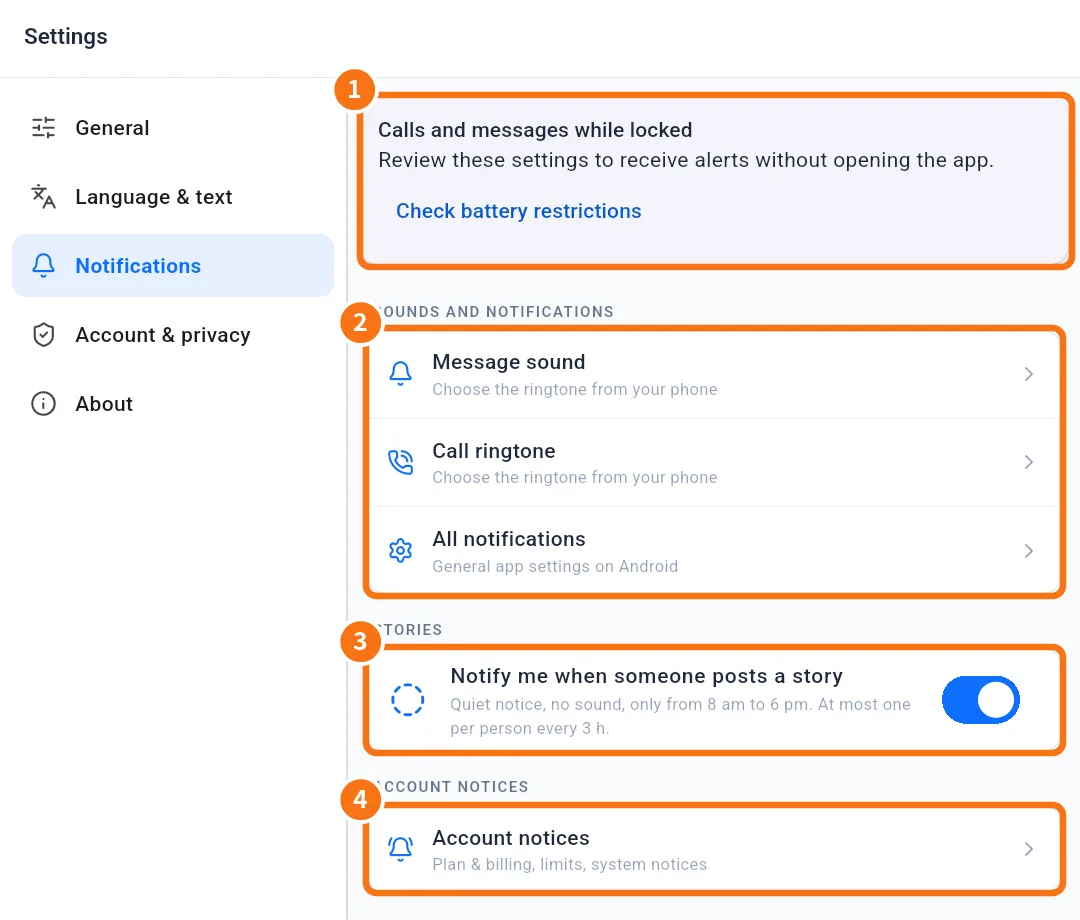
I do not get message notifications
Likely cause: KOCHAT notifications off in the system, "Messages" type off, chat muted or battery saving.
What to do:
- Settings → Notifications → All notifications: keep KOCHAT notifications on.
- In Notification types, check that Messages is on.
- Settings → General → Muted conversations: tap Unmute if the chat is there.
- On Android, use Check battery restrictions.
- Still nothing? Sign out and in again and open the app once.
Notification opens the chat list instead of the conversation
Likely cause: You tapped the message notification while the app was closed, it was the second notification in a row from the same chat, or you had no internet connection.
What to do:
- Update KOCHAT to version 1.8.54 or later. This issue is fixed in that version.
Calls do not ring on the locked screen
Likely cause: missing full-screen permission (Android 14+), calls channel off, Focus mode on iPhone, or the app was not opened after updating.
What to do:
- Open KOCHAT once.
- Android: follow the Calls and messages while locked panel until Permissions checked appears.
- iPhone: Settings › KOCHAT › Notifications and check Focus.
- Ask a colleague to test with your phone locked.
The other side cannot hear me
Likely cause: KOCHAT has no microphone permission, or the microphone is muted in the call.
What to do:
- During the call, check the microphone button is not off.
- In the device settings, allow Microphone for KOCHAT (in a browser, allow it from the padlock in the address bar).
- Close other apps using the microphone (other calls).
The camera does not open (video call or photo)
Likely cause: no camera permission or another app is using the camera.
What to do:
- Allow Camera for KOCHAT in the device or browser settings.
- Close apps using the camera.
- Restart the app.
Sound is low or comes out of the wrong place
Likely cause: a different audio output is selected (earphones, Bluetooth, speaker).
What to do:
- In the call, tap Audio output and choose Speaker or the earpiece.
- Disconnect Bluetooth if you are not using it.
- Check the device call volume.
Alerts arrive twice or from another system
Likely cause: similar alerts can come from KOCHAT and from other company systems (email, other apps).
What to do:
- In KOCHAT, adjust Notification types.
- For alerts from another system, change them there or ask your administrator.
Related questions
- How to get calls and messages on a locked phone
- Notifications: what to notify and how it sounds
- FAQ: calls, notifications and status
- How to mute and unmute a conversation