











KMR · Màn hình & chức năng
Alerts, stores, projects and training
How managers resolve alerts, register stores and projects, and handle training materials and progress.
Bài viết này chưa được dịch sang ngôn ngữ của bạn: đang hiển thị bản English.
Trong trang này
What it is for
These screens keep operations in order: Alerts flag what needs attention; Stores and Projects are the records used by the schedule; Training controls the materials and who has completed them.
Alerts
- Tap the bell at the top or Menu → Alerts. The number shows Open alerts.
- Alerts come from last-minute cancellations, lateness, absence, check-in away from the store, expiring documents and more.
- Open the alert and handle it (for example, call or message). Then mark it as resolved. To clear everything, use Resolve all.
- For a last-minute cancellation, Undo cancellation puts the shift back (same process as the web).
- To record something manually, use New alert.
Stores
- Open Menu → Stores to see stores with address and linked projects.
- Tap New store to register name, address and period.
- The store position is used by the Live map to tell whether the person is at the store, near it or away.
Projects
- Open Menu → Projects (or Shifts → Projects).
- Tap New plan to create the project for a period: name, dates, Weekdays, stores and Application form.
Training
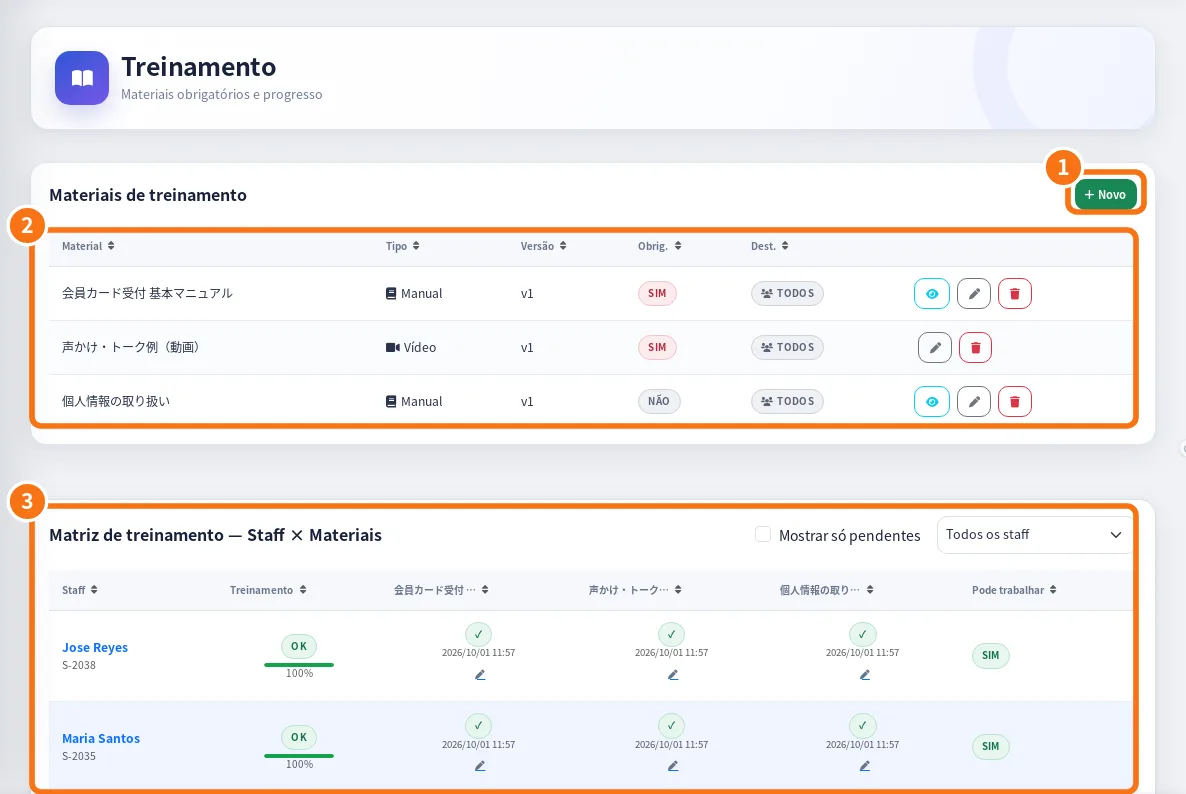
On the web panel: ① + New (material), ② the training materials list and ③ the Staff × Materials matrix.
- Open Menu → Training. See Completion by material and Progress by staff. ★ = mandatory.
- In Training materials, tap New material: choose the Type (Manual, Video or Test), upload the file (PDF or video mp4, webm, mov, avi, up to 100 MB) or give a URL, and set whether it is mandatory and visible.
- Tap a staff member to adjust progress, Test score and Attempts.
Common mistakes
- Repeated alerts: resolve the first one; if it keeps happening, use Report a problem.
- “Store position not set” on the map: register the store position.
- Training video will not upload: check the format and the 100 MB limit.
Related questions
- Today in detail and Live map
- Manual & training: mandatory materials and progress
- Manager shifts: create, change, confirm and cancel