











KOCHAT · 界面与功能
Make voice and video calls
Call by voice or video from a one-to-one chat; understand Calling, Ringing, Connecting and Reconnecting; use microphone, camera, audio output and End.
此文章暂无您的语言版本,以English显示。
本页目录
What it is for
KOCHAT makes voice and video calls over the internet with people in your company and your contacts. It does not use phone minutes. Calls are logged in the chat itself.
Who uses it and where it is
The buttons are at the top of a one-to-one chat. Groups and website conversations have no call button. Calls must be included in the company plan.

Step by step
- Open the chat with the person.
- Tap the phone (①) for voice or the camera (②) for video.
- The first time, allow the microphone (and camera for video).
- Follow the state: Calling… → Ringing… (their device is ringing) → Connecting… → the call timer starts.
- To finish, tap the red End button. KOCHAT goes straight back to the chat.
During the call
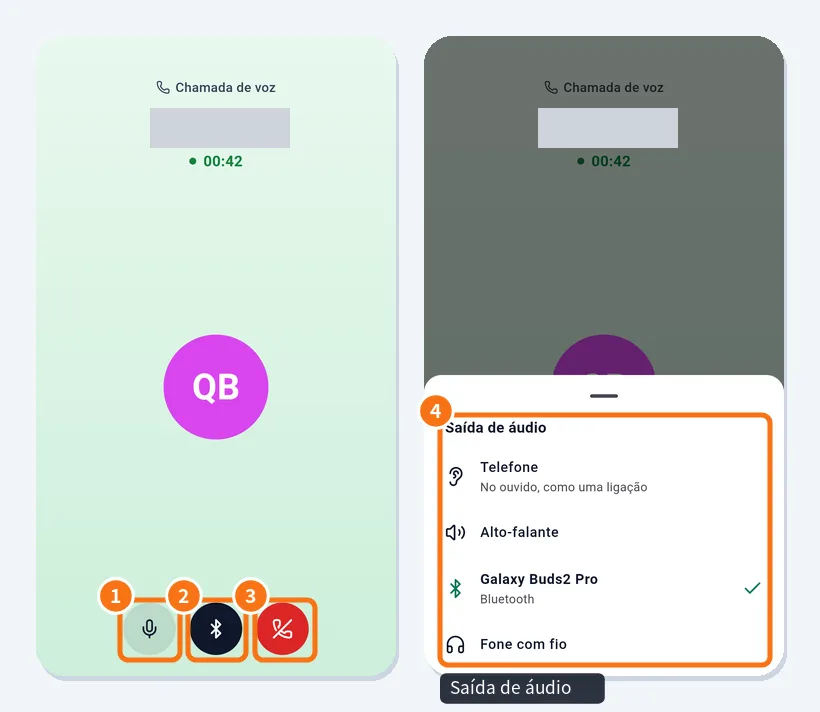
- Microphone: mute/unmute yourself.
- Audio output: choose Phone (earpiece), Speaker, Bluetooth headset or Wired headphones (④ shows the list).
- End.
In a video call there is also Camera (video on/off) and a button to switch front/back camera. If the connection wobbles you see Reconnecting…; wait a few seconds.
Call history
- The chat shows lines such as “You called · 0:32”, “Received · 1:19” or “Missed call”.
- On the web there is also a phone icon above the list with recent calls; click a row to open the chat.
Phone, desktop and web
Android and iPhone make voice and video calls. On a computer (Windows, Mac, Linux), incoming voice calls can be received and answered since version 1.8.30. On the web, the browser asks for the microphone on the first call.
Common problems and what to do
- “… is away — cannot receive calls” or offline: send a message; they can call back.
- “The person is on another call”: try later.
- “You are offline”: check the internet.
- The other person can't hear me: check that you are not muted and that KOCHAT has microphone permission.
- No call button: it is a group, or the plan has no calls.
Related questions
- Receive calls (locked screen, desktop and web)
- Inside a chat: header, messages and read status
- People tab: find colleagues and view profiles