KOCHAT · 界面与功能
Call agents with @
Mention conversation members or call an authorized agent without adding members.
此文章暂无您的语言版本,以English显示。
本页目录
Type @ in a conversation and select a name. Typing @ shows only people in this conversation, with available agents in a separate section. An authorized employee can call an agent to accompany their request in the same conversation without adding the agent as a member. The agent replies there and tracks the work through the official request flow. An agent called this way does not appear in the members list and receives only the necessary context from that conversation. Customers, suppliers and guests cannot authorize work by internal agents. Financial, destructive and infrastructure actions retain their existing triage and permission rules. Agent actions are attributed to a BOT.
If suggestions fail to load, close @, reconnect and try again; outside contacts are never a fallback. Test in a QA group with QA/BOT accounts: confirm a member is listed, an outsider is absent and agents have a separate section. Select an agent and follow its response and request number. Server changes apply immediately; the new native picker requires publication of release 1.8.47 (105).
The request receives an official tracking number. Follow its result in the conversation and report; only the reporter confirms closure. Refusals or required review are explained in the reply. Do not repeat the request to bypass permissions.
Mentions in version 1.8.56
Type @, choose a person and send the message. Their name is highlighted, including names with spaces. Tap a mention to open the profile. The @ marker in the chat list helps find conversations where you were mentioned and clears when you read the conversation.
Version 1.8.57: what the agent is doing and how long is left
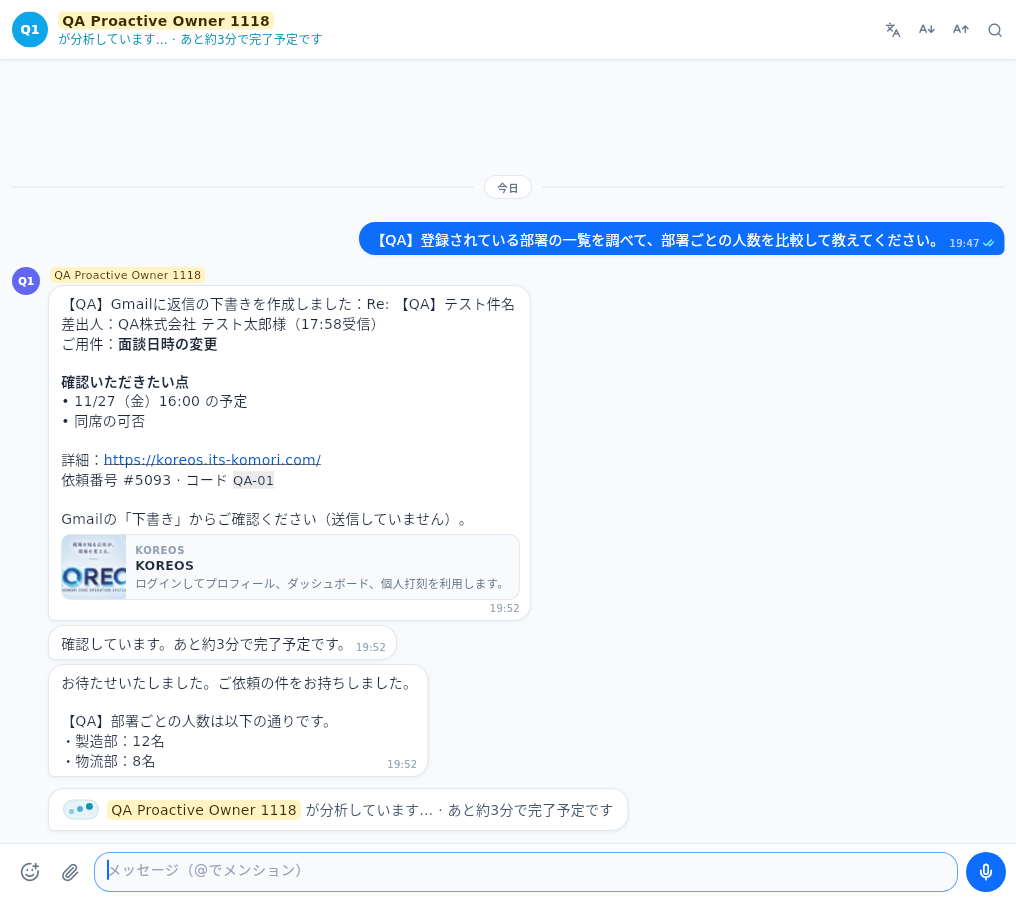
When you ask the secretary or an AI agent for something, next to its name you see what it is doing: thinking, looking it up, analyzing, fetching the data, comparing. If it will take a while you see "about X min to go" and the agent tells you in the chat; when it finishes it comes back with "Thanks for waiting" and the result. It looks the same on web, Windows and phone.