











KMR · Màn hình & chức năng
Manual & training: mandatory materials and progress
How to open manuals, videos and tests, see what is mandatory and what counts as completed.
Bài viết này chưa được dịch sang ngôn ngữ của bạn: đang hiển thị bản English.
Trong trang này
What it is for
Manual & training holds the materials your company prepared: PDF manuals, videos and tests. Some are mandatory: until you complete them, the company may block work (“Training pending”).
Where it is
- In the app: My page → Manual & training. When training is pending, Home also shows a shortcut and “{n} mandatory training item(s) pending.”
- In the browser: staff portal → Manuals.
What is on the screen
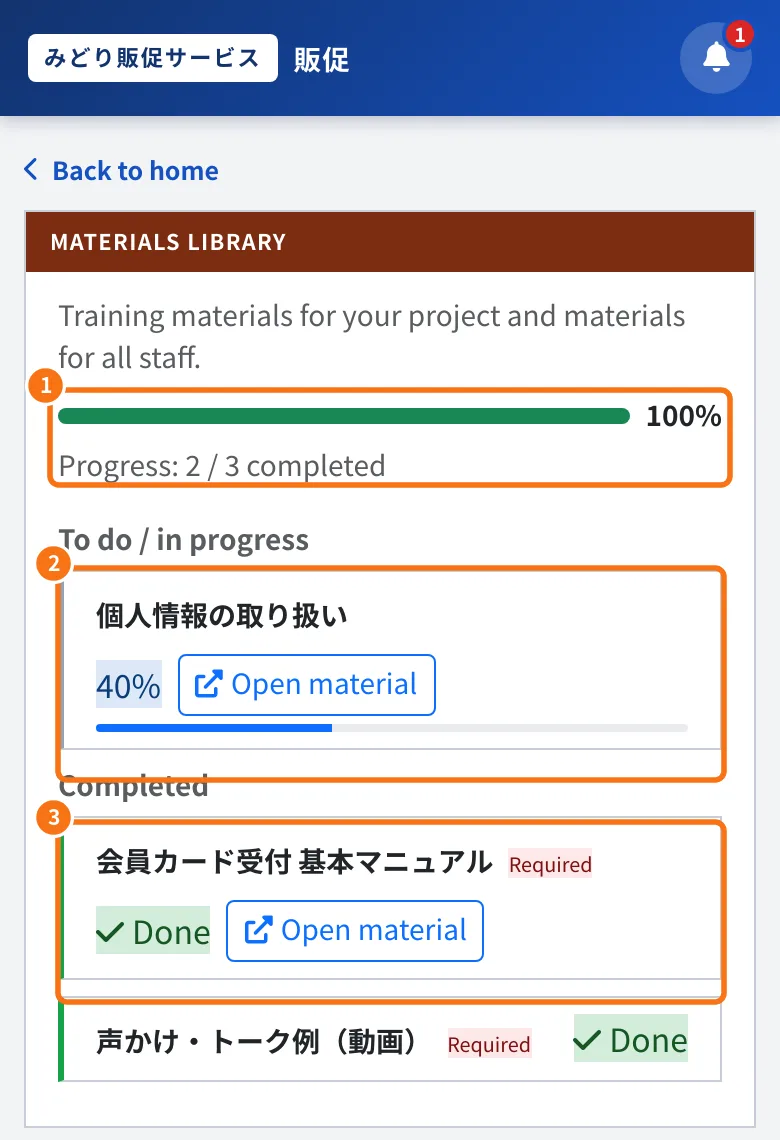
- ① The progress bar and “Progress: N / N completed”.
- ② To do / in progress: the material, how much you have seen and the button to open it.
- ③ Completed: with the done mark. “Required” means a mandatory material.
Step by step
- Open Manual & training.
- Tap a material. PDFs open in the app viewer; read to the last page.
- Videos: the app explains that the video opens on the portal screen (a browser inside the app), because your presence is checked with the camera while you watch. Tap Open video and watch from start to end.
- Tests: answer to the end. Your company sees the score and the number of attempts.
- Back on the list, the material moves to Completed and your progress goes up.
Common mistakes
- The material does not complete: open it again and go to the end (last page or end of the video).
- “This material file was not found.”: contact your administrator; the file needs to be uploaded again.
- The video asks for the camera: it confirms you are present while watching. Allow the camera in the browser.
- I am blocked by training: finish the mandatory materials. If you already did, ask your manager to check.
Related questions
- My page: your details, payments, training and settings
- Alerts, stores, projects and training
- Common KMR problems and what to do