











KŌLOGY · 界面与功能
Driver app settings
The Settings tabs: General (navigation, sounds, location), Language, Notifications, Account & privacy and About.
此文章暂无您的语言版本,以English显示。
本页目录
What it is for
In Settings you adjust the app to your way of working: which navigator to use, sounds, on-duty location, language, notifications, connected devices and signing out. The app version, What's new, Report a problem and Guides are here too.
Where it is
The gear at the top of the screens, or More → Account → Settings. On a phone the tabs are at the top (swipe to switch); on a tablet, at the side.
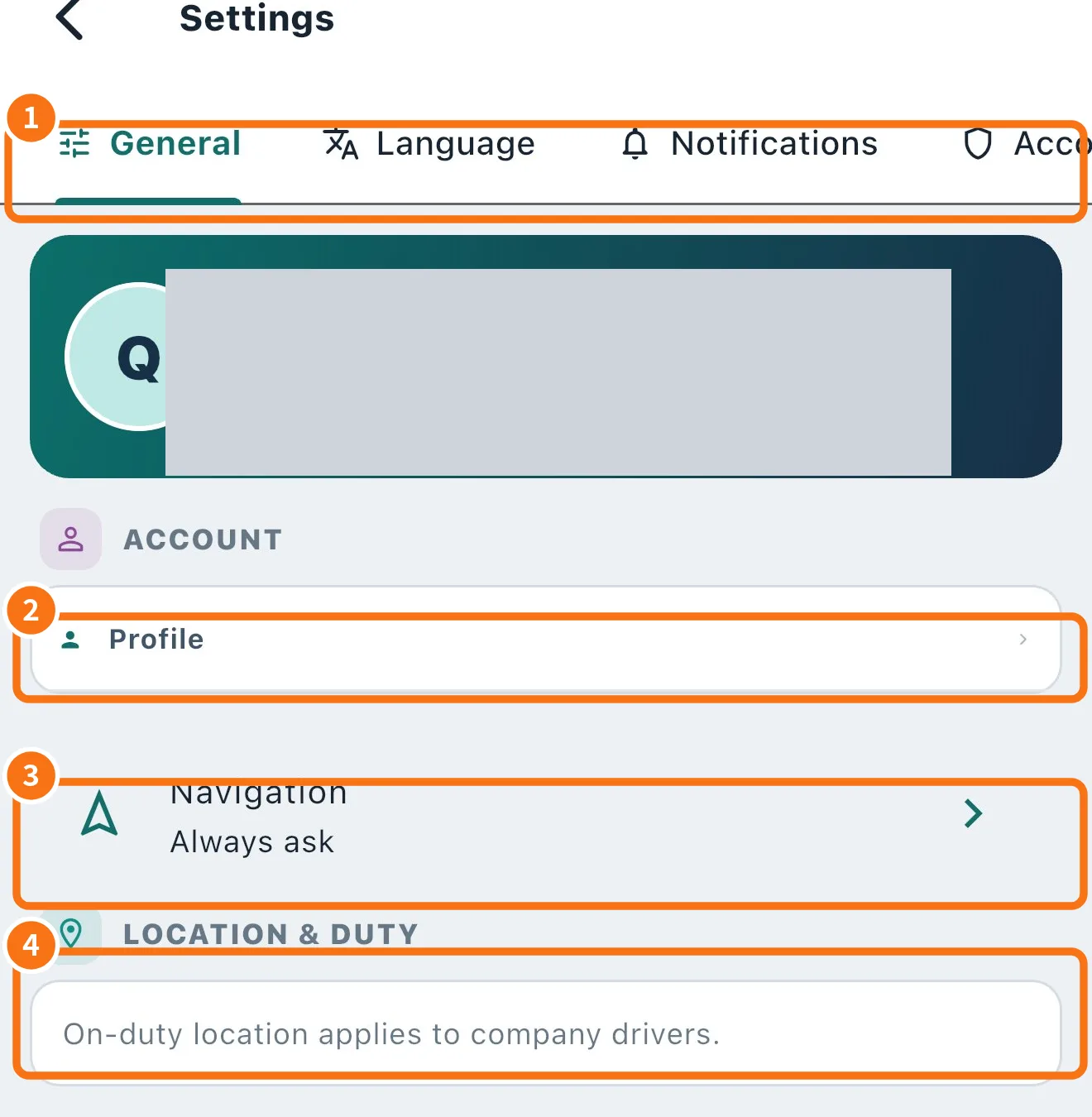
What each tab has
- Tabs (①): General, Language, Notifications, Account & privacy and About. At the top of General is the card with your name, company, role and mode.
- Account → Profile (②): opens My profile.
- Navigation (③): KŌLOGY navigator, Google Maps, Always ask or (iPhone) Apple Maps.
- Location & duty (④): the Location for dispatch switch (see “On duty and location for dispatch”).
General also has Sounds: Before each turn, Arrived at the stop, Route recalculated, Delivery recorded, Absent / failed recorded and New stop or route optimized. Each one turns on or off; Play plays it. In silent or vibrate mode they do not play (the phone vibrates).
The other tabs
- Language: Match the device, 日本語, Português, English, Tagalog, 简体中文, Tiếng Việt and Español. Portuguese, Japanese and English are written by the KOMORI team; the others are translated automatically and anything missing shows in English.
- Notifications: device permission and categories.
- Account & privacy: Connected devices (with This device and Sign out on the others), Contracts & terms and the Danger zone with Sign out and Delete my account.
- About: App version, What's new (version history), Report a problem and Guides (this wiki).
Common mistakes
- The language did not change: pick the language in the list (not “Match the device”) and go back.
- “On-duty location applies to company drivers”: your account does not use that feature.
- Sounds do not play: check the phone's navigation volume and silent mode.
Related questions
- Navigate to the delivery
- How to change your password and sign out devices
- How to delete your account