











KoCAD · Bắt đầu
A tour of the KoCAD window
Title bar, menus, the 12-tab command ribbon, left and right panels, 3D view and status bar — where everything is.
Bài viết này chưa được dịch sang ngôn ngữ của bạn: đang hiển thị bản English.
Trong trang này
What it is
The window follows the SolidWorks flow: commands on top, tree on the left, model in the centre and the KOREOS Library on the right. Switching tabs or panels is instant.
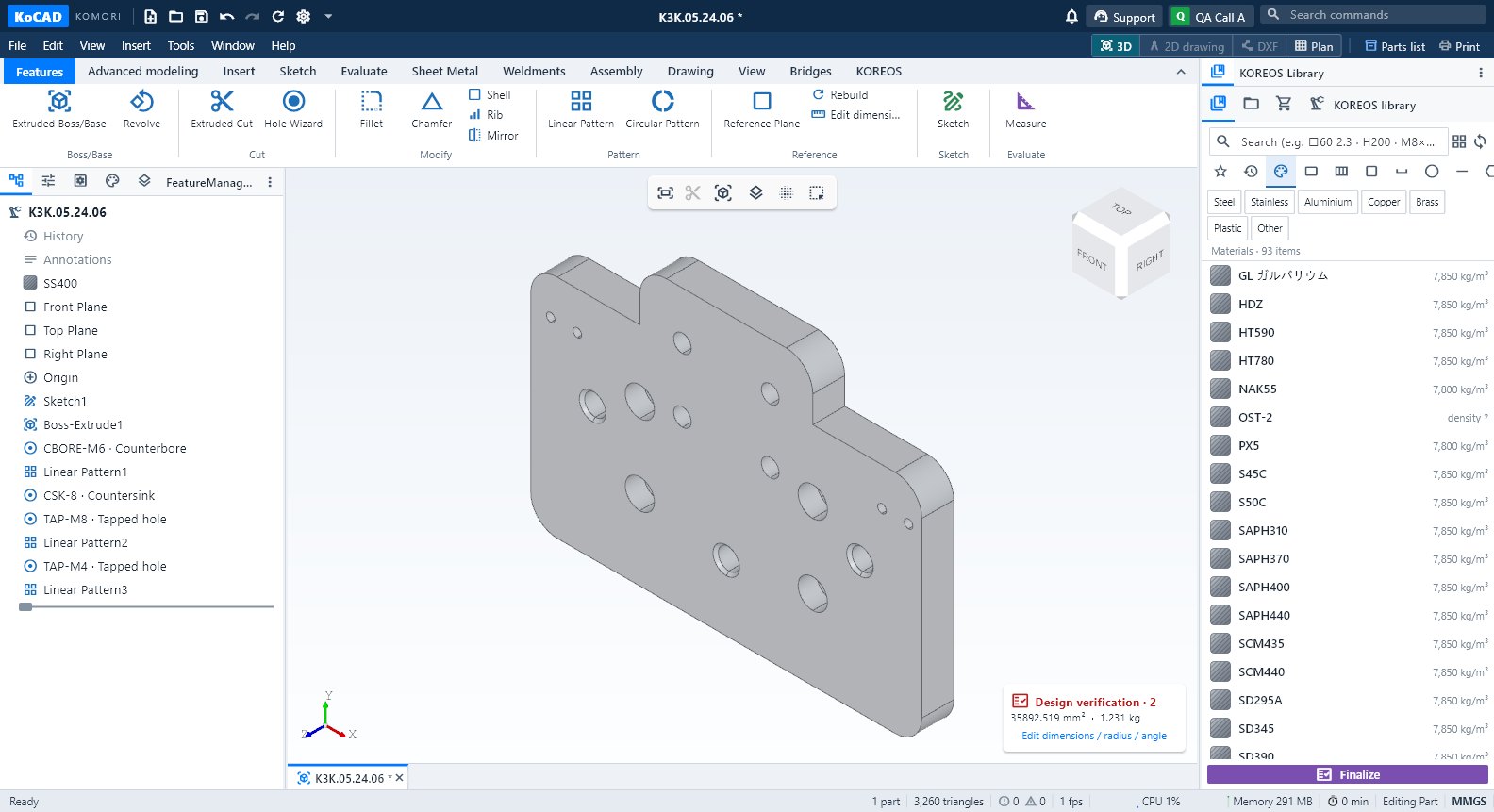
Parts of the window
- Title bar: quick buttons (new, open, save, undo, redo, rebuild, options), the notification bell, Support (chat with Bob and the team), your account and Search commands (type the name of any command).
- Menus: File, Edit, View, Insert, Tools, Window, Help. On the right, the document bar: 3D, 2D drawing, DXF, Plan, Parts list and Print.
- Command ribbon (CommandManager): Features, Advanced modeling, Insert, Sketch, Evaluate, Sheet Metal, Weldments, Assembly, Drawing, View, Bridges and KOREOS. On small screens groups turn into menus. The ^ arrow collapses the ribbon.
- Left panel: FeatureManager design tree, PropertyManager, Configurations, DisplayManager and Layers.
- 3D view: orientation cube (click a face), axes and the floating view toolbar. The Design verification badge shows area, mass and warnings of the model.
- Right panel: KOREOS Library, Files, Materials & purchasing and Processes, with the fixed Finalize button below.
- Status bar: state (Ready / Editing Part / Editing sketch), errors and warnings, triangles, fps, CPU and memory (click = 60 s chart), today's working time and the unit system (MMGS; click to change).
Tips
- View → Panels turns each panel on/off; View → Reset the layout puts everything back.
- Any panel can be dragged, resized or detached (Window → Detach to a new window).
- Key S opens the shortcut bar at the cursor; F1 lists keyboard and mouse shortcuts.
Common mistakes
- "The right panel is gone": use the side tab to reopen it or View → Reset the layout.
- Grey command: it needs a selection or an open document (the same command is grey in the menu and the ribbon).