KoCAD · Mga screen at feature
Projects start with country/standard, automatic folder, DXF always, live print preview
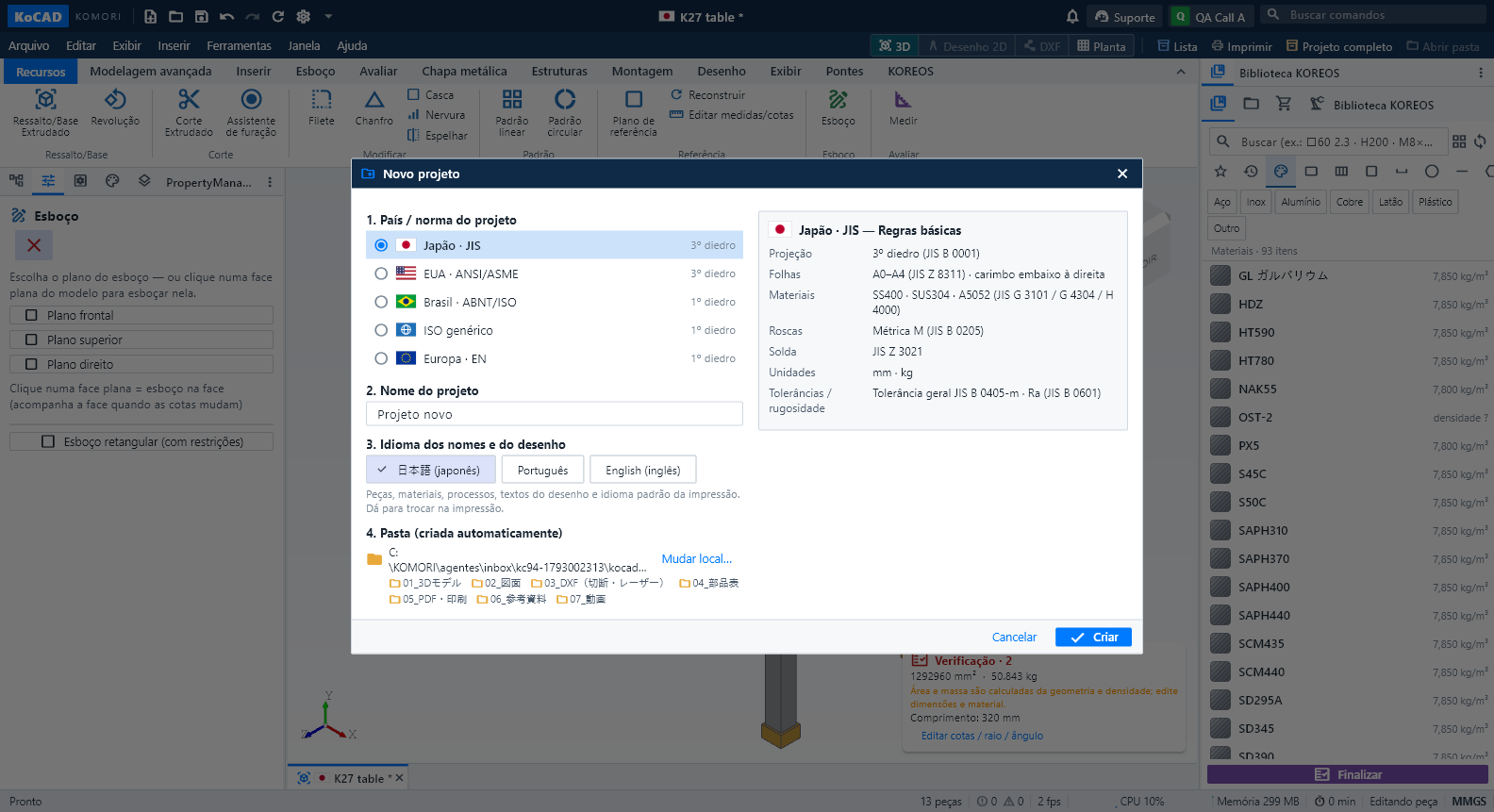
New (Ctrl+N), New assembly and New drawing start with the same question: the country / standard of the project — Japan · JIS, USA · ANSI/ASME, Brazil · ABNT/ISO, generic ISO or Europe · EN. A second column summarises its basic rules: projection (JIS and ASME third angle; ABNT, ISO and EN first angle), sheets, materials, threads, welding, units and tolerances. Only JIS has a material catalogue for now; for the others KoCAD says so and never uses JIS data unless you choose it.
Hindi pa naisasalin ang artikulong ito sa inyong wika: ipinapakita ang bersyong English.
New (Ctrl+N), New assembly and New drawing start with the same question: the country / standard of the project — Japan · JIS, USA · ANSI/ASME, Brazil · ABNT/ISO, generic ISO or Europe · EN. A second column summarises its basic rules: projection (JIS and ASME third angle; ABNT, ISO and EN first angle), sheets, materials, threads, welding, units and tolerances. Only JIS has a material catalogue for now; for the others KoCAD says so and never uses JIS data unless you choose it.
The same window asks the project name and the language of names and drawing (日本語, Português or English). Parts generated by Bob, drawing texts and the default print language follow this choice, not the interface language.
KoCAD creates the project folder itself, in Documents › KoCAD プロジェクト (or the folder of Options › Files): 20261026_Name/ with 01_3Dモデル, 02_図面, 03_DXF(切断・レーザー), 04_部品表, 05_PDF・印刷 and 06_参考資料. The first Save goes straight into it. "Open folder" is next to Print, in the File menu, in the print dialog and in the Files tab of the right pane, which shows the project's folders and files.
A small flag next to the name shows the country/standard of each document in tabs, title, Window menu and file lists, so several open projects are never confused.
Generate with AI now always delivers: 3D model, 2D drawing on the JIS sheet with the parts list (部品表) above the title block, PDF, drawing DXF, one cutting/laser DXF per sheet-metal part and the bill of materials (CSV, Excel, prints). If something fails, Bob says what and why and the other files still arrive. Without sheet parts (profiles only) it says so and the drawing DXF serves for cutting.
The title block follows JIS Z 8311 in the style of KOMORI drawings: 作成・検図・承認 and date, general tolerance, unit, material, finish, mass, quantity, scale, projection symbol, title, client, case, drawing number, revision, sheet and size, with the revision table above.
Print/PDF opens with the preview ready. Changing the print (3D/project, parts list, 2D, plan), paper (A4 to A0), orientation or print language updates it at once; combinations already seen come back instantly. The saved PDF is exactly the preview file and the save dialog starts in 05_PDF・印刷.
Insert › Standard parts opens the library on fasteners (it used to stay grey). The ribbon measures labels with the on-screen font, including Windows enlarged text: no name is cut at 1366, 1600 or 1920 px.