KoCAD · 界面与功能
Structural analysis (BETA): stress, deflection, modal, buckling and lightest JIS profile
What it is. A quick check of strength and deformation of the welded frame drawn in KoCAD (JIS profile members from the KOREOS library). It shows stress, deflection and utilisation in colour in the 3D view, natural frequencies and linear buckling, and suggests the lightest JIS profile that still meets the criteria. It is BETA: a linear-elastic calculation that does not certify capacity; the real engineering case (the 新200m³ base) is still pending. The decision to fabricate stays with engineering.
此文章暂无您的语言版本,以English显示。
What it is. A quick check of strength and deformation of the welded frame drawn in KoCAD (JIS profile members from the KOREOS library). It shows stress, deflection and utilisation in colour in the 3D view, natural frequencies and linear buckling, and suggests the lightest JIS profile that still meets the criteria. It is BETA: a linear-elastic calculation that does not certify capacity; the real engineering case (the 新200m³ base) is still pending. The decision to fabricate stays with engineering.
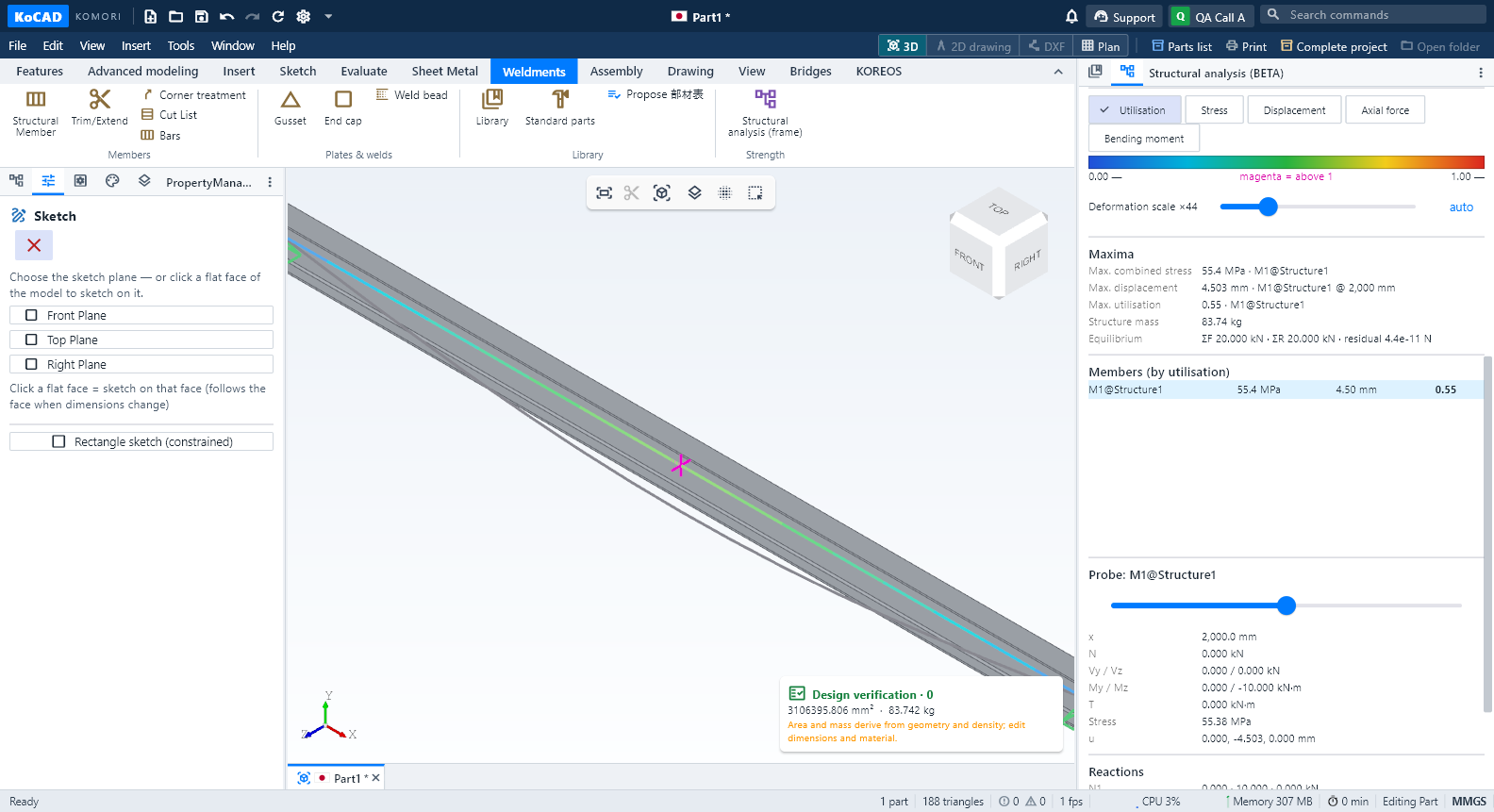
1. Open. With the structure open, use Evaluate → Structural analysis (or Tools). The panel opens on the right with the number of nodes, members and analysed spans. A member ending in the middle of another splits that span; crossings become rigid joints and are reported.
2. Materials. The KOREOS library has no strength values with a verified source yet, so KoCAD presumes nothing: enter E, ν and the allowable stress of each material with its source (standard, edition, thickness/temper range). Density comes from the structure's KOREOS material. Without these, Calculate stays blocked and the reason is shown in red.
3. Supports and loads. Choose the up axis (+Y in the SolidWorks convention). "Support lowest nodes" holds the feet; any node can also be supported. Types: fixed, pin, fork (a pin that holds torsion — use it for a single beam), roller (free along the member) or custom (6 DOF). Loads: self-weight, distributed load in kN/m on horizontal/vertical/all members, pressure (kPa) × tributary width (converted conservatively to a line load) and node load (kN).
4. Criteria and run. Enter the deflection limit (L/n) and, optionally, the minimum buckling factor. "Estimate memory" shows how much the run will use first. "Calculate" starts a separate program (kocad_fea) with a 2 GiB limit, one thread and a time limit; "Cancel" stops it immediately.
5. Reading results. Pick the map: utilisation (green→red; magenta above 1), stress (MPa), displacement (mm), axial force (kN) or bending moment (kN·m). The legend shows min, max and unit; the grey deformed shape uses the declared scale (×N, adjustable). Members are sorted by utilisation; click one and drag the probe to read N, V, M, stress and displacement anywhere. Maxima, mass, reactions and equilibrium (sum of loads = sum of reactions, with the residual) are in the panel. If "Mechanism" appears, the panel names the free node and degree of freedom.
6. Modal and buckling. After the static case, "Natural frequencies" and "Linear buckling" use the same supports. Click a mode to see it in the view. Buckling is the multiplier λ of all loads, flexural modes only: no local or lateral-torsional buckling, and not a real capacity.
7. Lightest profile. "Suggest lightest JIS profile" tries, per member group, the profiles of the same family from lightest up and proposes the lightest that meets stress, deflection and buckling for every member. "Keep outer dimensions" preserves connections and fits. You see weight and the official KOREOS cost before→after and the proposed 部材表 (save as CSV). Nothing changes until you confirm "Apply proposal"; Undo reverts it.
8. Out of date and report. Any edit makes the result "out of date" (the map disappears); calculate again. "PDF report" writes, in PT, JP or EN, the identity of the calculation (revision, hashes, program version), every input with its source, maxima, equilibrium, map, members, reactions, modes and the proposal.
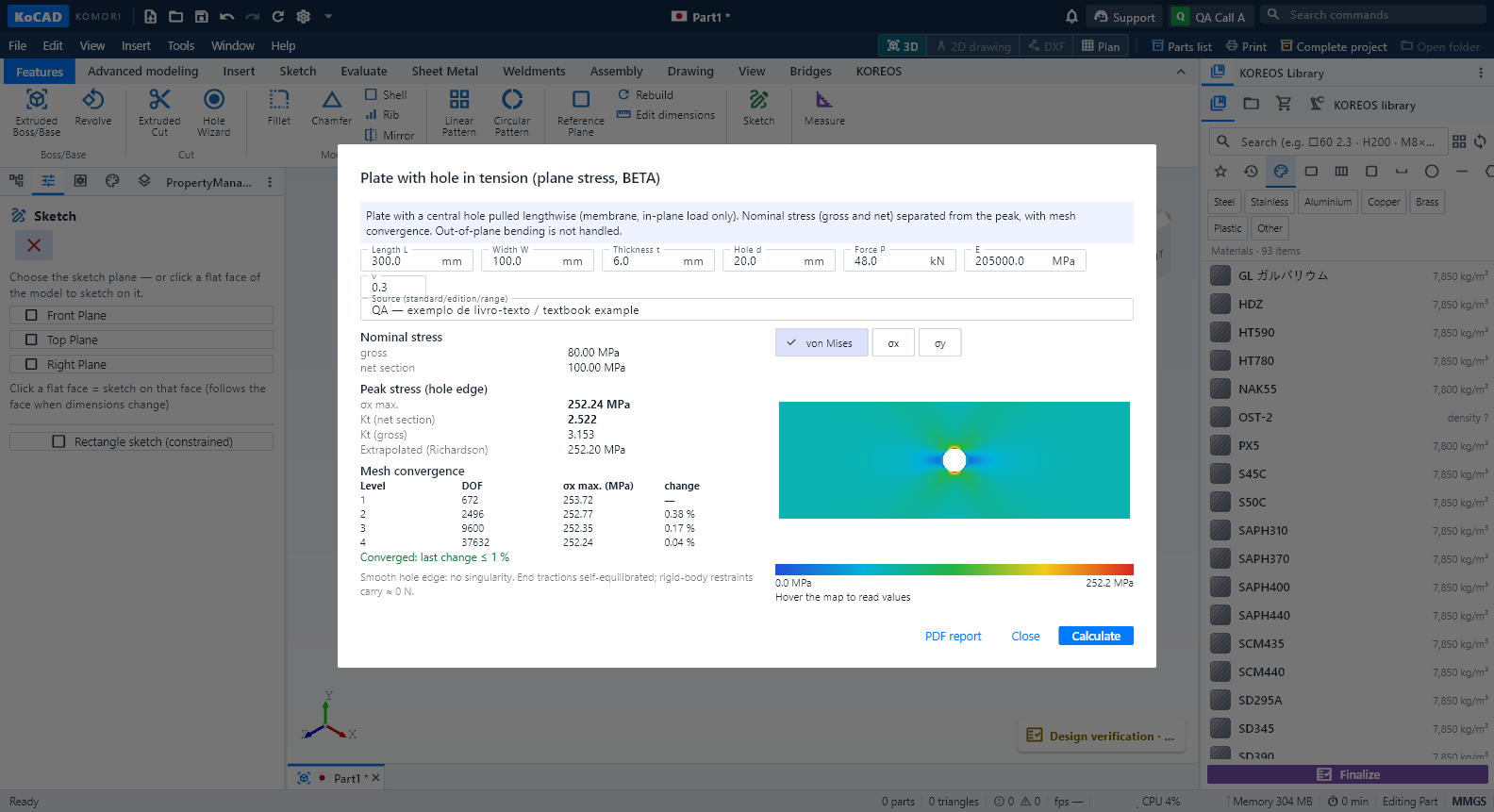
9. Plate with a hole. "Plate with hole (plane stress)" solves a plate in tension with a central hole: it shows the gross and net nominal stress separately from the peak at the hole edge, Kt, the mesh-convergence table and the extrapolated value, with a colour map and probe. In-plane load only: plate bending is refused.
Lightness. Nothing new loads when KoCAD opens; closing the panel unloads the results.