











KMR · 界面与功能
In-app support, Report a problem, Wiki and What's new
Where to ask questions inside the app, how to report a problem with a screenshot, where to read this guide and see what changed in each version.
此文章暂无您的语言版本,以English显示。
本页目录
What it is for
KMR has help inside the app: a support chat, a button to report problems, this guide (Wiki) and the What's new list for each version. It also tells you when a new version is available.
Support (chat)
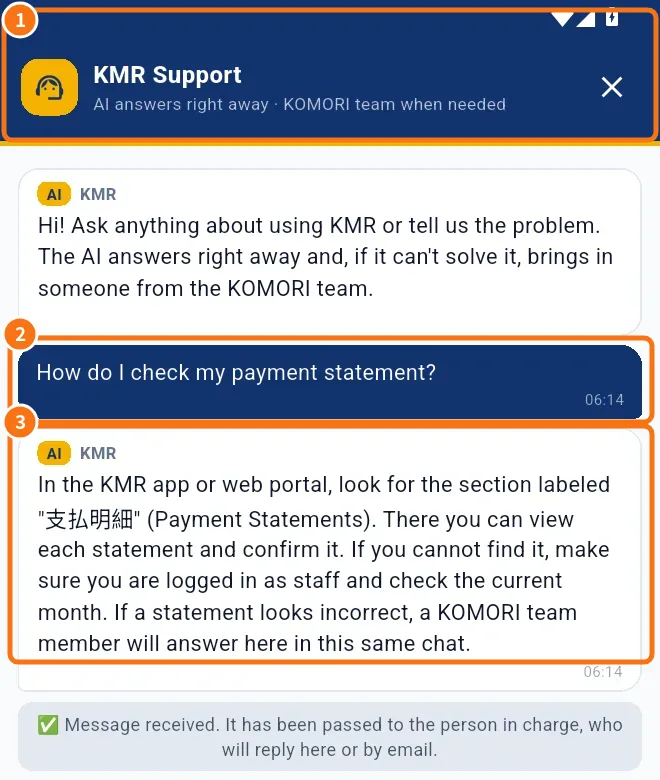
The Support screen (①) shows your question (②) and the answer (③).
- Tap the support icon (headset) next to the bell, at the top of any tab.
- Type your question (“Type your message…”) and tap Send. The AI answers right away.
- If that does not solve it, tap Talk to a person: the conversation goes to the KOMORI team and their reply arrives on the same screen.
- Outside business hours, the reply comes in the next business hours. The number on the icon shows new messages.
Report a problem
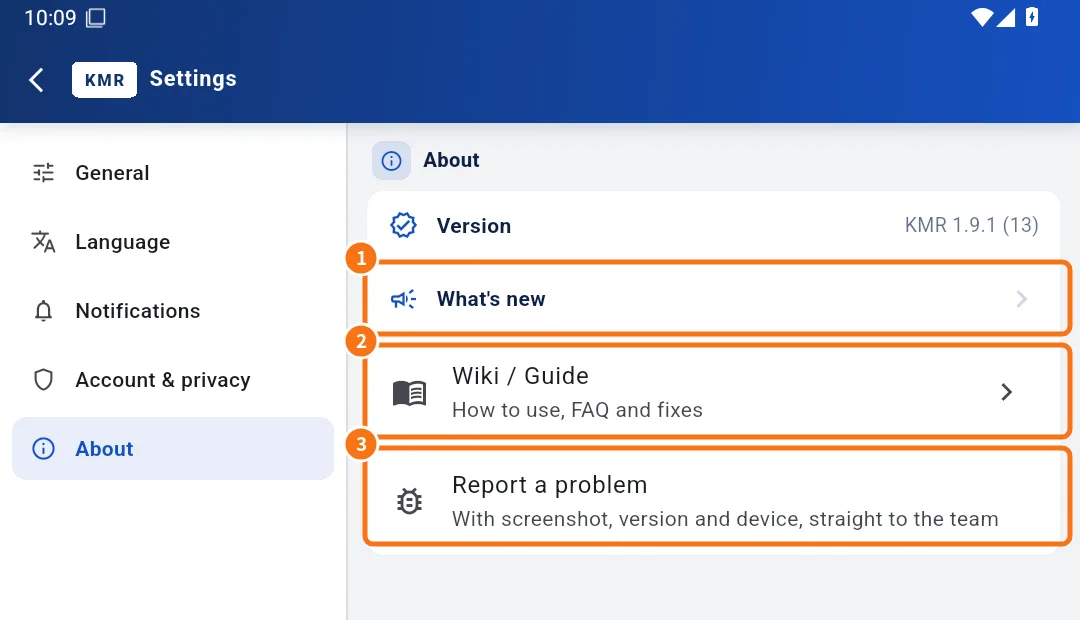
The About tab has ① What's new, ② Wiki / Guide and ③ Report a problem.
- Open Settings → About → Report a problem.
- Describe it: which screen, what you did, what you saw.
- Keep Attach a screenshot of this screen ticked (untick it if it shows someone else's personal data) and Attach technical info (version, device, last error).
- Tap Send. You see “Sent” with the report number.
Wiki / Guide
In Settings → About → Wiki / Guide you read these same articles inside the app, in your language.
What's new
- After each update, the app shows what changed, with pictures.
- To see it again: Settings → About → What's new.
Update the app
- When a new version is available, a bar appears at the top of Home (staff) or the manager Home: Official update available.
- Tap Update on Google Play or Update on the App Store.
- If you see This version is no longer supported. Please update, update before continuing.
Common mistakes
- “Can't reach support”: try again shortly, somewhere with signal.
- The report “Could not send”: check your internet and try again.
Related questions
- Settings: general, language, notifications, account and about
- Common KMR problems and what to do
- KMR frequently asked questions (staff and free account)