











KMR · 界面与功能
Company invitations: link your free account to a company
How to accept a company invitation code, work for it in the app, return to your personal account and leave the company.
此文章暂无您的语言版本,以English显示。
本页目录
What it is for
A company that uses KMR can invite you by e-mail. The e-mail contains a code. With it, your free account also becomes staff of that company: you receive its shifts, news and payment statements, and your personal history stays yours.
Where it is
My page → Company invitations, or the Company invitations button on the free-account card on Home.
What is on the screen
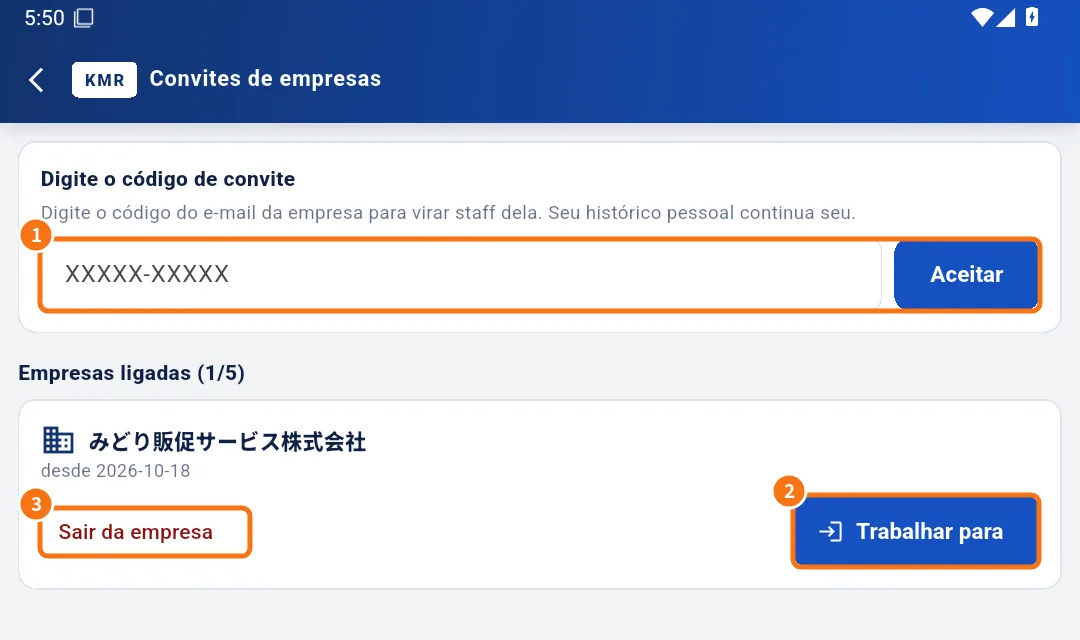
- ① Enter the invitation code (format XXXXX-XXXXX) and the Accept button.
- Linked companies (N/max): each company with its “since” date.
- ② Work for it: enters the company mode.
- ③ Leave company: removes the link.
Step by step
- Open the invitation e-mail and copy the code.
- In Company invitations, paste the code and tap Accept (①). You see “Linked to” + the company name.
- Tap Work for it (②). The app opens with the company tabs and a bar at the top: Working for + company.
- Use Shifts, Work, Messages and Payment statements as usual for that company.
- To return to your personal log, tap Back to personal on the bar.
Leave a company
- Tap Leave company (③).
- Confirm. Records of work done for it stay with the company; your personal history stays yours.
Common mistakes
- Code not accepted: check it matches the e-mail and that the invitation has not expired or been cancelled. Ask the company for a new one.
- “A free account can link up to N companies.”: leave a company you no longer use.
- I can't find the company's shifts: check that the “Working for” bar is at the top; if not, tap Work for it.
Related questions
- How to accept a company invitation (free account)
- Create a free account (no company)
- Accounts, free-account invitations and worker mode