











KMR · 界面与功能
How to tell your company you cannot work a shift
Three ways to tell the company: decline a new shift, cancel at the day-before check, or request cancellation of a confirmed shift.
此文章暂无您的语言版本,以English显示。
本页目录
When to use it
If you cannot go to a shift, tell the company in the app as soon as possible. The right way depends on when it happens. In every case the administrator is notified right away.
1. The shift just arrived and you cannot do it
- Open the Work tab. Under Shift confirmations, find the Shift assigned by your company card.
- Tap I can't.
- Choose the Reason you can't work and, if you like, write a Note (optional).
- Tap Send. You see “Absence reported.”
2. At the 2-day or day-before confirmation
- In the Work tab, on the confirmation card, tap I can no longer go.
- Read the notice: “This alerts your manager as a last-minute cancellation (urgent).” and confirm.
3. Request cancellation of a confirmed shift
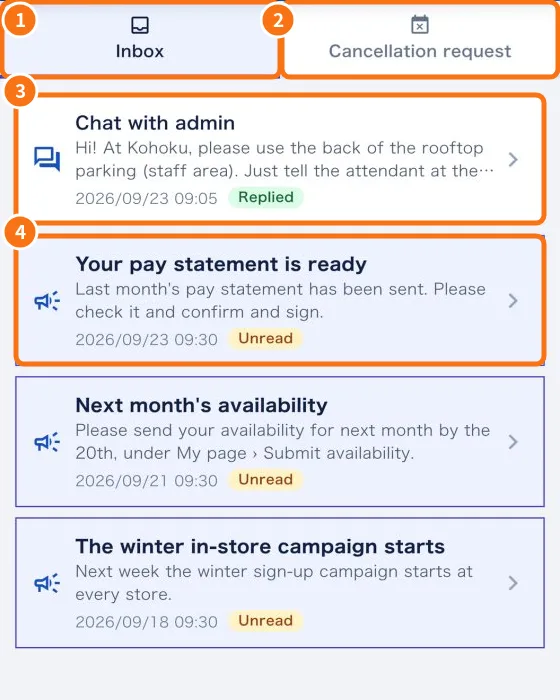
- Open the Messages tab and tap Cancellation request (②).
- Choose the shift and tap Request.
- Write the reason in Note (optional) and tap Send request.
- You see “Cancellation request sent.” Follow it in History.
What happens next
- The administrator receives the notice and can change the schedule or call someone else.
- If the shift is cancelled, it disappears from your Shifts and a notice arrives in Messages.
- If the manager undoes the cancellation, the shift comes back to you.
Common mistakes
- “No shifts to cancel.”: only confirmed future shifts appear in the cancellation request.
- I don't see “I can no longer go”: it appears on the 2-day or day-before confirmation card.
Related questions
- Work tab: confirm the shift and record the day
- Messages tab: news, questions and cancellation requests
- Shifts tab: your shift calendar