KoCAD · Tính năng mới
[0.10.1] Case (O.S.): open, save and send to 業務管理
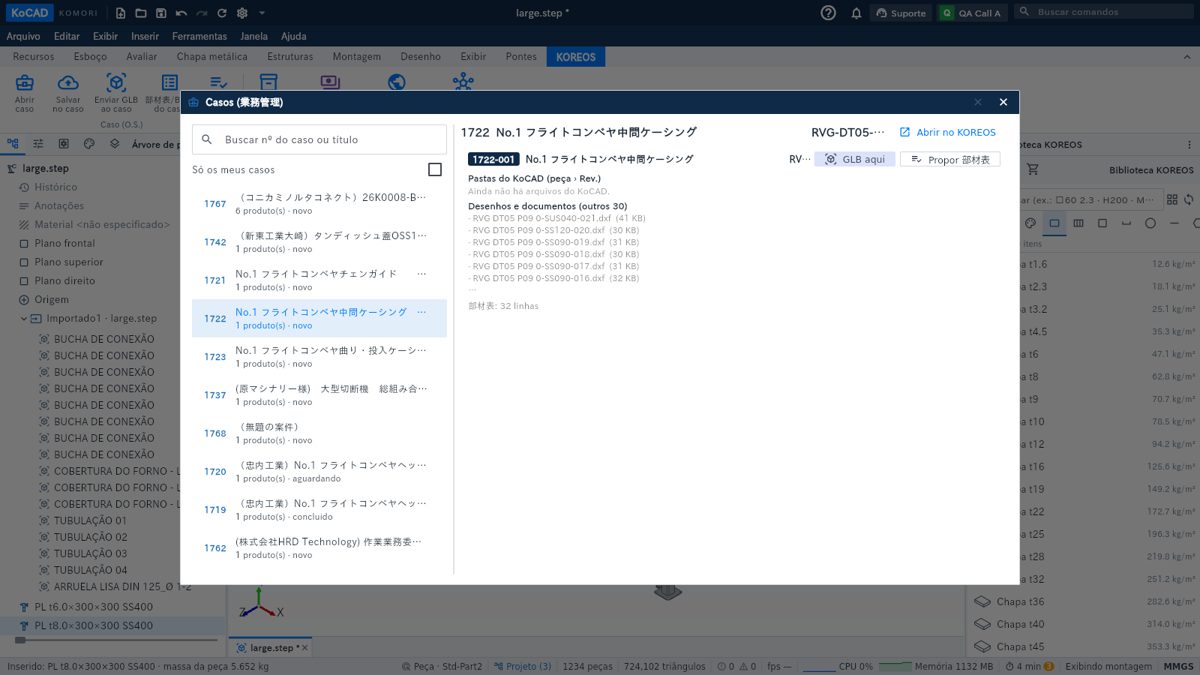
Case and O.S. are the same thing. On the KOREOS tab, the Case (O.S.) group opens the 業務管理 case, saves revisions, sends the GLB, shows the BOM and proposes the 部材表. The number is the gyoumu number (e.g. 1722-001).
Bài viết này chưa được dịch sang ngôn ngữ của bạn: đang hiển thị bản English.
Case and O.S. are the same thing: everything lives in the 業務管理 case, with the gyoumu number (e.g. 1722-001 = case 1722, product 001).
- Open case: search by number, title or client; the products, the KoCAD folders (part › Rev.) and the 部材表 show on the right.
- Save to case: pick the product and the part name; every send is a new revision (KoCAD file + GLB + DXF + STEP). Nothing is overwritten; you can undo within 10 minutes.
- Send GLB to case: sends only the 3D — it shows in the case and, optimized, on the TVs.
- Case BOM: mass and material cost of the model, compared with the case 見積 (target ±5 %).
- Propose 部材表: the model becomes a proposal; whoever curates the 部材表 accepts it line by line in 製品・仕様.
In Materials & purchasing (cart, on the right) the cut of the case shows with its process letters (B band saw, D drilling…) and a Cut drawing (A4) button.