











Karta · Pantallas y funciones
Review a batch and recover pending cards
In the app, each scan becomes a draft. A batch holds up to 10 cards and reports each save result.
Este artículo aún no está traducido a su idioma: se muestra la versión en English.
En esta página
What this is for
In the app, each scan becomes a draft. A batch holds up to 10 cards and reports each save result.
Step by step
- Review the scanned cards before starting another batch.
- Open each card and correct its fields, including the name.
- Choose Save all and read each card’s result.
- After a closed app or lost connection, return to Scan and open the cards awaiting review.
- Fix only pending cards; check saved cards in the list before taking another photo.
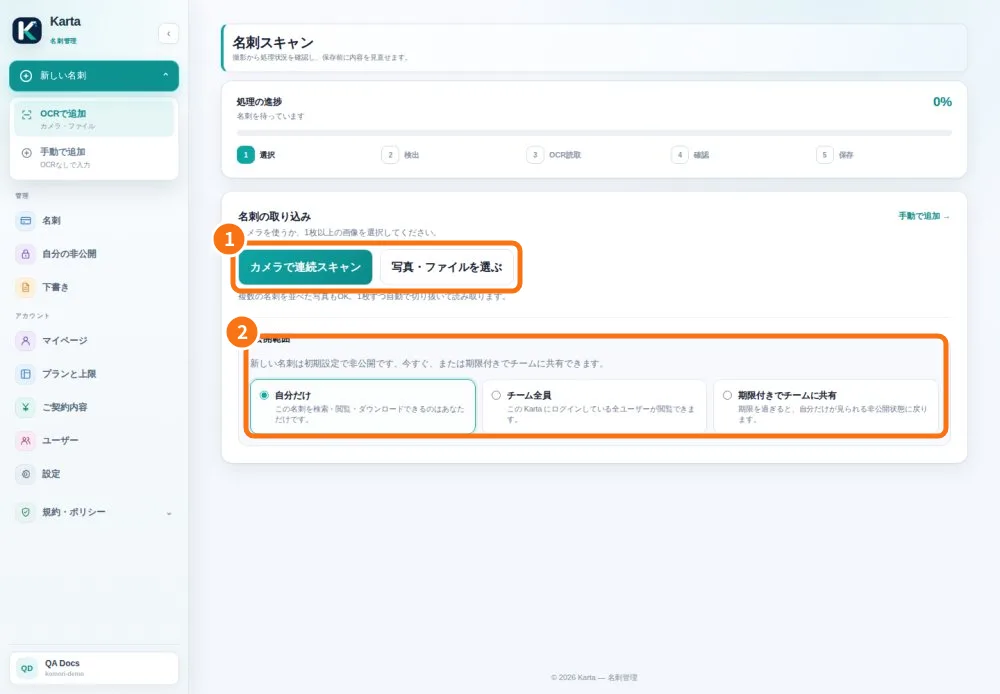
Demo screen. Numbered highlights mark the controls discussed; the image language may differ from yours.
Tip
If something goes wrong
On failure, keep the draft, restore the connection and check the retry result. Do not clear app data to recover a batch.
Related articles
- Capture the front and back
- FAQ: 20 answers