











KOREOS · Pantallas y funciones
AI tools: how to use
How to reach AI services for summaries, translation and drafts from the shortcut cards.
Este artículo aún no está traducido a su idioma: se muestra la versión en English.
En esta página
What it is
AI tools brings artificial intelligence into everyday work: summarising documents, translating between Japanese, Portuguese and English, and drafting e-mails and reports. It runs on the key of your own AI service, and set-up is quoted per project.
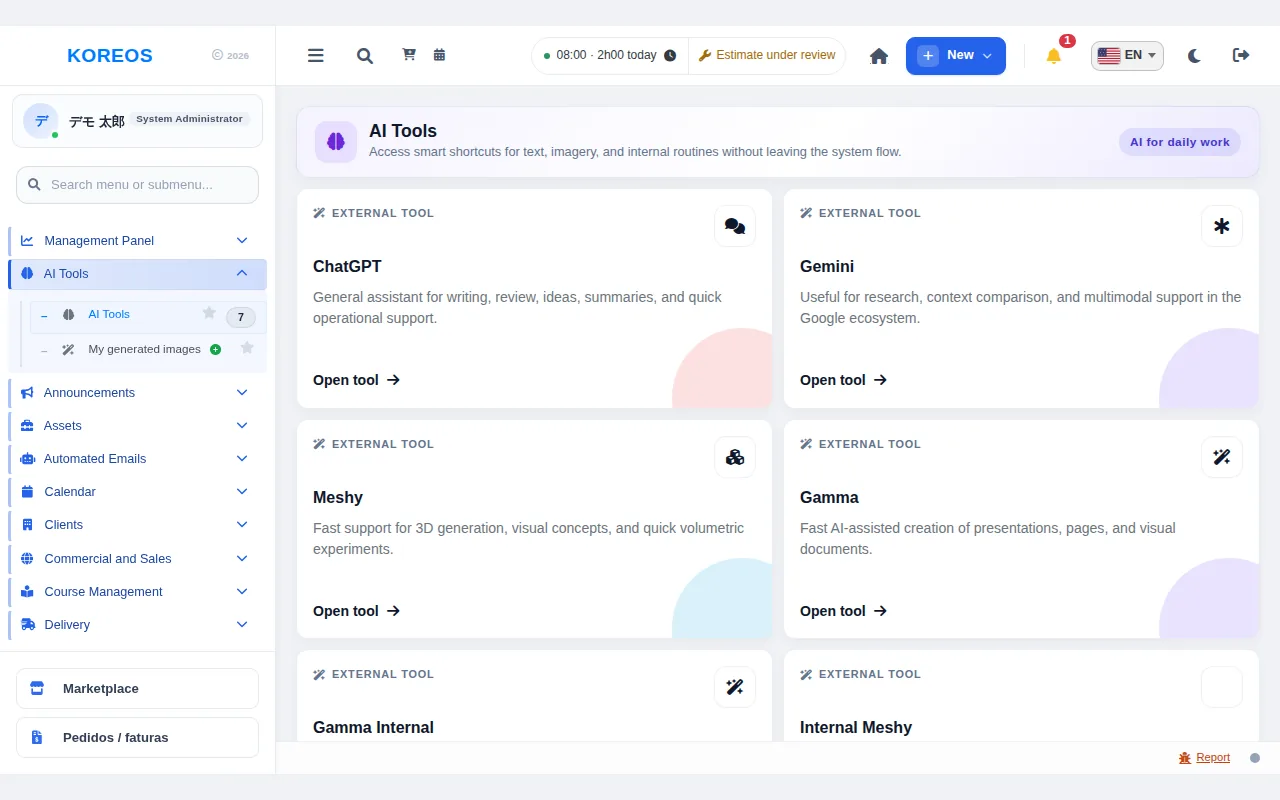
The screen (menu "AI Tools") shows shortcut cards that take you to the AI service without leaving your workflow.
Who it is for
- Office, sales and planning teams that want to use AI to write, summarise and translate.
- Administrators who want a single entry point to the AI services the company uses.
Step by step
- In the side menu, open "AI Tools".
- At the top of each card you will see "External tool" or "Internal module", which tells you the type. Each card has a short description of what the tool does.
- Click "Open tool" on the card you want. External tools open in a new tab. Internal-module cards have an "Open module" button and open a screen inside the system.
- To look back at images you generated, open "My generated images" in the menu.
Tips
- Which cards appear is agreed with you during set-up. Until it is configured the screen reads "No AI tools have been configured yet."
- When using an external service, check your company's internal rules before pasting confidential or personal information.
- How summaries, translation and drafts are used in practice is arranged according to the service you choose and your own routines.
Common questions
No cards are shown.A. No tools have been configured yet. They are set up during implementation, according to the service you want to use.
How is it priced?A. Set-up is quoted per project. Use of the AI service itself is contracted by you, with your own key.
Availability and plan: see the Marketplace article.