











KOLOGY Software Pro · Pantallas y funciones
Driver portal: My routes
Drivers see only their own stops in order, share their location and record each delivery with recipient, note and photo.
Este artículo aún no está traducido a su idioma: se muestra la versión en English.
En esta página
Once access is enabled, each driver signs in to KOLOGY Software Pro with their own email and password and lands straight on My routes. They do not see the administration: only the sequence of stops assigned to them, the map of those deliveries and the fields to record completion.
Who uses it and where
The driver, in the browser of a phone or computer, at the system address given in the invitation. The administrator can check the same screen in read-only mode with View as driver (Team).
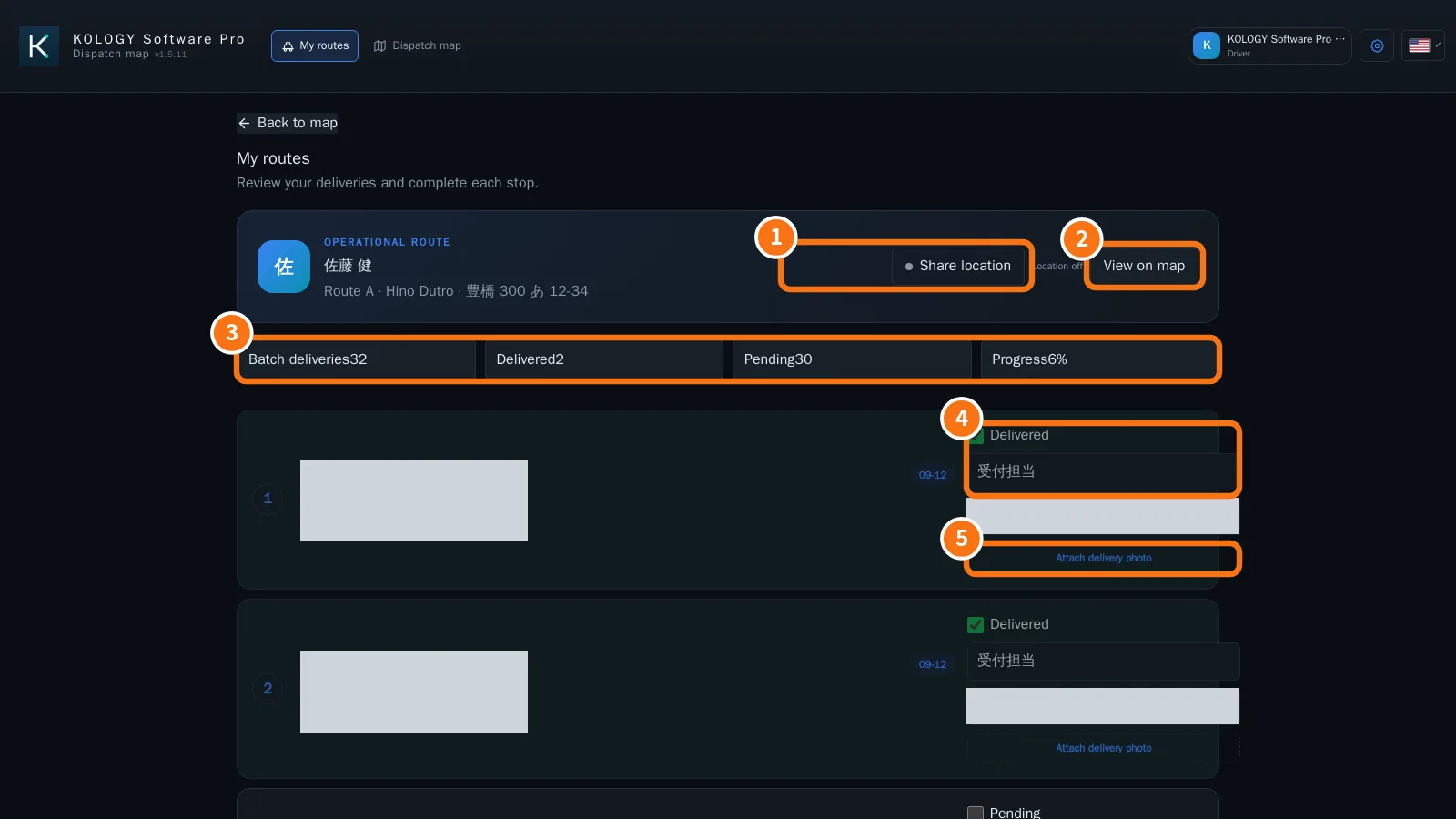
What is on the screen
- Share location: turns on sending the position from the browser. “Location off” shows next to it when it is off.
- View on map: opens the map with only this driver's deliveries.
- Summary: Batch deliveries, Delivered, Pending and Progress.
- On each stop: the Pending/Delivered box, the Recipient field and the note.
- Attach delivery photo.
Each stop shows its order, slip number, address, time window, group and status.
Driver step by step
- Sign in with email and password. My routes opens by itself.
- Tap Share location and allow it in the browser.
- Follow the stops in order. Use View on map when needed.
- At the delivery, enter the Recipient (“Name of recipient”) and a note, tap Attach delivery photo and tick Delivered.
- Afterwards, View proof shows the recorded photo.
Common mistakes
- “Account without a linked driver”: ask the administrator to link the account to a driver record.
- “No assigned deliveries”: no route is linked to your code yet. When it is, the stops appear.
- Location will not turn on: the browser blocked location permission. Allow it in the browser settings.
Related questions
- How to record a delivery (driver)
- How to enable a driver's access
- Delivery completion and proof